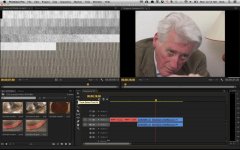
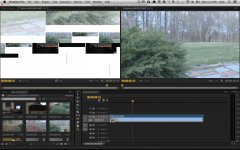
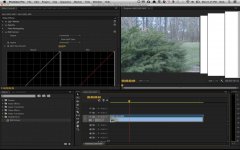
PP CS6 user interface bug i keep running into...

1.jpg2.jpg3.jpg

Not sure what's going on here. Has anyone else been experiencing these problems in Premiere Pro CS6?

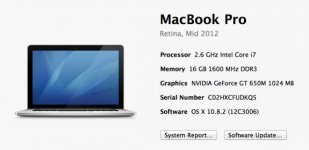
My PP CS6 UI interface windows seem to go berserk quite often, when I do the most basic tasks like color correction or simple moves on stills. I have a Macbook Pro Retina 15" with RAM maxed out. Is this a retina issue or a PP CS6 bug?
 
I saw this a few times when I had a problematic version of the NVidia drivers on my MacPro, along with sound but not video etc, and of course the horrible crashing that came with it.
 
I have never seen that ever so its not a bug experienced in Windows land .

Looks like a hardware (graphics card) issue ...or maybe a conflict.

Best answered by Mac guys.
 
Actually, I've had PP CS6 crash without any warning as well, it seems to crash in a flash…not even a spinning beach ball. One minute I'm editing and the next…zap...the whole computer restarts. Really scary.

To be fair, it's only happened a few times on my macbook pro retina. But not knowing why or when it could happen again is really worrying. Especially given the fact that I'm not even working in a long format feature.

I should mention that I have PP CS 6.0.2 version installed. Is there anything buggy about this particular latest version???
 
Last edited:
Windows users report far less crashes or issues of this nature than Mac users.

Significantly less.
 
Personally..I think its laptops that are the issue for some reason.

Wonder if Mac Towers have as many.
 
Probably not. Would that solve my problem?

It's actually the CUDA drivers that were causing me all the problems!

Within the project properties, see if the Mercury Engine is set to software only or to GPU accelerated. If it's on GPU accelerated, change it to software only and see if that fixes your problem.
 
Yeah, this is either a driver issue or a hardware issue. Try running without the GPU accelerated Mercury Engine as suggested. If you still get hard restarts or issues, you may actually have a fault in your hardware.
 
Thanks Exact and Gary. I'm actually now encountering another problem altogether with PP CS6. For some reason, my out point keyboard shortcut is no longer working. If I press the "o" key nothing happens in the source monitor. "In" key still works, but not "out" key.
 
Thanks Exact and Gary. I'm actually now encountering another problem altogether with PP CS6. For some reason, my out point keyboard shortcut is no longer working. If I press the "o" key nothing happens in the source monitor. "In" key still works, but not "out" key.

Check that the shortcuts haven't become corrupted. Go to the keyboard shortcuts editor and make sure it's still active. If so, create a NEW shortcuts profile, select it and see if it starts working again.
 
Back
Top