
Navigation
Install the app
How to install the app on iOS
Follow along with the video below to see how to install our site as a web app on your home screen.
Note: This feature may not be available in some browsers.
More options
You are using an out of date browser. It may not display this or other websites correctly.
You should upgrade or use an alternative browser.
You should upgrade or use an alternative browser.
post your hdr source/composites
- Thread starter bewillia
- Start date


alwayslearning
Well-known member
Very nice bewillia. When the semester starts where I part time tutor (math/electronics), I'll see about posting one I did from my lap top. Here (at home) I only have dial up and this thing doesn't stay connected long enough to upload all that. I started playing with the hdr thing about 4 or 5 months ago. There is some amazing stuff on the web too that you've probably seen. I use Photoshop 7.0 for it and my camera, my first digital, is a consumer Sony H2. I like the photos it takes. Interesting that my first try was from inside my house, back about 12 feet from a window, on a sunny day, with an apple tree outside about 25 feet from the house. I did the same thing you did, basically. Later I tried doing it with bracketed exposures of my wifes flower bed around a tree in front of the house. Half of it was in direct sunlight, the rest, shade. I had less success with that one ... but I'll work on it more.
A good link: http://www.luminous-landscape.com/tutorials/hdr.shtml
Larry
A good link: http://www.luminous-landscape.com/tutorials/hdr.shtml
Larry
Last edited:

bewillia
Well-known member
yeah, it just made sense to shoot a window and use natural light for this experiment. one thing i like about bracketing and HDR photography is that shooting with natural light becomes feasible in more situations. i hate lugging around lights and attempting to make a flash look natural.
how do you do HDR in photoshop 7? i only have 7, but downloaded the trial versoin of CS2 so i could test out it's HDR capabilities.
blake
how do you do HDR in photoshop 7? i only have 7, but downloaded the trial versoin of CS2 so i could test out it's HDR capabilities.
blake
alwayslearning
Well-known member
I took three photos. One with good exposure on the tree outside which, of course, made the inside wall around the window be basically, black. Took a second where the outside was somewhat overexposed and the inside wall was somewhat too dark. Then a third with the outside blown out and the inside wall has decent exposure. I opened all three in Photoshop 7. I dragged two of the images onto the third and closed the windows I dragged from. I arranged the photos on top of one another with the most blown out, outside photo on the bottom. and the darkest on top. Then I just adjusted the opacity of layer two and three, leaving the brightest, bottom layer, at 100%.
When I play with this some more (I had high hopes for this winter because of snow but we are getting NO SNOW! ), I will be making at least 5 exposures. It's too hard with so much range and only three layers.
The photos just snap into place over one another. I mention this for anyone that hasn't played with it yet but may want to. It is vital that each layer be lined up pixel to pixel .... unless you're after some weird (that's ok too) effect.
Larry
When I play with this some more (I had high hopes for this winter because of snow but we are getting NO SNOW!
), I will be making at least 5 exposures. It's too hard with so much range and only three layers.The photos just snap into place over one another. I mention this for anyone that hasn't played with it yet but may want to. It is vital that each layer be lined up pixel to pixel .... unless you're after some weird (that's ok too) effect.
Larry
alwayslearning
Well-known member
I was going to also say, I think your example you posted here looks better than mine because your "darkest" exposure is not near as dark as my darkest one. That is why I am wanting to use more exposures.
Over all though, this is a very exciting venture. Theoretically, one could have nearly any amount of dynamic range they want.
Larry
Over all though, this is a very exciting venture. Theoretically, one could have nearly any amount of dynamic range they want.
Larry
bewillia
Well-known member
you should check out the trial version of photoshop cs2. it's HDR functionality is really great. it will convert all of your exposures into one 32bit file. the trick is converting that back to a 16bit file while retaining the correct tonal values. takes a little tweaking. i'm going to post some more complex and aesthetically pleasing images later.

crazymcnutjob
Active member
bewillia said:i've just gotten into this hdr thing. here is the first image i took. starts with the bracketed exposures, then the composite image. i'd love to see results other people are getting.
here are too I did:


a good trick in my experience is to take 5 bracketed exposures (more if you choose, but i've never done more than five) then after you obtain a 32-bit hdr file, play with it a little in the 16-bit setting, like in the Shadow/Highlight adjustment feature that CS has. You can get some cool stuff.
alwayslearning
Well-known member
This morning I got the trial version. I could tell within about a half hour that I don't want to go back to 7.0.bewillia said:you should check out the trial version of photoshop cs2. it's HDR functionality is really great.

Looking forward to learning it more and playing with hdr in it. Thanks for the heads up.
Larry
crazymcnutjob
Active member
bewillia said:wow, those are great crazymcnutjob. i'd love to see the original bracketed exposures for those images. which conversion option do you use when going to 16 bit?
glad you like them! I don't think I have the original bracketed exposures, but i'll look for them when I get a chance. I know both of them were merged from 5 exposures, -2,-1,0,+1, +2 EV.
When going to converting from 32 to 16 bit, I simply use CS2, go to the pulldown menu, select IMAGE>MODE> 16bits/channel and just accept the adjustments CS2 make. Works very well for me. If there is something better, i"d love to know.
monkeymeat
Member
alwayslearning
Well-known member
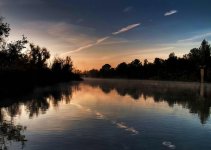
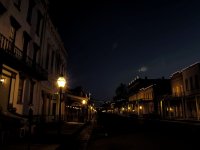
Very nice. In "Old Sac" is that the moon or some lens thing, vertically in the center and about 2/3 - 3/4 of the way over from the left?
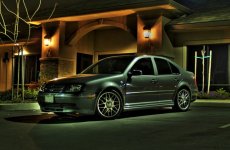
Also, if that is your house with the Jetta, nice job ... not just on the photo. How did you accomplish the green in the photo?
Larry
Also, if that is your house with the Jetta, nice job ... not just on the photo. How did you accomplish the green in the photo?
Larry
monkeymeat
Member
Thanks. In Old Sac what you see is some lens flare, I have another that I took it out. No its not my house, I wish I could use some more room, Its a new office building. I try to find places with not many people around when I shoot my car so I dont look like an idiot who loves his car, which I am. The green color just came out that way after the tone mapping. Try the photomatix trial, Ive been using it for a while now, youll just need to remove the watermarks. All of these were done using the trial version.

ryan brown
lOwEr CaSe Member
That jetta pic is SICK. Very nice.
monkeymeat
Member
Thanks, Ive been planing on getting a few more of the car.

Dizkoteck
Well-known member
I just gotten into HDR pretty recently, yesterday in fact. Ive gotten some pretty amazing results.
A few questions tho, the biggest one in my mind so far is Ive seen a few pics with ocean waves.
How are these done? I understand you have to take multiple shots with different exposures, by the time you change shutter, the waves would change. Whats the trick?
Also, any advice for handheld shooting?
A few questions tho, the biggest one in my mind so far is Ive seen a few pics with ocean waves.
How are these done? I understand you have to take multiple shots with different exposures, by the time you change shutter, the waves would change. Whats the trick?
Also, any advice for handheld shooting?
crazymcnutjob
Active member
Dizkoteck said:I just gotten into HDR pretty recently, yesterday in fact. Ive gotten some pretty amazing results.
A few questions tho, the biggest one in my mind so far is Ive seen a few pics with ocean waves.
How are these done? I understand you have to take multiple shots with different exposures, by the time you change shutter, the waves would change. Whats the trick?
I haven't seen too many HDR pics that incorporate ocean waves, but I assume if one wanted to, he/she could mask out the wavy-wierdness and incorporate a well exposed section of the ocean via layer mask in photoshop.
Dizkoteck said:Also, any advice for handheld shooting?
yeah, stay wide!
monkeymeat
Member
Dizkoteck said:I just gotten into HDR pretty recently, yesterday in fact. Ive gotten some pretty amazing results.
A few questions tho, the biggest one in my mind so far is Ive seen a few pics with ocean waves.
How are these done? I understand you have to take multiple shots with different exposures, by the time you change shutter, the waves would change. Whats the trick?
Also, any advice for handheld shooting?
Set your camera for continuous shooting and use the ae bracketing, this will adjust your exsposure as you shoot.
alwayslearning
Well-known member
Good HDR info .....
http://www.popphoto.com/howto/3038/how-to-create-high-dynamic-range-images.html
One example of important info (by clicking on the "making a negative" .....
Creating an HDR Negative
Now for a confusing bit of information: your monitor cannot properly display HDR images, and your printer cannot properly print them out. You've got to Tone map the HDR image, and crunch it back down into a Low Dynamic Range format that your computer and printer can handle for final output. This particular LDR image will maintain the expanded tonality and detail of an HDR image. Let's call this HDR file, with its massive 32-bit depth, the HDR "negative." In order to view it, it must be "developed" in the tonemapping tool. The computer cannot display the true HDR image correctly, because a massive number of potential color values for every pixel is assigned to each pixel, but each pixel's final value is dependent upon the values of its local pixel neighborhood, each of which also has an enormous amount of potential color values dependent upon the pixel values of the first pixel we mention. Got it? So, until the HDR is "developed" in the tone mapper, none of the pixel values are locked in, and thus, it is not able to be displayed properly.
Larry
http://www.popphoto.com/howto/3038/how-to-create-high-dynamic-range-images.html
One example of important info (by clicking on the "making a negative" .....
Creating an HDR Negative
Now for a confusing bit of information: your monitor cannot properly display HDR images, and your printer cannot properly print them out. You've got to Tone map the HDR image, and crunch it back down into a Low Dynamic Range format that your computer and printer can handle for final output. This particular LDR image will maintain the expanded tonality and detail of an HDR image. Let's call this HDR file, with its massive 32-bit depth, the HDR "negative." In order to view it, it must be "developed" in the tonemapping tool. The computer cannot display the true HDR image correctly, because a massive number of potential color values for every pixel is assigned to each pixel, but each pixel's final value is dependent upon the values of its local pixel neighborhood, each of which also has an enormous amount of potential color values dependent upon the pixel values of the first pixel we mention. Got it? So, until the HDR is "developed" in the tone mapper, none of the pixel values are locked in, and thus, it is not able to be displayed properly.
Larry
Last edited:

egproductions
Veteran
Nothing fancy but something I did for my book. I didn't actually use the hdr function i dind't find it to my liking but I took 3 exposures and masked out areas I needed in 16 bit mode.
