
Navigation
Install the app
How to install the app on iOS
Follow along with the video below to see how to install our site as a web app on your home screen.
Note: This feature may not be available in some browsers.
More options
You are using an out of date browser. It may not display this or other websites correctly.
You should upgrade or use an alternative browser.
You should upgrade or use an alternative browser.
possibly silly question: how much RAM is enough
- Thread starter pulpwoody
- Start date

Erik Naso
Veteran
I think the basic rule is two gigs per core. So a 2 x 2.26 GHz Quad core would be 16gigs or RAM. Adobe apps love RAM so more is always good. 96gig? Thats a lot! 36gigs would be nice.Seriously, is getting 96 gig of RAM overkill? I'm only editing video, no compositing, high end gfx or 3D.
The short answer is, all of it. If you system can handle 96 GB (which is very unusual, by the way) go for it.
If not Premiere Pro, then After Effects will use it.
Good to know, thanks.

refocusedmedia
Veteran
That is silly... as if you could ever have enough RAM. 

Amadou
Carbonite Member
I have two systems. One has 16 Gigs. The other 24Gigs. Same processor (I7 960). I work in Premiere CS5 and After Effects CS5. Do I see any performance difference? NO. Do I see any stability difference? No. Is rendering any faster on one? NO. Conclusion: Anything over 16 Gigabytes is unecessary. 96 Gigabytes is not only a total overkill, it is simply insane.

JeganRX
Well-known member
For most editing use, RAM is not hyper critical. Yes, more is better, but I do not see the need for more than 16GB, and believe me, I get by just fine on 8GB. If you handle lots of intensive footage like RED footage, 16GB could be necessary, but I'd hardly say more than that.
Now After Effects on the other hand....
Now After Effects on the other hand....
The 8GB chips are a good price/performance level that will allow you to add additional memory in the future if/when you have a use for it.
On a 6 "slot" DDR3 memory board, you can add 3x8GB of RAM for about $180. That gives you 24GB of RAM, with 3 slots open for future increases 2-3 years down the road.
The alternative is to add 6x4GB at $90 + $90 per 3 chip set. Then in the future you will have to throw away 3x4GB to add more RAM.
I have a 3 year old i7-920 that had 6GB of RAM. I bought 3x8Gb, for $180, pulled 3 chips, and now have 27GB of RAM. Perfect balance for now. I see the Mushkin Silverline 24Gb is $160 right now at Newegg, while Crucial is $220.
Michael
On a 6 "slot" DDR3 memory board, you can add 3x8GB of RAM for about $180. That gives you 24GB of RAM, with 3 slots open for future increases 2-3 years down the road.
The alternative is to add 6x4GB at $90 + $90 per 3 chip set. Then in the future you will have to throw away 3x4GB to add more RAM.
I have a 3 year old i7-920 that had 6GB of RAM. I bought 3x8Gb, for $180, pulled 3 chips, and now have 27GB of RAM. Perfect balance for now. I see the Mushkin Silverline 24Gb is $160 right now at Newegg, while Crucial is $220.
Michael
refocusedmedia
Veteran
4 Gigabytes is basic. 8 Gigabytes is perfect. 16 Gigabytes is more than perfect. 24 Gigabytes is unecessary. Anything over is insane.
Sorry, but that's nonsense. For example, if you have a 12-core system, following the 2GB per core rule, you absolutely would want 24GB. And if you followed the 3GB per core recommendation, you obviously would want more. Additionally, because CS shares RAM between apps, if you're wanting to do more than one thing at a time (e.g., render out a comp in AE and continue editing your timeline in PP) you are going to have a bad time with anything less than 16GB. RAM can be used in a large number of ways, so limiting yourself to only 8GB, or even 16GB, when you could easily have more is pretty shortsighted (especially when it's such a cheap and simple method to increase performance). You remind me of those who asked what would consumers ever need more than 1TB of storage for?
Do I see any performance difference?
Just because your work flow doesn't show off any difference doesn't mean there is none to be had for more demanding situations.
If nothing else, more RAM means larger RAM previews in After Effects.

anatusa
Veteran
Seriously, is getting 96 gig of RAM overkill? I'm only editing video, no compositing, high end gfx or 3D.
i am sorry.... maybe i dont understand something , but as far as i know there are Specifications on every pc part.....
lets take I7 2600k cpu - http://ark.intel.com/products/52214
its says : Max Memory Size (dependent on memory type) - 32 GB! Memory Types - DDR3-1066/1333
why some one would want to put 96GB if CPU can only support 32GB? as i understand there is just no point doing it! same for Memory Types..... why would i put there i dont know ddr3 1600 if it only supports 1333
so 1st of all u need to find out what your CPU and Mother Board are able to support, and i believe generally its under 64GB unless its Xeons we are talking about.
2nd i ve seen reports from guys saying that there is no any speed difference between 16GB or 32GB..... so i would not go beyond the reasonable amount of ram, if budget is not an issue i would better spend it on pro video cards like http://www.nvidia.com/object/media-entertainment-with-maximus.html
Have a look at this CS 5.5 Benchmark Database:
http://ppbm5.com/
It has speed ratings of 500+ real world, user machines running the same benchmark tests.
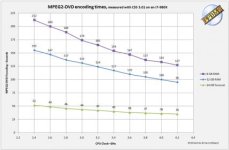
Here is an older graph of performance against RAM use from the new PPBM6.com web site. The new benchmarks are going to be more complex, with Red footage, 4:2:2 rendering, etc.
This is their summary on RAM usage:
http://ppbm6.com/Test.html
With CS6 the practical minimum memory is 8 or 12 GB of RAM, 16 or 24 GB is suggested for most users. For heavy multitasking or dynamic linking, 32 or 48 GB is optimal. Here is a Resource Monitor plot of memory usage while doing a simple PPBM5 MPEG2-DVD encoding in Premiere. This was a capture at a peak of memory usage. Notice that there are no Hard Memory Faults (requiring writing out and later reading the Paging file) but Premiere by itself is using more than 6 GB (this system had 12 GB).
http://ppbm5.com/
It has speed ratings of 500+ real world, user machines running the same benchmark tests.
Here is an older graph of performance against RAM use from the new PPBM6.com web site. The new benchmarks are going to be more complex, with Red footage, 4:2:2 rendering, etc.
This is their summary on RAM usage:
http://ppbm6.com/Test.html
With CS6 the practical minimum memory is 8 or 12 GB of RAM, 16 or 24 GB is suggested for most users. For heavy multitasking or dynamic linking, 32 or 48 GB is optimal. Here is a Resource Monitor plot of memory usage while doing a simple PPBM5 MPEG2-DVD encoding in Premiere. This was a capture at a peak of memory usage. Notice that there are no Hard Memory Faults (requiring writing out and later reading the Paging file) but Premiere by itself is using more than 6 GB (this system had 12 GB).
Attachments
refocusedmedia
Veteran
Most processors today have 4 cores and most every software uses no more than 4. This said, by your theory I assume you would need 32 cores to justify 96 Giga RAM. I don't know of any 32 core processor out there.
Well, we're discussing Adobe Premiere and AE here, and they do use more than 4 cores if available. Also, 4 cores with HyperThreading is the equivalent of 8 cores, which would put you at 16-24 GB.
For the average Premiere Pro user, you may be right.
For even the casual After Effects user, it will almost certainly come in handy.
Bottom line, you can have not enough memory to work smoothly, but you can never have "too much". So if the platform and budget support large amounts of RAM, you should definitely go for it.
For even the casual After Effects user, it will almost certainly come in handy.
Bottom line, you can have not enough memory to work smoothly, but you can never have "too much". So if the platform and budget support large amounts of RAM, you should definitely go for it.

Postmaster
Dark Side of the Camera
Is rendering any faster on one? NO. Conclusion: Anything over 16 Gigabytes is unecessary. 96 Gigabytes is not only a total overkill, it is simply insane.
It depends on your processor(s) and how much treads you can run.
I have no problem to max out 24GB in AE. I'm on PC, it may be different if you are on a Mac though.
Frank
In what way will After effects perform better with 96GB than with 24GB?
If nothing else, it allows for longer RAM previews.