Portkeys LH5P 5.5-inch monitor experiences?

Jim Feeley

Veteran
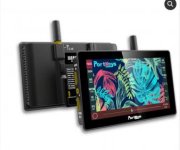
The Portkeys LH5P is their $399 US 5.5-inch on-camera monitor. HDMI only (but loop through), claimed 1700nits, funky Portkeys interface (I presume). Apparently the current versions have aluminum rather than a plastic case.

https://www.portkeys.com/lh5p/
LH5P.jpg


Anyone here own one, used one, or seen one in person?


Thanks!

Jim
 
I feel like most budget monitors are good these days? Though perhaps each has its quirks...

I haven't used that Portkeys, but I had to replace my Ikan D7 recently and I saw good reviews for a couple of budget monitors, and I thought - it can't be just THESE models that are good. It must just be commonplace/cheap tech now thanks to smartphones.

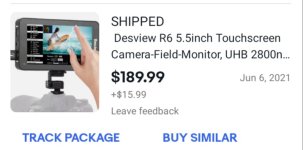
So I bought the Desview R6 which is claimed 2800 nits and has a touchscreen interface that makes it easy to turn down brightness to save battery (just swipe the screen up and down.)

My Ikan D7 cost $1k 9 years ago and my Desview R6 cost $200 and is so much better and has so many features that the Ikan doesn't have. It's like they're not even the same type of tool due to the feature difference. The Desview should cost 2.5x the Ikan

So I feel like it's hard to go wrong? At any rate, I recommend my Desview R6 for various reasons
 
Thanks A. Ya, I'm guessing the current state of panels is pretty high. But like you say, they probably all have quirks...

So I'm curious if the quirks or whatever in this unit are ones I can live with...or if they have extra features that appeal, such as the HDMI passthrough on the Portkeys and the simple brightness control on your Desview (thanks for mentioning that, btw).
 
This company developed a reputation for making monitors that can control a handful of cameras.

They became pretty popular overnight, but user feedback has been mixed.

If you're only after brightness, there are bigger 7" models for half the price.

Or maybe even wait until the 5" BM (2500nits) goes on sale and grab a HDMI/SDI monitor/recorder with just as many features if not more for an extra few hundred.

IMO, there's always that middle ground that sometimes isn't worth it. It's like...either go really cheap only for screen real estate and brightness (or something else), or spend a bit more and get something really good (like a monitor that also records which can always come in handy).
 
Thanks A. Ya, I'm guessing the current state of panels is pretty high. But like you say, they probably all have quirks...

So I'm curious if the quirks or whatever in this unit are ones I can live with...or if they have extra features that appeal, such as the HDMI passthrough on the Portkeys and the simple brightness control on your Desview (thanks for mentioning that, btw).

The desview R6 has passthrough too. I think it's common.

Can't speak to the portkeys quirks, but my desview quirks include:

Aspect ratio darkening gets overlaid on system info. So, the battery level indicator in the upper right hand corner gets shaded when I look at a 2.35:1 frame guide. Still visible. Totally livable. Just odd

Lp-E6 batteries seem to get dislodged easily, but I think I may have been mounting them insecurely and I may have fixed that issue. My ikan d7 had minor battery mounting issues as well

The headline feature that I bought it for - an automatic brightness adjustment based on a light sensor just like on a smartphone - is distracting because it shifts too abruptly and does it during a shot. Maybe I can adjust the speed shifts. But I just turned it off and ended up using the swipe-screen-for-brightness feature which I didnt think I would use but actually love.

The touchscreen works really well but it's hard to do precise slider drags. When I go to set the zebras to 90 by dragging my finger along the slider, I usually land at 91 or 92. And it takes finesse to get it back down to 90. But it's not a terrible tradeoff for being able to set them so precisely. And usually I just leave it on one place and dont need to readjust it

My ikan d7 had a few physical buttons and I could toggle false color on/off with one. No physical buttons on the desview R6 (although some of their other models have them and can do that). But it only takes a few screen taps to turn on/off any specific exposure tool. And you can set the opacity of the background of your wfm or histogram to various levels so they're less distracting, as well as where they're positioned on-screen. PS I love that it has both "spectrum" and ARRI false color. ARRI false color is much quicker/easier to read than spectrum, which is all that my ikan had (and the ikan didn't have wfm, zebras, or histogram)

That's all that I can think of right now. I don't think the build quality is on par with my ikan, but the reason I replaced the ikan was that its HDMI input broke. And the desview is probably lighter due to its design.

Plus, the ikan was 400 nits and unusable outside. The desview claims 2800 nits and I thought it would be crazy bright but it's actually just fine outside. Totally fine. Just not wowingly bright

I think all the quirks are totally livable, and I imagine that's more or less true with these various budget brands

One thing I've noticed doing monitor shopping is that the most recent generation of monitor from any given company seems to have substantial operating system and design improvements from the previous generation. So, I think that they're improving rapidly and I would probably try to get one of the most recent releases from whoever you buy from

IMO, there's always that middle ground that sometimes isn't worth it. It's like...either go really cheap only for screen real estate and brightness (or something else), or spend a bit more and get something really good (like a monitor that also records which can always come in handy).

I thought about this, too, and considered getting a Ninja V instead. But I realized that I've never told myself I needed to do external recording. I would probably never use it. ProRes raw from the A7SIII would be cool, but I don't currently have the need for it.

Meanwhile, I can just get something cheaper/lighter/lower-powered/brighter with a broader feature set
 
Last edited:
$239 is pretty low so V wouldn't be worth the jump unless they end up offering really HFRs in ProRes RAW (doubt it).
 
$239 is pretty low so V wouldn't be worth the jump unless they end up offering really HFRs in ProRes RAW (doubt it).

Actually the desview was $189 plus shipping on ebay. For some reason it's not in stock at b&h yet. Agreed that they won't do higher frame rates on the ninja v, but even if they did I'm not sure it would make me more likely to use ProRes raw
 
Back
Top