
Navigation
Install the app
How to install the app on iOS
Follow along with the video below to see how to install our site as a web app on your home screen.
Note: This feature may not be available in some browsers.
More options
You are using an out of date browser. It may not display this or other websites correctly.
You should upgrade or use an alternative browser.
You should upgrade or use an alternative browser.
PluralEyes problem
- Thread starter liukaitc
- Start date

Noiz2
Sound Ninja
I really HATE the ease with which one looses what one is typing with this new version of the board!!!
So the short version of what I wrote before is that I don't think either your english or the translation app you are using is up to the task of this kind of technical discussion.
I would suggest that you mention your native language and maybe someone who speaks it can work as a better translator or there maybe a list in your language that would be of more help.
Folks here are very willing but the translation is very confusing.
OR I'm just being dense and somebody else knows what your talking about...
But I think most will stop after failing to understand what your problem is and I'm concerned that even if they had the answer the translation would mangle it.
So the short version of what I wrote before is that I don't think either your english or the translation app you are using is up to the task of this kind of technical discussion.
I would suggest that you mention your native language and maybe someone who speaks it can work as a better translator or there maybe a list in your language that would be of more help.
Folks here are very willing but the translation is very confusing.
OR I'm just being dense and somebody else knows what your talking about...
But I think most will stop after failing to understand what your problem is and I'm concerned that even if they had the answer the translation would mangle it.
ye..sorry..my english not good...I can not help it......
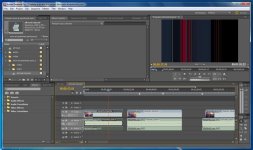
can u see the pic I uploaded?
bascially...after I sync using pluraleyes and import the file, and then after I did some editing to the sequence...program monitor turn to that...
this is only happening after I sync using pluraleye..never happen before
can u see the pic I uploaded?
bascially...after I sync using pluraleyes and import the file, and then after I did some editing to the sequence...program monitor turn to that...
this is only happening after I sync using pluraleye..never happen before
Noiz2
Sound Ninja
Well I only speak one language passably so your way ahead of me. Pluraleyes may not be CS5 ready? I don't actually use it so that is just a guess. You may want to talk to the folks who make it since this sounds like something they might want to fix. They may also know what the problem was.