

Logan LeBlanc
Well-known member
I know, I know. Everyone's in a rush. My case is no different.
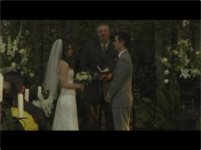
My wife asked me last month to edit our wedding video for her Christmas gift. This is three years late. Gulp.
After lots of caffeine and Adderall, I actually finished it.
Between that and building an epic treehouse as a gift for my godchildren, I didn't factor in DVD compression and all the bullshit it entails.
Compressor is killing me. I'm either getting crappy pixelated footage or huge files that won't fit on a DVD.
Yes. I'm basically asking for a walkthrough. HOLD MY HAND (virtually, I mean).
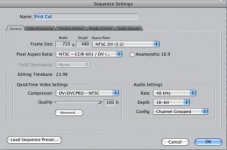
The project was shot on (3) DVX-100s
Running time is 45:23
I'd like it to be the highest quality and cropped to 16x9 out from Compressor.
Output Formats:
1) Single-layered DVDsI
2) Dual-layered DVDs
3) I also have a Roku 2 XS that can play video files from a USB drive
Roku would probably be the easiest and best quality.
PLEASE, dvxusers, I beg you. HELP THIS POOR MAN!!!!
Phone 337.230.7178
My wife asked me last month to edit our wedding video for her Christmas gift. This is three years late. Gulp.
After lots of caffeine and Adderall, I actually finished it.
Between that and building an epic treehouse as a gift for my godchildren, I didn't factor in DVD compression and all the bullshit it entails.
Compressor is killing me. I'm either getting crappy pixelated footage or huge files that won't fit on a DVD.
Yes. I'm basically asking for a walkthrough. HOLD MY HAND (virtually, I mean).
The project was shot on (3) DVX-100s
Running time is 45:23
I'd like it to be the highest quality and cropped to 16x9 out from Compressor.
Output Formats:
1) Single-layered DVDsI
2) Dual-layered DVDs
3) I also have a Roku 2 XS that can play video files from a USB drive
Roku would probably be the easiest and best quality.
PLEASE, dvxusers, I beg you. HELP THIS POOR MAN!!!!
Phone 337.230.7178


 rogar-BigGrin(DBG)
