

AtticusLake
Well-known member
I've been trying to figure out why some of my titles are coming out super-pixellated, and I think I've narrowed it down to the colour -- red or blue titles, when exported to H.264, come out super-pixellated. Green, cyan and white titles are fine. Sounds nuts, but here's an example:

Here it is scaled up 5x WITHOUT interpolation:
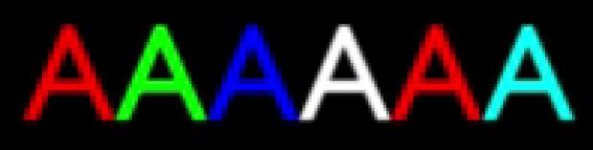
This is a single text object with just the colour changed on each character.
This is not visible while editing, or if I export the sequence as a PNG image set. It IS visible with titles generated in Premiere's titler, and also with titles made in AE and imported into PP.
So it seems to be an effect of the H.264 encoding; however, I've tried both the built-in H.264 encoder and X.264, and got the same result in both.
Any ideas? Can I avoid this (without changing my colour scheme)? The titles I want (darkish red) look super-ugly right now.
Here it is scaled up 5x WITHOUT interpolation:
This is a single text object with just the colour changed on each character.
This is not visible while editing, or if I export the sequence as a PNG image set. It IS visible with titles generated in Premiere's titler, and also with titles made in AE and imported into PP.
So it seems to be an effect of the H.264 encoding; however, I've tried both the built-in H.264 encoder and X.264, and got the same result in both.
Any ideas? Can I avoid this (without changing my colour scheme)? The titles I want (darkish red) look super-ugly right now.