Pixelation HELP

TM video

Member
Hi, Hoping someone out there can help solve this issue.
Ive been having this problem pop up more and more often. when I review my dvds after burning it from Encore using dynamic link in premier (cs4) I notice everything looks great but on occasion I would get sudden color pixelated frames (red blue & green). This tends to happen when I had some effects placed on the footage, not on plain footage. the screen sometimes turns grey. I guess best discribed as dropouts for a few frames. This is very annoying as you can imagine as I have to review every dvd before giving it to client. Attached are some frame grabs of the issue.Your help wouldbe very much apreciated Thank you in advance Sequence 01_73642.jpgSequence 01_73475.jpg
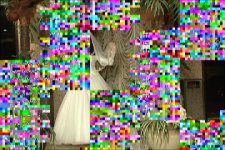

​
 
This looks like corruption and could be from a bad memory stick.

I would check your memory integrity with a program like memtest86+

Monitor your system temps with some program like coretemp , realtemp, or everest, and make sure you are well ventilated (no dust bunnies). Overheating can cause corruption as well


Does it occur if you don't use dynamic link?
 
I have tried useing encoder to create an avi file then importing into encore but I have discovered the same issues in the avi file . I will check it your suggestion. What exactly would these programs do ?
 
They are free programs that check your system memory (DRAM) and CPU temperatures

My guess is that you're having hardware or overheating problems. I've seen something similar to this type of error before with a corrupted memory stick. The fact that it's occurring more frequently supports this hypothesis

http://www.memtest.org/
http://www.alcpu.com/CoreTemp/
 
There are a few places in your chain where things can go wrong.

1) Importing from the tape - Are you sure your footage doesn't have this garbage baked into the file?

2) Exporting to Mpeg-2 - Are you sure that your encode to Mpeg-2 is not putting garbage in the stream

3) writing to the DVD - Are the files written to the DVD have this error?

4) Reading the DVD - Is the player you're using reading the disc incorrectly due to media incompatibility, or a bad burn, or cheap media?


You'll need to go through every part of the chain to find the problem. In my experience a hardware issue would cause the machine to crash, not introduce garbage into the encode. My gut is telling me that the problem with your chain is either at capture, or somewhere on the DVD.
 
1)I checked the original footage , Its perfectly clean so nothing to do with capture.
2) I encoded to avi and had a similar problem
3)I only notice the issue when I view the dvd on any player I watch it on . I do not see it in encore or in premier on the timline.
Its diffenitly happening during the encode process , just not sure why or how to avoid it.
Ill check out the temp as PDR suggested although I understeand when you say that if it was a hardware issue the computer would crash
Thanks for taking the time to help
 
Back
Top