PIP rendering taking 16hrs from 2hrs of footage??

DNathan

Well-known member
Is there any way to shorten the render time for a PIP that lasts several hours? The render time is many times as long and I have ten more hours of PIP left to produce.

I'm using AVC-HD with ProRes 1920 x 1080 compressed to MPEG-2.

Since I'm converting to SD anyway, is there any way I can convert before it has to compress this. A two hour project has been rendering for 16 hours so far and I have several deadlines. Do I just change the sequence settings?
 
I found out I can Paste the sequence into one with an SD setting and reduce the render time (and a bit of quality, but not much).
 
You converted AVCHD to ProRes, then converted that to MPEG-2?
What exactly are you doing? Your render times don't seem right for a proper workflow.
 
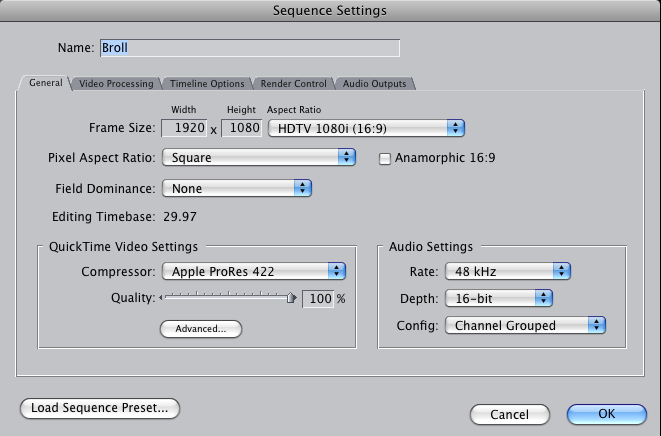
I filmed a long (really long) teaching series that includes a PowerPoint. I transcoded as I normally do, and edited with the sequence settings:
picture7.png


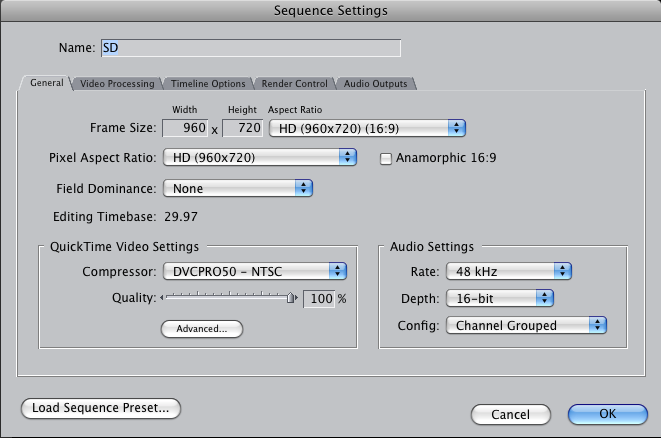
Then I created a new sequence and copied the edited footage:
picture8.png


When I rendered it, the quality loss is definitely there, and I'm concerned that the client will reject it, but if I render the prores, I can't afford to wait for it though I have an 8core 3GHz.
 
Whoa! That's wrong! An HD frame size setting with an SD compressor setting? That's not going to fly well at all. And that second Sequence is a whole different HD frame size than the first. Yep, you've got some very messed up Sequence settings going on in that second image.
 
Then leave it at that, you're fine. You don't have to render before exporting, either. Set RT to Unlimited, Dynamic for quickest playback for previewing. Transcoding to MPEG is going to take time, no matter what, but the biggest influence on render or export times are your CPU, RAM, hard drive configurations.
 
My mistake -- The time waster is the export. I'm not rendering before that. (I tend to think of exporting as rendering)

On jobs that don't need 1080p quality, should I transcode the AVCHD to standard before editing? Is the transcode where I went wrong?

Thanks for your help!
 
Transcoding to a Long-GOP format won't do anything but take up more time.
Only thing you can do is get a faster computer.

What is your CPU config, how much RAM, and what is your hard drive set up?
 
Set up an internal quick cluster in QMaster, use 7 of your 8 cores, Send To Compressor.

Apple Pro Training Series: Compressor 3.5, must have book for any FCP user.
 
Back
Top