Performance of Raid 0 vs SSD. Preparing for 4K

M1CEtro

Active member
Hey guys I've been shooting music videos with a 5d Mark 3 and eventually plan to start working with 4k footage soon. I'm researching upgrading my computer to prepare for the transition. Currently I edit music videos in Sony Vegas and use a separate 256 GB Sandisk SSD as the drive to store my project media and work in Vegas with. I have been doing some research that I should use a RAID 0 array with multiple disks to prepare to work with larger 4k files. I'm aware of the other RAID configs but at this point, speed is my priority so I am focusing on RAID 0.


I have been doing research online and have concluded that what I need to pay attention to in regards to improved speed and performance (editing large files smoothly in Vegas) is the access time or read time of whatever config I choose. Currently I am contemplating trying out a RAID 0 with 2 (maybe even 3), 1TB HDDs and I want to know if this will improve the access/read time for me to edit in Vegas more smoothly as compared to my current configuration with 1 SSD. I have found different posts on line that contradict each other. Some say that a RAID 0 does not improve access time, some say that it does. If it does improve access time, how much faster is it?


1. Does anyone have experience with this or able to give me a more definite answer?


2. Let's say hypothetically I get the RAID 0 config described above, what is a good tool to use to measure the access time of my SSD vs my RAID 0 setup to evaluate the improvement with numbers?


For other tech specs I'm using an i7 quad core processor with 24 gigs of RAM and an Nvidia GTX 550 ti graphics card.


Thanks


Roger
 
Blackmagic design has a disc speed test app which you can download to test your disc read write times.

Your circumstances may be different than mine, but a single 256 GB SSD is nowhere big enough for me to use as an edit drive. Currently I use a 4x3TB = 12TB raid 0 Thunderbolt setup for editing. The more drives you raid together the faster it will be. I then perform a nightly backup.
 
As a frame of reference, my 2x WD Black RAID 0 gets ~180MB/s writes, while my 840 EVO SSD gets 500. SSDs are a lot faster, but also a lot more expensive and die quicker under heavy workloads.
 
If you want speed and are already considering multiple HDDs then why don't you configure 4 drive RAID 10 for the extra redundency. Some day in the near future your SSD will crash and you won't be able to recover a byte of it. Safe yourself the experience and edit on redundant drives SSD or HDD.
 
As a frame of reference, my 2x WD Black RAID 0 gets ~180MB/s writes, while my 840 EVO SSD gets 500. SSDs are a lot faster, but also a lot more expensive and die quicker under heavy workloads.

thanks for the frame of reference, but from a performance standpoint, meaning the smoothness of editing in within my software, I should be concerned about the Read/access speed and not the write speed correct? I assume I should only worry about write speed when I am rendering out the file?
 
Yes, I was mistaken. That is the problem going by memory sometimes.

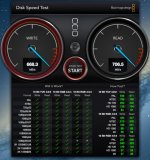
Here is a screen capture of a speed test in progress.
 

Attachments

  • Speed Test.jpg
    Speed Test.jpg
    85.1 KB · Views: 0
Let me step back here and ask some question:

What camera/codec will you be using for 4k?

Will you be delivering in 4k?

What computer/CPU will you be using?

How many layers of video will you need to be active when editing?

RAIDs are great but often are not as necessary as believed. CPU usually is the bottleneck in editing systems especially when working with compressed source footage.
 
Let me step back here and ask some question:

What camera/codec will you be using for 4k?

Will you be delivering in 4k?

What computer/CPU will you be using?

How many layers of video will you need to be active when editing?

RAIDs are great but often are not as necessary as believed. CPU usually is the bottleneck in editing systems especially when working with compressed source footage.

I haven't decided on what my next camera will be. With the introduction of 4k DSLRs like the GH4 I am hoping that Canon will make a competitor (or some other brand that will allow me to use Canon lenses) That could be awhile before that happens, so until then I will be renting other cameras. In about 2 months I will be shooting with a RED One so I want to make sure I am ready for that. Other cameras may include the Black Magic 4k cameras or Sony FSXXX camera.

95% of my projects will be delivered online, I would like the option to edit and deliver in 1080p as well as 4k.

Currently I have a I7 quad core. I am contemplating upgrading to a Xeon Hexa-Core.

With my style of orginization and editing I will have several tracks active. Currently when editing 5d Mark 3 footage I probably have around 50 tracks active to be rendered.
 
Thanks for the info. I think RED footage is going to be a lot different to work with compared to GH4 footage. The GH4 internal codec tops out at 100mbps if I remember correctly. Easy for a spinning hard drive RAID and even a single disc depending on how many layers you have accessing at the same time. The strain will be on the CPU side. Maybe you could ask around to RED users and get the lowdown on their RAW workflow.

Remember that it is all about the numbers. 1k, 2k, 4k etc... the drives do not care. GH4 4k @ 100mbps is the same as AVC-Intra 720p @ 100mbps. This datarate is roughly 13 megabytes a second. A modern hard drive can easily do 100 megabytes a second. So do some testing before you invest. You might not need such a fast drive setup, or even a RAID etc...
 
Back
Top