
Navigation
Install the app
How to install the app on iOS
Follow along with the video below to see how to install our site as a web app on your home screen.
Note: This feature may not be available in some browsers.
More options
You are using an out of date browser. It may not display this or other websites correctly.
You should upgrade or use an alternative browser.
You should upgrade or use an alternative browser.
PC monitors as alternative field monitors, strong NITS, low power consumption, 24”+
- Thread starter demoboy
- Start date

puredrifting
Major Contributor
To my knowledge, there are no high brightness, daylight viewable PC monitors.
If we look at video monitors, 1500-2000 nits are considered daylight viewable with some models now hitting 3,000 nits.
There is nothing even near that neighborhood in a PC monitor. I just bought a Dell 21.5" PC monitor to use for
live streaming, monitoring the output of our system. For around $150.00, it looks great but is only 250 nits.
If we look at video monitors, 1500-2000 nits are considered daylight viewable with some models now hitting 3,000 nits.
There is nothing even near that neighborhood in a PC monitor. I just bought a Dell 21.5" PC monitor to use for
live streaming, monitoring the output of our system. For around $150.00, it looks great but is only 250 nits.
G
Guest
Guest
If you just need the NITs, than I'm sure anything will do that fits your price range. Getting accurate image in that setup would be difficult, but could definitely show framing and composition. Just hopefully the people at that "monitor" are not also ones making the calls on the image.
I am assuming the VESA 100 mount option will make life easier on set. so just make sure the monitor has that. Although, you might blow half your budget on a monitor mount that converts vesa 100 baby pin or gobo head.
Personally, monitors have all gotten a lot better than they used to be, and yet chasing an accurate image gets expensive real quick. So, there is this sort of relief right now, where you can just go for what fits your budget and not worry about accuracy, because you don't really get that cheaply.
But, yeah, HDR computer monitors make high nit way more affordable. Make sure it has an IPS panel, so off angles are better. And the CineEye is only 1080, so, don't worry about 4K or larger than 24", unless you need that for some reason. I know some people do like to have a 55" on set, in a director's tent.
Sorry, I don't know which one to recommend, because they come out with a new one every two seconds and each seems to be better than the last, and yet they are all ok too. I saw a review for the "most popular monitor on Amazon" and it was like $95 or something, and apparently had the same panel as an Apple iMac.
Also, what Puredrifting said^
I am assuming the VESA 100 mount option will make life easier on set. so just make sure the monitor has that. Although, you might blow half your budget on a monitor mount that converts vesa 100 baby pin or gobo head.
Personally, monitors have all gotten a lot better than they used to be, and yet chasing an accurate image gets expensive real quick. So, there is this sort of relief right now, where you can just go for what fits your budget and not worry about accuracy, because you don't really get that cheaply.
But, yeah, HDR computer monitors make high nit way more affordable. Make sure it has an IPS panel, so off angles are better. And the CineEye is only 1080, so, don't worry about 4K or larger than 24", unless you need that for some reason. I know some people do like to have a 55" on set, in a director's tent.
Sorry, I don't know which one to recommend, because they come out with a new one every two seconds and each seems to be better than the last, and yet they are all ok too. I saw a review for the "most popular monitor on Amazon" and it was like $95 or something, and apparently had the same panel as an Apple iMac.
Also, what Puredrifting said^

demoboy
Well-known member
If you just need the NITs, than I'm sure anything will do that fits your price range. Getting accurate image in that setup would be difficult, but could definitely show framing and composition. Just hopefully the people at that "monitor" are not also ones making the calls on the image.
I am assuming the VESA 100 mount option will make life easier on set. so just make sure the monitor has that. Although, you might blow half your budget on a monitor mount that converts vesa 100 baby pin or gobo head.
Personally, monitors have all gotten a lot better than they used to be, and yet chasing an accurate image gets expensive real quick. So, there is this sort of relief right now, where you can just go for what fits your budget and not worry about accuracy, because you don't really get that cheaply.
But, yeah, HDR computer monitors make high nit way more affordable. Make sure it has an IPS panel, so off angles are better. And the CineEye is only 1080, so, don't worry about 4K or larger than 24", unless you need that for some reason. I know some people do like to have a 55" on set, in a director's tent.
Sorry, I don't know which one to recommend, because they come out with a new one every two seconds and each seems to be better than the last, and yet they are all ok too. I saw a review for the "most popular monitor on Amazon" and it was like $95 or something, and apparently had the same panel as an Apple iMac.
Also, what Puredrifting said^
Wow. $100 for iMac type panels? I remember seeing bus powered monitors 13-15” at Microcenter last year. Probably not the best image but it was 1080p. I don’t even remember the brand but it was definitely something cheap and it had HDMI. I regret not getting one. And yes, the CineEye Can shoot more than one signal so the color wouldn’t be too important. Then again every year I go to a Microcenter and see prices it’s almost a shock how much better and convenient things have gotten for video. Basically we’re mimicking the Asian market and sales
puredrifting
Major Contributor
Also, just popped into my head since I own the Accsoon CineEye, how do you plan on getting the signal into a monitor when it's designed to stream to phones and tablets?
Guess you could get a phone or tablet, stream to it, then use an Apple TV or something to mirror the signal on the monitor? Might make more sense to just spend more money
on a Hollyland or low-end Teradek that has video outputs if the goal is a larger monitor rather than multiple phones or tablets?
Guess you could get a phone or tablet, stream to it, then use an Apple TV or something to mirror the signal on the monitor? Might make more sense to just spend more money
on a Hollyland or low-end Teradek that has video outputs if the goal is a larger monitor rather than multiple phones or tablets?
demoboy
Well-known member
Also, just popped into my head since I own the Accsoon CineEye, how do you plan on getting the signal into a monitor when it's designed to stream to phones and tablets?
Guess you could get a phone or tablet, stream to it, then use an Apple TV or something to mirror the signal on the monitor? Might make more sense to just spend more money
on a Hollyland or low-end Teradek that has video outputs if the goal is a larger monitor rather than multiple phones or tablets?
This is a good question. I haven’t seen any replies regarding the minimum requirements (iPad model) to receive the signal from the CineEye. I don’t mind the minor detail latency from Apple Lighting AV adapter to my HDMI monitor. Basically a redundancy with an iPad sided by a monitor. Used minimum requirement iPads could do the trick, but signal strength and dated Apple boards is what has me skeptical. It can only be 1080p anyways. In another post I expressed that Bluetooth 5.0 should be a standard with any investments. I do know of other industry protocols for creating a WiFi hotspot, but I want full proof setup for the next 3 years, so atm I’m really doubtful in purchasing any iPad with BT 5.0 as well as having TruTone displays (in case I ditch the idea of having bigger monitors receive an HDMI source) and just having tablets on tripod stands. You know how it is! Of course a bigger screen is more ideal since team members can give critiques for a minor details with bigger screens! Hard choices! unfair lol. Though if one has money to splurge it doesn’t matter
G
Guest
Guest
Sounds like some new school stuff. You may have to be giving us advice on these budget work arounds. Would be great to hear how your experience goes.This is a good question. I haven’t seen any replies regarding the minimum requirements (iPad model) to receive the signal from the CineEye. I don’t mind the minor detail latency from Apple Lighting AV adapter to my HDMI monitor. Basically a redundancy with an iPad sided by a monitor. Used minimum requirement iPads could do the trick, but signal strength and dated Apple boards is what has me skeptical. It can only be 1080p anyways. In another post I expressed that Bluetooth 5.0 should be a standard with any investments. I do know of other industry protocols for creating a WiFi hotspot, but I want full proof setup for the next 3 years, so atm I’m really doubtful in purchasing any iPad with BT 5.0 as well as having TruTone displays (in case I ditch the idea of having bigger monitors receive an HDMI source) and just having tablets on tripod stands. You know how it is! Of course a bigger screen is more ideal since team members can give critiques for a minor details with bigger screens! Hard choices! unfair lol. Though if one has money to splurge it doesn’t matter
G
Guest
Guest
By the way, Sony Fx9 and Red Komodo are doing wifi video built in too. This may end up being a more common feature going forward, so good to figure out these wifi options.

Jim Feeley
Veteran
By the way, Sony Fx9 and Red Komodo are doing wifi video built in too. This may end up being a more common feature going forward, so good to figure out these wifi options.
Keep an eye on what Adam Wilt's up to. Two good things: (1) He's a really solid programmer who gets our space. (2) He doesn't oversell his products and is really clear about the limits. Still:
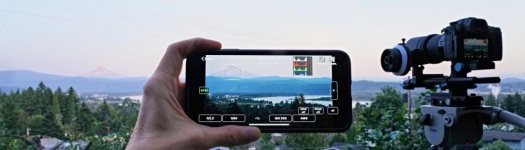
"FieldMonitor turns your iPhone®, iPad®, or iPod touch® into a wireless picture monitor / waveform monitor / vectorscope / histogram. See exactly what your camera is doing, without tethering your camera — or yourself — to a hardwired monitor and set of ’scopes."
FieldMonitor: Wireless Video Monitoring
G
Guest
Guest
That looks great!

CharlesPapert
Director of Photography
Cool app but make sure to check out the latency specs for a given camera. High latency monitors work fine for certain applications and users but are dealbreakers for others.
Last year I did a lot of research into the space of 24" monitors as we needed to purchase an army of them to be used as puppeteer monitors for Crank Yankers. I looked at both computer monitors and consumer TV's. Much harder to determine input specs (i.e. what camera outputs would be compatible--watch out for that damn 1080 23.98psf) with the computer monitors, since they tend to list them in Hz vs framerates. Off-axis viewing was very important also, as the pupeeters moved around, as well as very low latency. Ultimately I landed on the Vizio D24F-F1. Unfortunately 24" 1080p TV's are going away fast, with 720p models replacing them to keep costs down.
The daylight viewable aspect I think is going to be very hard to find in a larger display, especially at the price point of a computer monitor or consumer TV.
Last year I did a lot of research into the space of 24" monitors as we needed to purchase an army of them to be used as puppeteer monitors for Crank Yankers. I looked at both computer monitors and consumer TV's. Much harder to determine input specs (i.e. what camera outputs would be compatible--watch out for that damn 1080 23.98psf) with the computer monitors, since they tend to list them in Hz vs framerates. Off-axis viewing was very important also, as the pupeeters moved around, as well as very low latency. Ultimately I landed on the Vizio D24F-F1. Unfortunately 24" 1080p TV's are going away fast, with 720p models replacing them to keep costs down.
The daylight viewable aspect I think is going to be very hard to find in a larger display, especially at the price point of a computer monitor or consumer TV.

Run&Gun
Veteran
On the consumer front with regards to TV's/monitors, I'm actually surprised there's much of anything left being made that's 720. I was actually thinking it's going to start to be hard to find 1080 in just a few years, as all the lines switch over to 4K and 8K panels as prices continue to fall. Heck, I was at Sam's Club yesterday and saw an 82" 4K/UHD set for $1699. And I think they were even cheaper back during Christmas.
CharlesPapert
Director of Photography
From what I understand, the smaller TV's (under 42") are becoming less popular in their traditional uses (RV, kid's room etc) where laptops and iPads may do just as well. To keep the size to price ratio consistent, when a 40-40" TV costs $200 or so the cost of a 24" TV has to be under $150 and it is easier to achieve that with a 720p unit, plus there is an argument that the difference in resolution for a smaller display is harder to detect.