Panasonic announces UX180 and UX90 pricing & availability

We don't know that the B1 isn't compatible. All we know is that it has not been certified as being compatible -- for that matter, it may not have even been tested yet. Panasonic has tested and certified three adapters as being compatible: the WM30, WM50, and ASUS N53-A1. If you go with one of those, you know for sure it will work. If you go with something else, it may very well work -- or it may not. We don't know. But it might work.

I have tried the ASUS N53 B1 version and it does not seem to be compatible. The camera doesn't detect that a wi-fi module is installed at all. With the A1 version, however, the camera does recognize the wi-fi module and I can connect to it wi-fi access points or connect via a tablet. At least this was my experience with the DVX200. I don't actually have a UX180 to test against, but given that the supported wi-fi module list for both cameras is the same, I would expect results on the UX180 to be similar.

This experience between the two different ASUS N53 versions A1 and B1 was what led to my further investigation of the differences between the two. And the fact that the two modules use different internal chipsets has led to compatibility issues with the B1 version on Linux systems since apparently MediaTek never released an official Linux driver for the MT7662 chip used by the B1 version.

At any rate, after discovering that the two versions use different internal chips requiring different drivers, I was no longer surprised that the B1 version didn't work. Presumably, Panasonic has some kind of wi-fi module driver support built into their firmware, which is why some modules work and others don't. And it seems possible that Panasonic's own WM30 and WM50 wi-fi modules may very well be using the same Ralink chipset (or one in the same driver family) as the ASUS N53 A1 version, although that is just speculation.

It would be interesting to plug the Panasonic WM30 or WM50 into a Linux system and see what chipset they are using internally as this might suggest some other wi-fi modules to try.
 
As far as I know it should be the exact same as the presets (i.e., in theory if you dialed in the variable white balance temperature to 3200k, it should look identical to the P3200K preset, and if you dialed it up to 5600k it should be identical to the P5600k preset). It should be using neutral values for purple/green etc offsets, so IINM it should be accurate for 100% CRI lighting (like direct sunlight at 5600k).


Thanks Barry. Overall, I find white balance to be tricky on any camera. On my PX270 I am at the point that I do it visually using the viewfinder because the values are all over the place in many lighting situations. My thought was that if the variable WB would use the last manual setting taken , you might be able to use the variable-ness to dial it in and be close. For example, if you are in a gym with a 4000ish WB. You could take a reading then dial the final number in to what looks the best. But, this only works if the variable WB uses the last manual reading and the manual reading was close.

Now it is click, click, click taking a lot of readings and trying to trick the camera into the numbers that look the best.
 
Barry I wanted to ask you concerning sleep mode in the UX90, I can not seem to be able to wake it up from sleep mode and end up having to turn it off and back on, is this the way it is supposed to function? Also I just did a shoot with about 20 B-Roll clips and two clips would not transfer, seem to be corrupt (no image displayed), does Panasonic provide a utility to retrieve those clips (by the way never happened to me with the HMC80 after 4 years of usage).
 
Turning it off and back on is the way you do it, yes. The sleep isn't a sleep, it's a power-off after a certain amount of time.

I haven't had a single corrupted clip yet -- so I haven't had need to look for a clip retrieval utility. The camera should fix any clips that are damaged automatically, it should bring up a message saying it's repairing clips... how are you getting them though? Are you perhaps ejecting the card before it's completely done writing to it? Because that would certainly cause such an issue. It can take a second or two or maybe four or five for it to finish writing, so always check to make sure the red light is off before ejecting a card...
 
Turning it off and back on is the way you do it, yes. The sleep isn't a sleep, it's a power-off after a certain amount of time.

I haven't had a single corrupted clip yet -- so I haven't had need to look for a clip retrieval utility. The camera should fix any clips that are damaged automatically, it should bring up a message saying it's repairing clips... how are you getting them though? Are you perhaps ejecting the card before it's completely done writing to it? Because that would certainly cause such an issue. It can take a second or two or maybe four or five for it to finish writing, so always check to make sure the red light is off before ejecting a card...

The card never came out of the camera till I got home Barry. It's a new SDXC Sandisk. The two bad clips where back to back towards the middle out of about 20 files. I never got any error messages on the camera. When I got home I was transferring the files to the editing system and when it got to those files I received a system message that the files are corrupt or damaged. Frankly I got nervous as this was a paid shoot thinking the rest of the clips that have not transferred might pop up the same error message but luckily after skipping those two files the rest were fine. When I went back to the card to inspect the files, all good files showed thumbnails with the exception off the two bad files. Last week I had a two day studio shoot with the camera with a total of about 12 hours and all the files were fine. I was using only one card slot, from now on I am going to record to both slots just in case.
 
Had you formatted the card in the camera before using it?

No I did not Barry. I used it with the UX90 along with couple other new cards during the studio shoot few days ago, so this was the second time I use the card. If it's a card formatting issue wouldn't cause problems to all the files? Am I supposed to format it once or every time before re-shooting with it?
 
I generally recommend always formatting the card in-camera before each project. Sometimes people think it's okay to format the cards in a computer, and it isn't -- you have to format it in the camera. I don't know if that would be related to your problem or not though, if it works fine before...
 
Been playing with the AG-UX180 for a couple of months now and starting to feel I'm getting to grips with it. Despite not white balancing before I started filming this one...I did some colour correction and the results came out OK. So happy I spent the money on this bit of kit and will really know how to use it before the Summer flying season starts and I'll be attending big shows and events.

 
Anyone using the AG ROP APP with the UX180. I brought an ASUS USB-N53 wireless adapter (as seen in a YouTube vid where a guy was using it with the DVX200) and the camcorder doesn't even recognise it as a USB device. Any help appreciated.
 
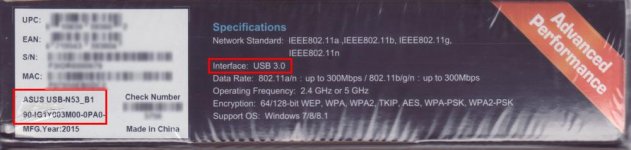
Check in the bottom of the Asus N53 box the part number. If you see something like this, then this is the wrong model. It doesn't work.

ASUS USB-N53_B1.jpg

The correct version is 90-IG1Y002M00-OPAO (USB 2.0) and not 90-IG1Y003M00-OPAO (USB 3.0).

Today I have receive the Asus N53 and even if the seller says that was USB 2.0 ver they send me the USB 3.0 ver. I will return it tomorrow.

Also I have order this cheap usb wifi with the right chipset from ebay http://www.ebay.ca/itm/181769887414, I will try it on my Panasonic UX180 when i get it, but i don't "trust" something cheap for my camera. In few weeks I will tell you if it works.

I think Panasonic do their "magic" again... they know that it's impossible to find the old model in the market and also they sell the Panasonic AJ-WM50P in high price. Only for some remote control buttons and nothing more (they have to look Sony for that even with limited functionality, for example on Z150)

So they say that they support WiFi only with their dongles and only for iPad... they have to think it about it again. This is not the right marketing.
 
Last edited:
Anyone using the AG ROP APP with the UX180. I brought an ASUS USB-N53 wireless adapter (as seen in a YouTube vid where a guy was using it with the DVX200) and the camcorder doesn't even recognise it as a USB device. Any help appreciated.
Make sure that the USB MODE is turned on, and set to USB HOST. There are two menu settings, you have to set both of them. Then when you plug in the wireless adapter, it should make a little wi-fi icon on the screen after a few seconds. If it does, you're good to go; if it doesn't, then the adapter may not be compatible.
 
Make sure that the USB MODE is turned on, and set to USB HOST. There are two menu settings, you have to set both of them. Then when you plug in the wireless adapter, it should make a little wi-fi icon on the screen after a few seconds. If it does, you're good to go; if it doesn't, then the adapter may not be compatible.

Barry, I don't know if essential_rc have USB 2.0 model but USB 3.0 model doesn't work. HOST and USB is on but even after camera restart there no network or wifi icon.
 
Looked on the packaging and I've got the USB 3 model. Already had USB MODE on and set to USB HOST. Doesn't work. :( I went with the ASUS because the Panasonic gizmo was silly expensive in comparison. How can a state of the art cam like this not support USB 3?!
 
Looked on the packaging and I've got the USB 3 model. Already had USB MODE on and set to USB HOST. Doesn't work. :( I went with the ASUS because the Panasonic gizmo was silly expensive in comparison. How can a state of the art cam like this not support USB 3?!

As davedv said ASUS versions have different chipsets and maybe this is the reason for incompatibility. I don't know why ASUS keep the same name for this model but this is a mess on the market. Even the sellers they don't know the exactly version. The A1 model was on the market before 5 or more years I don't believe that we can find it.

This experience between the two different ASUS N53 versions A1 and B1 was what led to my further investigation of the differences between the two. And the fact that the two modules use different internal chipsets has led to compatibility issues with the B1 version on Linux systems since apparently MediaTek never released an official Linux driver for the MT7662 chip used by the B1 version.
 
Looked on the packaging and I've got the USB 3 model. Already had USB MODE on and set to USB HOST. Doesn't work. :( I went with the ASUS because the Panasonic gizmo was silly expensive in comparison.
Well, not to be too blunt about it, but -- the Panasonic one works. I've used it. If the ASUS one doesn't work, that could be why it's less expensive? Who knows what the differences are? I don't, but I do know that the Panasonic ones do work.

How can a state of the art cam like this not support USB 3?!
The camera absolutely does support USB 3. Both the Host and Device ports are USB 3. But if the ASUS adapter is incompatible, it isn't because it's USB 3, it's due to something else being different, as tsioukas said.
 
Found something neat today - the UX180 can power my iPhone or iPad via the USB port. This got me thinking, what a great way to power a wireless HDMI transmitter without worrying about and external power source. Just plug in the HDMI, plug in the USB, and you're off and running. Seems very convenient for remote monitoring.
 
Last edited:
Found something neat today - the UX180 can power my iPhone or iPad via the USB port when in record mode. This got me thinking, what a great way to power a wireless HDMI transmitter without worrying about and external power source. Just plug in the HDMI, plug in the USB, and you're off and running. Seems very convenient for remote monitoring.

Well that's a cool find - but it only works when recording ?
 
Found something neat today - the UX180 can power my iPhone or iPad via the USB port when in record mode. This got me thinking, what a great way to power a wireless HDMI transmitter without worrying about and external power source. Just plug in the HDMI, plug in the USB, and you're off and running. Seems very convenient for remote monitoring.

Just keep in mind that there is a limit to how much current a device can provide via its USB port. According to the USB specifications:
  • USB 2.0 ports: 0.5 amps at 5 volts (2.5W)
  • USB 3.0 ports: 0.9 amps at 5 volts (4.25W)

The recent Panasonic cameras like the UX180, HC-X1, and DVX200 have a USB 3.0 port. So as long as the wireless transmitter or other device you have plugged into the camera's USB port doesn't require more current than this, it should work fine.
 
Back
Top