videomagician
Well-known member
I just had a major field order problem in a Vegas Pro 12 (486 but still present in 563) project that ruined a 12 hour render and I had to re-render after I figured it out. I'm trying to explain the problem to SCS Tech support and they said it hasn't been reported before.
Bear with me on this convoluted process...
OK - HD video should be Upper Field first correct? Well, Vegas Pro 12 is identifying P2 HD - both DVCProHD and AVC-Intra as lower field first.
I have been editing a private golf tournament with DVCProHD (HPX500), AVC-Intra (HPX370), XDCAM Disc (PDW355) and XDCAM SxS (EX1) files from various cameras. Project was set to HD 1920 X 1080 60i (Upper Field First.) Completed all the editing. Everything looked fine on Preview Monitor in Vegas and on BMD Intensity Pro Output to 1080P TV/Monitor.
I then rendered to DVDA NTSC Widescreen video stream (only changing bitrate to fit 75 minutes on DVD) which is lower field first. I then burned DVD and played the disc on a Pioneer DV-563A DVD player hooked up to a Sony CRT monitor (this is what I check all my DVD burns on.)
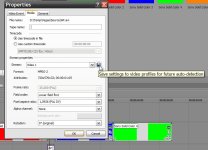
On playback, all P2 video had motion flickering/problems and both XDCAM flavors were smooth as silk. I then looked at properties of a few of the clips and all the P2 HD material was listed as (lower field first) and XDCAM material was listed as (upper field first.) I then changed all the P2 HD clips to Upper field first, did a test render of a couple minutes and everything was fine on playback. Re-rendered whole project for another 12 hours and it all worked.
So, if in fact P2 HD is upper field first then Vegas Pro 12 is incorrectly identifying it as lower field first. I NEVER had this problem with DVFilm Raylight.
I realize I may be the last person on the planet checking DVDs on a CRT, but just in case someone gives a DVD to their Grandmother that still has a Curtis Mathis television with an old Orion DVD player from Wal-Mart I want it to play correctly.
Sony said they need a file to reproduce but I doubt they want a full 64GB P2 Card uploaded. I would think they could load their own P2 card image and look and see the field order was listed wrong. I guess I will shoot the dog running around the yard for 30 seconds and upload it.
Am I nuts? After all the crashes and problems with Vegas Pro 12 I feel like it...
David
Bear with me on this convoluted process...
OK - HD video should be Upper Field first correct? Well, Vegas Pro 12 is identifying P2 HD - both DVCProHD and AVC-Intra as lower field first.
I have been editing a private golf tournament with DVCProHD (HPX500), AVC-Intra (HPX370), XDCAM Disc (PDW355) and XDCAM SxS (EX1) files from various cameras. Project was set to HD 1920 X 1080 60i (Upper Field First.) Completed all the editing. Everything looked fine on Preview Monitor in Vegas and on BMD Intensity Pro Output to 1080P TV/Monitor.
I then rendered to DVDA NTSC Widescreen video stream (only changing bitrate to fit 75 minutes on DVD) which is lower field first. I then burned DVD and played the disc on a Pioneer DV-563A DVD player hooked up to a Sony CRT monitor (this is what I check all my DVD burns on.)
On playback, all P2 video had motion flickering/problems and both XDCAM flavors were smooth as silk. I then looked at properties of a few of the clips and all the P2 HD material was listed as (lower field first) and XDCAM material was listed as (upper field first.) I then changed all the P2 HD clips to Upper field first, did a test render of a couple minutes and everything was fine on playback. Re-rendered whole project for another 12 hours and it all worked.
So, if in fact P2 HD is upper field first then Vegas Pro 12 is incorrectly identifying it as lower field first. I NEVER had this problem with DVFilm Raylight.
I realize I may be the last person on the planet checking DVDs on a CRT, but just in case someone gives a DVD to their Grandmother that still has a Curtis Mathis television with an old Orion DVD player from Wal-Mart I want it to play correctly.
Sony said they need a file to reproduce but I doubt they want a full 64GB P2 Card uploaded. I would think they could load their own P2 card image and look and see the field order was listed wrong. I guess I will shoot the dog running around the yard for 30 seconds and upload it.
Am I nuts? After all the crashes and problems with Vegas Pro 12 I feel like it...
David