Output split-track audio

uhrgl

Veteran
Ch.1 Voice
Ch.2 Music
Ch.3 SFX
Ch.4 Music

According to FCP HD's manual, when sequences get downmixed, odd numbered audio channels go left, and even numbered go right. I've got my Audio Output set to dual mono and everything is kosher in the timeline, but when I output to Beta, my channels get downmixed to stereo.

I want Voice and SFX on one channel and the music on the other channel, standard split-track.

Please advise.
 
Betacam SP can take 4 tracks of audio (or can it take 8+?). You could just setup your tracks in a more traditional setup (voice/sfx as 1/2, music as 3/4) and do a 4 channel output. Its been so bloody long since I've done that though I don't remember all the details and don't have a Beta VTR at hand, so can't really give much more detail.

Also, I wouldn't rely on the assumption of odd tracks/even tracks falling down like that. I'd rather physically do the adjustments myself so I know where stuff is going. That way you see exactly what you're doing.

If you've gone into the sequence settings and made your sequence as dual mono, then you should be able to just right click next to the track names and set them to which channel you want to output to. When you right click over a blank grey area (not over any kind of icon, as that will do some function of that icon) a little popup menu will appear. In that it will say 1 and 2 with a check mark next to the channel that the specific track is outputing to.

Otherwise, simply leave your sequence settings as the normal stereo setup. Then on your timeline, highlight all the stuff you want on CH 1, go to Modify > Audio > Pan Left, and finally for CH 2 materials, go to Modify > Audio > Pan Right.

Also, after whatever you do, make sure you play around with muting channels and then playing back the timeline and confirming that both FCP and your deck are all in mutual happy place. Good luck.

cheers.
 
First off, what capture card are you using, and how are you connected to the Beta deck?

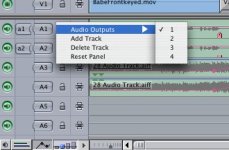
Second, after you do the track assigment in the Sequence settings AUDIO OUTPUT area, you need to RIGHT CLICK on the track in the timeline, in that blank space to the left of the A1, A2 letters...and make sure that you have the track outputs properly assigned there.
 
I'm using the AJA Io.

Here's my timeline:


I changed it up based on VaricamLife's feedback. I have A1 (Dialog) and A2 (SFX) output to a1; A3 and A4 (music) are output to a2. Everything is fine on the timeline -- I mute tracks and hear what I expect to hear. But my tape doesn't match my timeline; both channels have dialog and music.

I'm going to try rendering a downmixed track of A1 + A2, and use that as A1 in a new sequence, and do the same with A3 + A4 and use that as A2.

EDIT: Ignore the three minute track at the beginning called Coming Attractions -- I know that part is stereo, and I'm conscious of monitoring the segment that is supposed to be split-track.
 
Are you still only doing the dual mono and setting tracks to A1 and A2? We've run into a few hiccups with that here from time to time (randomly, so still haven't figured out the "why"). Again, I'd try selecting all desired clips on the desired tracks and using the pan left and pan right options. I prefer not to do that, but its done the trick here when we've been in a pinch. Good luck.

cheers.
 
I think you may be confusing the edit target tabs with output tabs. Instead of clicking on those. Right click around the little lock, not right on it but just to the side of it. A small menu will pop up and you want to select "audio outputs", then select the appropriate output. (see attached picture) Do this for every track of audio. (note: your timeline settings have to allow for 4 channel mono output to get all 4 tracks seperate.)

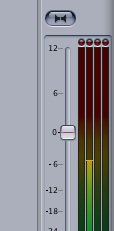
Then once all track are assigned an output make sure that the little gray downmix button is not pressed when recording to the deck. (see attached picture)

That should work if the deck can record 4 chan and yo have four seperate channels going to the deck or an SDI.
 

Attachments

  • Picture 1.jpg
    Picture 1.jpg
    33 KB · Views: 0
  • Picture 2.jpg
    Picture 2.jpg
    8.5 KB · Views: 0
TRY the little gray downmix button above the master level slider in the mixer, like in the above picture.
 
Thanks, jc. I had downmix off. I read what little documentation Apple provided and got that far. I really hate their manuals. How about an index, Apple? And split track turns up ZERO in their FCP Help widget.
 
Back
Top