I'm having this problem...
This footage was shot 60i, imported as such and edited on a 29.97 timeline, and is headed for dvd. I exported using all the following export methods:
quicktime movie (the first one), dv ntsc 29.97 interlaced->comressor, mpeg2
using compressor... mpeg2
using quicktime conversion... (2nd one), dv ntsc 29.97 interlaced->compressor mpeg2
using quicktime conversion... (2nd one), uncompressed 10-bit->compressor mpeg2
from compressor I used the following settings
interlaced
bottom field dominance
29.97
TwoPass VBR
mpeg2 5mb Ave 7mb Max
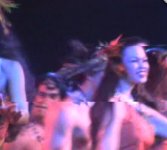
without variation I get the following banding in the image (see image). It comes during fast movement or pans much as interlacing artifacts do. This wasn't visible in the fcp viewer of course. It was visible in the quicktime exports though though not as obvious due to bad interlacing artifacts. It is most prominent in mpeg2 format (attached image) and seen equally on computer screen and tv.
-Any ideas why this is happening?
-There was heavy interlacing artifacts in the quicktime movies, I understand this is normal for interlaced footage on computer screen (??) but could it be connected?
Any help would be greatly appreciated!!! Thanks
This footage was shot 60i, imported as such and edited on a 29.97 timeline, and is headed for dvd. I exported using all the following export methods:
quicktime movie (the first one), dv ntsc 29.97 interlaced->comressor, mpeg2
using compressor... mpeg2
using quicktime conversion... (2nd one), dv ntsc 29.97 interlaced->compressor mpeg2
using quicktime conversion... (2nd one), uncompressed 10-bit->compressor mpeg2
from compressor I used the following settings
interlaced
bottom field dominance
29.97
TwoPass VBR
mpeg2 5mb Ave 7mb Max
without variation I get the following banding in the image (see image). It comes during fast movement or pans much as interlacing artifacts do. This wasn't visible in the fcp viewer of course. It was visible in the quicktime exports though though not as obvious due to bad interlacing artifacts. It is most prominent in mpeg2 format (attached image) and seen equally on computer screen and tv.
-Any ideas why this is happening?
-There was heavy interlacing artifacts in the quicktime movies, I understand this is normal for interlaced footage on computer screen (??) but could it be connected?
Any help would be greatly appreciated!!! Thanks