
I need some help here. I'm trying to export a 35 minute timeline to MP4. Every time it gets an Out of Memory error. I've rebooted the computer multiple times to no avail. I'm resorting to exporting the timeline in shorter segments which is working somewhat.
In the Activity Monitor, FCP shows to be using anywhere from 150% to 300% CPU capacity! Is that even possible, or am I reading it wrong? I've attached a screen grab of the activity monitor.
My timeline has lots of JPEG and TIFF images, but I've done this many times before and have never had such a hard time. Oh, and exporting through Compressor failed several times.
I'm at a loss, and am considering a new Mac Pro, as this one is from 2008.
Help!
Thanks,
Andrew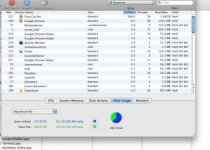
In the Activity Monitor, FCP shows to be using anywhere from 150% to 300% CPU capacity! Is that even possible, or am I reading it wrong? I've attached a screen grab of the activity monitor.
My timeline has lots of JPEG and TIFF images, but I've done this many times before and have never had such a hard time. Oh, and exporting through Compressor failed several times.
I'm at a loss, and am considering a new Mac Pro, as this one is from 2008.
Help!
Thanks,
Andrew

