Opinions on lighting?

rcpro8

New member
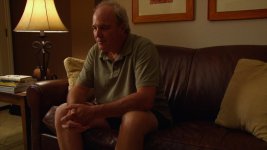
I have been lurking on this forum a year or so, trying to learn about lighting as much as possible. After reading the thread Learning to light cinematic I was somewhat inspired to try some stuff out myself as I have a project in about a month that I will most likely be in charge of.

I do know that it will be a drama type of film with lower key lighting probably but unfortunately I do not have many details yet. I also know however that we will be shooting with an hvx200 with a 35mm adapter.

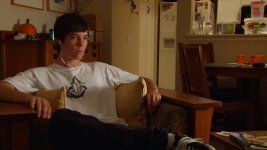
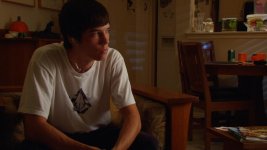
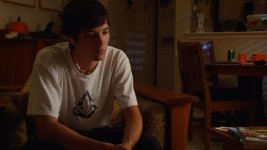
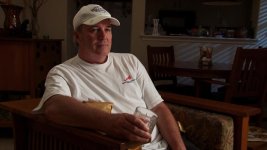
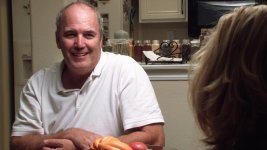
The test shots that I did were on a sony nx5u. Most of my experience is in portrait photography so lighting for video/film is a new(ish) thing to me. All the shots below are pretty much straight out of the camera. Oh and the "actor" is myself, which makes things difficult running back and forth. If you wouldn't mind critiquing my shots it would be much appreciated!!


If the attachment doesn't work give this a try: http://flic.kr/s/aHsjwnsboF
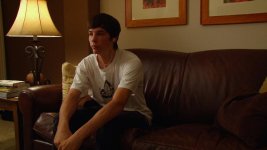
Sequence 01.jpgSequence 01_1.jpgSequence 01_2.jpgSequence 01_3.jpgSequence 01_4.jpg
 
Last edited:
I have been lurking on this forum a year or so, trying to learn about lighting as much as possible. After reading the thread Learning to light cinematic I was somewhat inspired to try some stuff out myself as I have a project in about a month that I will most likely be in charge of.

The way you have lit the subject, is perhaps a bit dramatic. Here's an idea about where this sort of lighting could go if that's the 'mood' you want.

For a less 'moody' shot, I'd boost the fill to make the shadow on the face more of a 2:1, but it depends on the story and what is being presented at that moment.

A PS Curves Adjustment layer was used to 'neutralize' the heavy yellow cast of the tungsten lights. I then applied an 's-curve' to the RGB 'curve', I then applied a Hue/Saturation Adjustment layer and dialed
down the saturation.

You do have a practical in the shot, and that sort of sets the high value. the dark portions of the couch set the lows, the subject in between. The subject's head sort of blends into the background, and perhaps some light kicked in there would separate the subject from that background. Alternatively move the camera slightly to the camera's left, and position the subjects head more against the lighter wall.

I'd say the guy's girlfriend just left, say she's leaving him for another girl, and he's plotting his revenge... but I digress...


attachment.php
 
Last edited:
Dunno if it's already past tense in the film world, but I really dig the lighting in Breaking Bad. They often use low key side light, and in general the light setups are really pleasing and good for the scenes. Maybe you could check out a couple of episodes and try to interpret their setups?
 
The way you have lit the subject, is perhaps a bit dramatic. Here's an idea about where this sort of lighting could go if that's the 'mood' you want.

For a less 'moody' shot, I'd boost the fill to make the shadow on the face more of a 2:1, but it depends on the story and what is being presented at that moment.

A PS Curves Adjustment layer was used to 'neutralize' the heavy yellow cast of the tungsten lights. I then applied an 's-curve' to the RGB 'curve', I then applied a Hue/Saturation Adjustment layer and dialed
down the saturation.

You do have a practical in the shot, and that sort of sets the high value. the dark portions of the couch set the lows, the subject in between. The subject's head sort of blends into the background, and perhaps some light kicked in there would separate the subject from that background. Alternatively move the camera slightly to the camera's left, and position the subjects head more against the lighter wall.

I'd say the guy's girlfriend just left, say she's leaving him for another girl, and he's plotting his revenge... but I digress...

Yeah I was sort of going for a moody sort of light on this one. With his head blending into the background, normally with an interview setup a hair light would help this, would a hair light work for this or would it look too un-natural?


Also for a less moody type of shot would you move the light over so it wraps around more or just use a bounce or something like that?
 
Yeah I was sort of going for a moody sort of light on this one. With his head blending into the background, normally with an interview setup a hair light would help this, would a hair light work for this or would it look too un-natural?

While 'toplight' or 'hairlight' is frequent enough, for 'movies' lighting tends to be 'motivated'... sure there's lots of occasions where lighting is as 'motivated' as the music score...
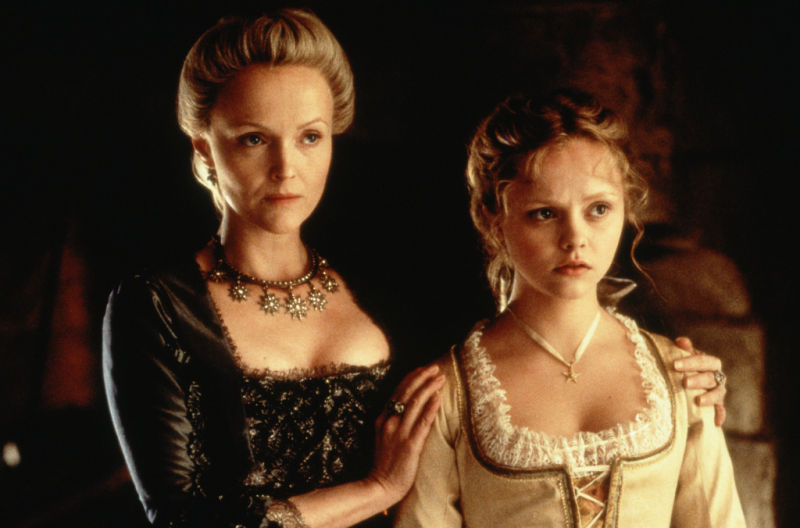
but here's a mood shot from the movie I watched last night, "Sleepy Hollow"(1999), getting ready for the season of the witch...

In this case the lighting is motivated by what people would expect, windows, or at night from wall candles, fireplaces, and not from above, at least in pre-electrified home lighting. A 'grand ballroom'
may have had large chandeliers, but not 'homes' of ordinary, even well to do ordinary people...

So, there's a deep to the left light to give shape to Lady van Tassel (aka Rita Skeeter in the Harry Potter series...) with a soft frontal, from the far right, with little 'fill' on the near left.
Wednesday, as she was known in "The Addams Family", has the same lighting as well.

There may be a hint, of top lighting just to get the tops of the heads slightly separated from the background, but the internet image is what I could find...

But in any case all the shape outlines have some amount of 'definition'.


sleepy-hollow-sleepy-hollow-13104811-800-528.jpg


Also for a less moody type of shot would you move the light over so it wraps around more or just use a bounce or something like that?

I think just filling more and getting closer to a 2:1 or even 1:1 puts the shot in a different mood on the subjects face. Adding a bit more light to the right side in general would soften things up.
 
Alright, I'm gonna try that 2:1 ratio probably on Sunday or Tuesday, Along with some outdoors shots, those are the ones I really need to get better at.
 
Just on the lighting side of things:

(for reference, i'm going by order of the pics on the flickr page)
the first pic looks pretty solid to me, for what i imagine you're going for... a couple things:
looks like you're getting a little blue light on the chair, guessing that's daylight coming in from the window. if that's what you want, cool, but i would look for ways to fix it (gels on the window, or block the window and nix the light there, or block the window and put a tungsten in its place)
as someone else mentioned, i would put a little backlight to get a nice outline and separate the subject from the background. not a lot, just a teeny tiny little bit... but something.
get some light into those eyes, too! Maybe a flashlight would do it, maybe a small reflector. in this case i wouldn't add much at all, but something to make you not look like a zombie.
The background light especially on the right side of the frame is a bit much for my eyes... mostly it's highlighting parts of the background when we want to be focused on the subject. There are tons of ways to do this, including cinematography tricks (don't leave that big space there to be taken up by the table and soda cans) or set design tricks (don't put objects of irrelevance in a shot where they'd be featured)... but just from a lighting perspective, you can lessen the light there, or at least remove the shiny objects, or increase the light a little on the subject (but you'd need to increase it equally, which probably means a fill). If you decrease the light back there and decide it's all too dark, you can splash a little light on different parts of the background... this is where putting a tungsten in that window would be nifty, or similar tricks... just make sure the light is there because you want it there, not just because it's splashed over from your fill.
The objects in the background on the left side of the frame are causing a few shadows... hardly noticeable here, not too much to worry about but if that kind of thing bugs you you can soften that light or move them a little from the wall, especially because...
in the third picture, with more light, those shadows are more noticeable. still probably not a huge issue but something to keep in mind.
in this picture particularly it looks less like you're shaping light for a purpose, and more just turning lights on so you can see stuff. cinematography is painting with light, not just illuminating objects.
what someone previously mentioned about cutting the key or upping the shadows to get a little closer to 2:1 is probably a suggestion best applied to your final photo, because of that practical and your proximity to it.
the final picture would probably have the same issues as the first ones in terms of too strong and even light over the background... but since most of the rest of the frame that's not the subject is just a red couch, it's not so bad. but keep it in mind... if you were to move the camera angle, you'd probably have a bit of a problem with it.


A lot of this is nitpicky stuff, and entirely my opinion so feel free to take the advice you like and ditch what you don't... but overall this is a solid lighting job.
 
Just on the lighting side of things:

(for reference, i'm going by order of the pics on the flickr page)
the first pic looks pretty solid to me, for what i imagine you're going for... a couple things:
looks like you're getting a little blue light on the chair, guessing that's daylight coming in from the window. if that's what you want, cool, but i would look for ways to fix it (gels on the window, or block the window and nix the light there, or block the window and put a tungsten in its place)
as someone else mentioned, i would put a little backlight to get a nice outline and separate the subject from the background. not a lot, just a teeny tiny little bit... but something.
get some light into those eyes, too! Maybe a flashlight would do it, maybe a small reflector. in this case i wouldn't add much at all, but something to make you not look like a zombie.
The background light especially on the right side of the frame is a bit much for my eyes... mostly it's highlighting parts of the background when we want to be focused on the subject. There are tons of ways to do this, including cinematography tricks (don't leave that big space there to be taken up by the table and soda cans) or set design tricks (don't put objects of irrelevance in a shot where they'd be featured)... but just from a lighting perspective, you can lessen the light there, or at least remove the shiny objects, or increase the light a little on the subject (but you'd need to increase it equally, which probably means a fill). If you decrease the light back there and decide it's all too dark, you can splash a little light on different parts of the background... this is where putting a tungsten in that window would be nifty, or similar tricks... just make sure the light is there because you want it there, not just because it's splashed over from your fill.
The objects in the background on the left side of the frame are causing a few shadows... hardly noticeable here, not too much to worry about but if that kind of thing bugs you you can soften that light or move them a little from the wall, especially because...
in the third picture, with more light, those shadows are more noticeable. still probably not a huge issue but something to keep in mind.
in this picture particularly it looks less like you're shaping light for a purpose, and more just turning lights on so you can see stuff. cinematography is painting with light, not just illuminating objects.
what someone previously mentioned about cutting the key or upping the shadows to get a little closer to 2:1 is probably a suggestion best applied to your final photo, because of that practical and your proximity to it.
the final picture would probably have the same issues as the first ones in terms of too strong and even light over the background... but since most of the rest of the frame that's not the subject is just a red couch, it's not so bad. but keep it in mind... if you were to move the camera angle, you'd probably have a bit of a problem with it.


A lot of this is nitpicky stuff, and entirely my opinion so feel free to take the advice you like and ditch what you don't... but overall this is a solid lighting job.

Hey don't worry about being nit picky, that's the whole point!

I only had time for one set up tonight but I did try to do the hair light, but I only had a 200w bulb for it and I am not sure if this was enough but in my mind it looks decent.

I fixed the background and made the contrast ratio a bit closer to 2:1. Oh and I suckered my dad to sit in for me which made it a whole lot easier. I also used some curves to crush the blacks and de-saturate it a bit.

The "daylight" that is coming in the window to the right of the table is actually a 500w? tota with a full ctb on it to kinda do a moonlight thing.

The key is another tota shot through a 4x4 diffusion frame with a ton of foam core flagging the light as best I could.

Well...?


10172011.jpg

http://www.flickr.com/photos/brennan_wright/6256119155/
 
Now you're talkin'. Again, it's all about what you're going for. Do you WANT that much of his face in shadow? Do you want less of it in shadow? Do you want it harder or softer? Nothing "wrong" with it that I can see, looks good.
 
looking good on the last test. If your dad can take that hat off, it will be easier to see how the hair light works. Also does the scene/story call for a white shirt?? normally I asked the director to stay away from white and black shirt, since it is harder for us to light. If the director call for white, I ask for off-white.
It also changes the tone and mood of the scene tho. You should test it out too.
 
Alright, cool. Thanks for the feed back, I think I have those simple shots down pretty well. here is one more if you don't mind...

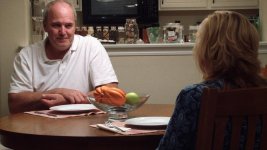
Here I was going for a more up beat higher key lighting. I used a ghetto 4x4 diffusion in place where the overhead lamp would be and then shot a tota though it. the background is lit pretty much with the practicals.


#1
http://flic.kr/p/azmpGq
overthessholder.jpg


#2
http://flic.kr/p/aziPZH
wideish.jpg
 
Last edited:
To me, those two latest shots look well exposed and natural. It looks like you are pretty close to clipping on the highlight on his forehead, but you have managed to avoid it, just barely. I also liked the previous test but agree with others that the hat made it kind of difficult to judge what the backlight was doing.

You don't mention any fill sources, but it looks like there is a little light on the left side of the woman's hair and shoulder that is coming from a different direction than the key on the man. Or is that from the man's backlight?

Now, just get your wardrobe department to tone down the brightness of his shirt and you'll be good to go.

- Greg
 
Back
Top