Oh boy! Almost smoked my workstation

Postmaster

Dark Side of the Camera
Oh boy! I just was a hair away to smoke my workstation.


I have some huge 3D render job going on with a killer deadline on next Monday.
So the workstation is number crunching 24/7 since days and nights.
After coming to the office this morning, I heard some strange chirping, opened the housing and found out, that the fan died somewhere during the night.
CPU temps where close to melt the whole thing into a boat anchor.

Here is the quick fix for the moment:
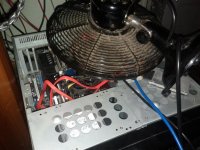
IMG_20120713_123713.jpg

Is it just me, or do computers love to fail close to important deadlines?
I remember back in the ole Macintosh (Pizza Box Mac) days, you can count on seeing bombs, the more your own adrenaline level raised.
We called it spiral of death.

Frank
 
Its a strange noise they like to produce when they overheat. I remember when one of mine had a PSU fan go and there was smoke emerging out the back and that noise! Set the smoke detector off!! :( Bad news all round... Good luck with your deadline.
 
I'm glad you caught it before it went up in smoke. I've had a workstation looking like that before in almost that same situation, big 3D rendering job, but my deadline wasn't as tight as yours. The good news was after the job was done and I could replace the defective fan, the workstation worked as good as new. Hope that works for you too.

I'm thinking there are more fun ways to raise one's adrenaline level.
 
For what it's worth, modern motherboards should prevent this (for the most part) via CPU throttling and if that isn't enough, outright shutdowns. I know my motherboard is configured to kill the power if it hits a threshold. Of course in your case, you wouldn't want to lose power outright in the middle of a render, but you'd at least avoid a burn out!
 
The fan doesn't look too far behind.

I have a Toshiba and need to keep a table-top fan on it constantly. Occasionally I get a little warning click before it shuts down, but more commanly it just shuts off mid dialogue.

a
 
Glad to hear you were in time to avoid a melt down.
Just a thought, if your internal fan(s) look anything like that backup you have on top you might want to think about taking canned duster and/or a vacuum to them once in a while.
 
Glad all went well, but dude, clean that fan! Looks like it has dust from the 50s!
 
Hey man why haven't you set up a render farm? :)

I'm sure you must have some old pc's/ laptops lying around? if so network them up and put those old buggers to use :)
 
Hey man why haven't you set up a render farm?
:)

I'm sure you must have some old pc's/ laptops lying around? if so network them up and put those old buggers to use :)

Just gave my render farm away a few months ago. My workstation is faster than my old renderfarm (4 computers).
It was collecting dust and needed precious space in my small office, since I don`t do much 3D jobs anymore.

@Stefan

Just an old 1940s desk fan, running 24 hrs since the day of my first post. Actually cools better than the Coolermaster I had.
The new Thermaltake arrived today. 2 more days of rendering on "a wing and a prayer", than I bolt it in.

@kylevant Yeah, it was supposed to shut down, but didn't for some reason. Haven't checked the Bios since than, I was afraid that it refuses to boot again and I loose precious time over the weekend.

Kinda feels like a WWII crew on a Flying Fortress, coming home with one burning engine, Flak holes all over the fuselage and a missing elevator flap :)

Frank
 
Last edited:
I think the PC automatically switches off when the processor reaches 100ºC. Not the best thing in the world to run your processor at temps near that, but I'm pretty sure today's hardwares are protected from a total meltdown.
 
That would be the next big thing after water cooling :evil:

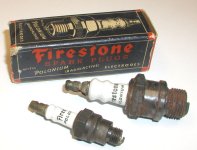
They tried that stunt in the 1940s with spark plugs.

sparkplugs2.jpg

Also they had radio active (Atomic) electron tubes and pencils with uranium ore in the 60s.
 
Last edited:
Back
Top