Noise in my speakers. Help

KINOKS

Well-known member
So, this thing is WAY beyond me. It's an electrical problem and I don't know much about electricity! But let me try to explain it
and hopefully somebody can lend me some help:)
I'm hearing lot's of noise in my speakers. It's electrical noise. If I move my mouse, if a light turns on in the room, etc. etc. I hear it all.
I have 2 active speakers (Alesis M1Active 620) plugged into my onboard (Realtek) soundcard (but interference can be heard on an USB card, just not as much). They are plugged into the sound card via one cable that divides itself into two mono jacks. And the jack has an adaptor on it to turn it into a mini jack so I can plug it in to the soundcard. But here's the deal,
if I unplug one of my speakers from the outlet the noise completely goes away from the other speaker. Only when both speakers are plugged in the AC the noise comes. Oh and if I wiggle the jack that's plugged in the soundcard I can get lower or higher variants of noise loudness.

A friend of mine said that I should try and put some tape over the side thingys on the plug that goes in the wall outlet, if you know what I mean?:) (I'm in PAL land BTW) I think that that's ground or something...? Anyway this seems to do the trick. The noise completely disappeared. But it can come back if I wiggle the jack plugged in to the soundcard. He said that this is only a temporary problem and that all of my equipment is suffering because I have faulty electrical wiring... Something to do with polarisation or something...

Any thoughts?

Thx

Br
S
 
You can get good filtered power strips that can help eliminate buzz. At my house I switched from an onboard sound card to an external USB audio interface. I have a shielded USB cable between the computer and the interface, and all of my connections to the monitors are balanced. I have no humm or buzz, but the electronics in my speakers pick up cell phone interference if the phone is within 2' of the speaker.
 
Yes, it's probably not all that serious, but you should have an electrician check your situation just in case. I'm 99% sure that it is a grounding issue, but not the kind that costs $1,000's of dollars for new electrical work. Grounding issues occur with audio gear all of the time. Try plugging some of the items that you have in the same strip into different strips and/or different outlets. You can and should be using balanced cable (specifically designed to eliminate noise), as suggested above. And, you can get special power supplies (such as those by Furman, Monster Cable, etc.), but you can also try things like the devices that Ebtech makes-- awesome stuff. The Hum X, Hum Eliminator, and Line-Level Shifter products all do a decent job of filtering most ground hum problems.

GJ
 
So, this thing is WAY beyond me. It's an electrical problem and I don't know much about electricity! But let me try to explain it
and hopefully somebody can lend me some help:)
I'm hearing lot's of noise in my speakers. It's electrical noise. If I move my mouse, if a light turns on in the room, etc. etc. I hear it all.
I have 2 active speakers (Alesis M1Active 620) plugged into my onboard (Realtek) soundcard (but interference can be heard on an USB card, just not as much). They are plugged into the sound card via one cable that divides itself into two mono jacks. And the jack has an adaptor on it to turn it into a mini jack so I can plug it in to the soundcard. But here's the deal,
if I unplug one of my speakers from the outlet the noise completely goes away from the other speaker. Only when both speakers are plugged in the AC the noise comes. Oh and if I wiggle the jack that's plugged in the soundcard I can get lower or higher variants of noise loudness.

A friend of mine said that I should try and put some tape over the side thingys on the plug that goes in the wall outlet, if you know what I mean?:) (I'm in PAL land BTW) I think that that's ground or something...? Anyway this seems to do the trick. The noise completely disappeared. But it can come back if I wiggle the jack plugged in to the soundcard. He said that this is only a temporary problem and that all of my equipment is suffering because I have faulty electrical wiring... Something to do with polarisation or something...

Any thoughts?

Thx

Br
S

Is the noise 'crackling' or a steady 'hum' when the various plugs are 'wiggled'?

In the US, and what I've seen of Europe, Germany and the UK, we all have 2 and 3 prong plugs. In the three prong case, I don't believe there's a way to 'wrongly' plug into the socket, without really obvious serious effort. If the noise is a steady hum, and you are using a 3 prong plug, it may mean that the socket is not properly connected to 'ground'. In the case of the 2 prong plug, there may be an issue with 'polarization'. I have some 'cheater' plugs that I use in Germany, that are 2 prongs but don't look like they are 'polarized' with notches so they can be plugged in only one way. In the US these days, the 2 prong plugs have one connector 'wider' than the other so they go into the current standard plug only 'one way' again with out effort.

However, older plugs are not keyed like that.

In any case, you should call an electrician to verify the safety of the wiring.

If the wiring in the house/building is 'really old', there are any number of things that could cause such a fault in the ground... broken wire, corroded connections, etc. In 'really, really' old buildings, the code at the time may have only covered 2 wire power connections...

Since you indicate you are in Slovenia, I have no idea about the local code but I'm sure there are codes.

You can also create a 'ground loop' by having one piece of equipment plug into one wall socket, and have some other piece of equipment plugged into a different wall socket, and somewhere in between there is a 'connection between the two pieces of equipment.

For example, you have your computer plugged into the wall socket near your desk. But the audio amplifier and speakers you have plugged into the socket on a different wall. You connect your sound card output to the amplifier... and you may have a ground loop.
 
Last edited:
Sounds like a ground fault in the AC wiring to your studio. Call in a qualified electrician to check it.

Yeah, but first I'd like to see what I can do to fix it:)

You can get good filtered power strips that can help eliminate buzz. At my house I switched from an onboard sound card to an external USB audio interface. I have a shielded USB cable between the computer and the interface, and all of my connections to the monitors are balanced. I have no humm or buzz, but the electronics in my speakers pick up cell phone interference if the phone is within 2' of the speaker.

Okey, but if my soundcard doesn't have balenced outputs how much sense does it make using balanced cables? And why use a shielded USB cable? USB is a digital... I have an USB soundcard sitting here next to me but it doesn't eliminate the hum completely.

Yes, it's probably not all that serious, but you should have an electrician check your situation just in case. I'm 99% sure that it is a grounding issue, but not the kind that costs $1,000's of dollars for new electrical work. Grounding issues occur with audio gear all of the time. Try plugging some of the items that you have in the same strip into different strips and/or different outlets. You can and should be using balanced cable (specifically designed to eliminate noise), as suggested above. And, you can get special power supplies (such as those by Furman, Monster Cable, etc.), but you can also try things like the devices that Ebtech makes-- awesome stuff. The Hum X, Hum Eliminator, and Line-Level Shifter products all do a decent job of filtering most ground hum problems.

GJ

I've tried plugging it in different sockets, but not all of them. So far it didn't help. As for that other stuff, the hum eliminators...that looks great, but firstly I'd like to tackle the problem at it's source if that doesn't work I'll definitely look into your suggestions.

Is the noise 'crackling' or a steady 'hum' when the various plugs are 'wiggled'?

It's a steady-ish hum. Probably an 50HZ hum:):) But when other stuff is used there's all kinds of noise, it's almost music:)

In the case of the 2 prong plug, there may be an issue with 'polarization'.

Yes it's a 2 prong plug. And that's what my friends told me so far that it's probably an polarisation problem... What ever that means:)

If the wiring in the house/building is 'really old', there are any number of things that could cause such a fault in the ground... broken wire, corroded connections, etc. In 'really, really' old buildings, the code at the time may have only covered 2 wire power connections...

The wiring is or should be mostly new. It was renovated 2 years ago but I don't know what was done to it.


You can also create a 'ground loop' by having one piece of equipment plug into one wall socket, and have some other piece of equipment plugged into a different wall socket, and somewhere in between there is a 'connection between the two pieces of equipment.

For example, you have your computer plugged into the wall socket near your desk. But the audio amplifier and speakers you have plugged into the socket on a different wall. You connect your sound card output to the amplifier... and you may have a ground loop.

Okey, I'll try that out. But somehow I have a felling that this isn't going to help.


Could it be that the problem is because of the shared cable between the two speakers? I wonder what would happen if I was to use 2 different cables...
 
For example, you have your computer plugged into the wall socket near your desk. But the audio amplifier and speakers you have plugged into the socket on a different wall. You connect your sound card output to the amplifier... and you may have a ground loop.

Just to be clear this are 2 active speakers. Each one has it's amplifier built in. And I forgot to mention this: I don't get any noise/hum or whatsoever in my headphones...
 
You can also create a 'ground loop' by having one piece of equipment plug into one wall socket, and have some other piece of equipment plugged into a different wall socket, and somewhere in between there is a 'connection between the two pieces of equipment.

For example, you have your computer plugged into the wall socket near your desk. But the audio amplifier and speakers you have plugged into the socket on a different wall. You connect your sound card output to the amplifier... and you may have a ground loop.

Oh, I think I didn't quite get this the first time. A ground loop is a bad thing! Right?:)

Yes, the speakers were/are plugged into a different outlet then the computer ie. soundcard. So this probably creates a ground loop right?
So now I've tried plugging the speakers on the same socket as the computer and... the buzzing went away BUT in comes a different kind of sound!:)
Now it's not a buz buts it's like a squeal and a ticking kind of sound (like a one second tick). But the buzzing went away. Oh yes and I tried
plugging the speakers in different parts (on a different fuse) but it didn't help with the buzzing. So, now what? If I understand this correctly I'm creating a ground loop if
I plug the speakers in a different outlet. And when I plug the speakers in the same outlet I don't create a ground loop but I get some electrical interference from other equipment. Is this correct? If so what can I do? I suppose a USB card would save me in this instance as it wouldn't be subjected to electrical interference? Or is there a problem with the motherboard having some bad grounding issues or something??

The other thing is to tape over the ground on the speakers so they have no ground. In this instance there is absolutely no noise, no nothing BUT if I move the jack that's plugged into the soundcard the speakers crack really outloud. It's kinda scary. And if I nudge the jack just right I can get the buzz back and it's much much louder. This isn't good right as the speakers aren't grounded.
 
Last edited:
As mentioned it sounds like a ground loop. Here's a quick fix (potentially):

Make sure everything, including speakers, are on the same circuit electrically. To find out......take a small table lamp, and plug it into one of the outlets you are using for your system, turn the light on (leave it on). Go to your breaker panel and find the breaker that controls that circuit and turn it off. Verify the lamp went out. Turn breaker back on. Move to the next plug associated with your system and repeat the process, but turn off the same breaker. If at any time, the light stays on when the breaker is off....... that's a different circuit and you need to move where that device is plugged into onto the same circuit as the other stuff. By doing this, you will create a microcosm of what is known as "Star Grounding", the preferred method of grounding audio systems.


Edited: because OP does not have any ground plugs if the are just 2-prong outlets.

Bottom line is you have a ground lifted/looped somewhere, from your description of it.

BTW,
Yes it's a 2 prong plug. And that's what my friends told me so far that it's probably an polarisation problem... What ever that means
smiley.gif
That confirms it for me. You need grounded plugs with a ground system put in. LOL....polarization???????? No. In AC, there is no such thing.
 
Last edited:
Edited: because OP does not have any ground plugs if the are just 2-prong outlets.
BTW, That confirms it for me. You need grounded plugs with a ground system put in. LOL....polarization???????? No. In AC, there is no such thing.

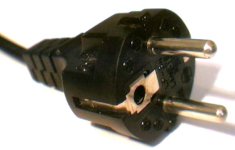
Note that the OP is in Europe, where the ground connection is a strip of metal along the side of the plug.
He IS using grounded mains plugs, and he "lifted" the ground by taping over the ground connections.
So his setup works when he "lifts" the ground, but no matter where you are in the world, that is NOT the way to fix the problem.
 
It's a grounding issue. I had this same problem when I had my pro tools rig in my first apartment in LA. Even with a good interface and good cables I still had the problem. I ended up getting power strips that filtered this stuff out, and the issue went away. When I moved to a new place, I didn't have this issue. The funny thing is, I had the rig for about 6 months before the problem reared it's noisy head.
 
But the circuit thing still applies. Potentially drawing power from 2 different circuits and 2 different ground sources.
 
Note that the OP is in Europe, where the ground connection is a strip of metal along the side of the plug.
He IS using grounded mains plugs, and he "lifted" the ground by taping over the ground connections.
So his setup works when he "lifts" the ground, but no matter where you are in the world, that is NOT the way to fix the problem.

It wasn't clear until the OP's recent description of what he was doing, that he was using the 'round plug, keyed, with the metal strip for ground'. There are sockets and plugs that don't have the ground connection. I checked and Slovinia seems to use the same type of plugs as in Germany, as opposed to the British or Italian plugs which for the current standard have 3 prongs.

I've used both 2 prong with ground strip and 2 prong ungrounded while in Germany, but then I've never needed to setup an audio system...


At some point isolation transformers become The Solution...
 
The solution is simple. You have decent loudspeakers connected to an internal sound card that is built to make bleep noises and play the windows sound. It's value is probably less than $10. The audio recording enthusiasts covered this phenomena 10 years ago. The inside of the computer is a harsh RF laden environment and an unscrew bunch of component is so prone to all sorts of noise sources - RF coming in over the power cable, harmonics of the many oscillators inside and even unfiltered noises from the power supply which change as the dirt on the mains power changes.

If you want good quality, low noise audio - but an external audio unit - there are loads available, and all remove the audio generation from the noise source - the PC.

Of course you should have your power system checked if you are worried, but these noises are very common. They're made worse by combinations of connected equipment that accidentally promote the noise. Common mode noise carried on system ground, grounds that actually have a few volts of ac between the case ground and the real earth potential - all these things can destabilise the system, and just a few millivolts of noise can sound very loud. As items in the building are turned on or off, these circulating currents change and you hear it. Some home appliances with moving parts like refrigeration compressors can be nasty, as can microwave ovens, and even multiple devices with similar switch mode PSUs that chop the mains waveform. Add in the shifting of data in the computer and poorly performing sound card and it's bad. I have one computer used in my office that makes a noise when the mouse runs across the screen. With rubbish audio cards or on motherboard Realtec devices, it can be just this combination of poorly performing (audio interference wise) connected kit.

My favourite sound modules are the Lexicons - good audio quality and useful features, but have a look on the home recording websites and you'll see loads because they have had this problem for years and have very strong opinions on quality audio and noise free products.
 
Note that the OP is in Europe, where the ground connection is a strip of metal along the side of the plug.
He IS using grounded mains plugs, and he "lifted" the ground by taping over the ground connections.
So his setup works when he "lifts" the ground, but no matter where you are in the world, that is NOT the way to fix the problem.

Exactly! And you're saying this isn't a permanent solution? This is it: CEE_7-7.jpg

It's a grounding issue. I had this same problem when I had my pro tools rig in my first apartment in LA. Even with a good interface and good cables I still had the problem. I ended up getting power strips that filtered this stuff out, and the issue went away. When I moved to a new place, I didn't have this issue. The funny thing is, I had the rig for about 6 months before the problem reared it's noisy head.

Yes I tested this today, A LOT. I haven't touched a project I'm working on for 2 days now! Arrrgg:) So what are this power strips that you mention?

But the circuit thing still applies. Potentially drawing power from 2 different circuits and 2 different ground sources.

Yes, I tried what you said. So it's like this: when the speakers are plugged in any other socket that's not the same as the PC I get something like this http://www.youtube.com/watch?v=4YM1iwC6vhg (go to the second minute) When I plug the speakers in the same socket as the PC I don't get this HUM but I get all sorts of interference. This interference I found through testing today that I can really minimize it with careful wiring. I can almost get rid of it but then when something gets plugged in it slowly comes back - weird!?? Also I must nudge the jack that's plugged in the soundcard a bit to get rid of the interference - this is also weird? I don't know enough about electricity to make a conclusion here. But it must be something to do with the grounding as there is no noise when I "lift" the grounds and there is no noise in my headphones! I understand that the noise in my speakers is EM pollution and other stuff...? So how do I get rid of this?

At some point isolation transformers become The Solution...

I'm all ears, what are this isolation transformers?:):)


...You have decent loudspeakers connected to an internal sound card that is built to make bleep noises and play the windows sound. ...The inside of the computer is a harsh RF laden environment and an unscrew bunch of component is so prone to all sorts of noise sources - RF coming in over the power cable, harmonics of the many oscillators inside and even unfiltered noises from the power supply which change as the dirt on the mains power changes.

...They're made worse by combinations of connected equipment that accidentally promote the noise. Common mode noise carried on system ground, grounds that actually have a few volts of ac between the case ground and the real earth potential - all these things can destabilise the system, and just a few millivolts of noise can sound very loud. As items in the building are turned on or off, these circulating currents change and you hear it. Some home appliances with moving parts like refrigeration compressors can be nasty, as can microwave ovens, and even multiple devices with similar switch mode PSUs that chop the mains waveform. Add in the shifting of data in the computer and poorly performing sound card and it's bad. I have one computer used in my office that makes a noise when the mouse runs across the screen. With rubbish audio cards or on motherboard Realtec devices, it can be just this combination of poorly performing (audio interference wise) connected kit.

This is definitely the problem. But why is there no noise in my headphones then? This makes me think that the soundcard isn't all that's wrong here.
I already have a USB sound card. It's a crappy card from Creative. But the drivers are making my PC freeze up and behave really weirdly so I decided to stop using it. I'll probably burn in the yard and make a youtube video out of it!:) I can't believe they sell this shi*t. Creative yeah I know I know, but it works well with Media Composer, and those of you who worked with MC you know how picky MC is regarding soundcards. I'll probably buy a PCIe M-Audio card. I've read that PCIe cards are properly shielded nowadays.

And the ting with the jack makes me think also. If I nudge the jack I can get all kinds of interference. Maybe I need a better jack or a balanced cable (if this even makes sense as the output of the card isn't balanced...?). But still I'm leaning towards a grounding issue. I think:):)
 
Okey, with this clean setup (with careful placement of the wires and the speakers being on the same socket as the PC) I just tried using my external USB card. The noise is present exactly the same as with the internal card!
 
Yes, I tried what you said. So it's like this: when the speakers are plugged in any other socket that's not the same as the PC I get something like this http://www.youtube.com/watch?v=4YM1iwC6vhg (go to the second minute) When I plug the speakers in the same socket as the PC I don't get this HUM but I get all sorts of interference. This interference I found through testing today that I can really minimize it with careful wiring. I can almost get rid of it but then when something gets plugged in it slowly comes back - weird!?? Also I must nudge the jack that's plugged in the soundcard a bit to get rid of the interference - this is also weird? I don't know enough about electricity to make a conclusion here. But it must be something to do with the grounding as there is no noise when I "lift" the grounds and there is no noise in my headphones! I understand that the noise in my speakers is EM pollution and other stuff...? So how do I get rid of this?

There are several issues... The major 'hum' from your description and tests seems to be a 'ground loop' issue...

However, that's not the only source of noise. Wire just being 'wires' will act as pickups/antennas for all manner of evil signals, ranging from short bursts of crackling noise, to radio stations, etc.

This where cable shielding, cable lengths, connectors, and using 'balanced' signaling comes in.

A effect known as parasitic capacitance can 'vary' depending on the environmental conditions, such as humidity, the presence of a 'human body' in the are, etc. waving one's hand over 'circuits'... (ever wondered how some types of touch screens work?)

Shielding and using 'balanced' signals is the way to deal with this sort of thing.

The same is true for 'inductance', where coils of cables can allow signals to 'jump' around.

A note about the video. While the fellow did use a 'ground lifter' to diagnose the problem, I would not call that as a 'solution'. If the amplifiers are close together they should be connected to the same 'power strip'. The problem arises when the total power for the combined equipment exceeds the power available from the 'one wall outlet'.

I don't think that's a problem for you at this point.
 
Last edited:
Seeing as this is a ground loop problem I'm going to buy an isolator and see if it helps.
 
Back
Top