

triplej96
Veteran
Well I just opened PP for the first time. I've had on my computer for quite some time but I usually do my editing in Avid. PP seems easy enough to get to grips with and a much friendlier UI then Avid.
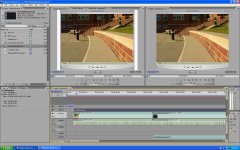
Any how here is my question. In my source monitor my file looks like its suppose to but in my program monitor its not displaying it at the source resolution size its zoomed in. When I export its fine but for accuracy I need the comp window to display it correctly.
Here is a picture to illustrate my problem.
Any how here is my question. In my source monitor my file looks like its suppose to but in my program monitor its not displaying it at the source resolution size its zoomed in. When I export its fine but for accuracy I need the comp window to display it correctly.
Here is a picture to illustrate my problem.
Attachments
Last edited:
