New inexpensive Sony, 1920x1080 60p • 24Mbps

I agree with Kurth on the size issue. Not quite a pocket cam. The HX100 isn't that much bigger and is just as easy to cart around. True, the photo side is pedestrian but the video...oh my. Ya gotta love having an 800 mm lens with you at all times! I'd like to hear anybody else's experience with one. Not having a mike input is really to bad. Other than that, what's not to like?
 
Last edited:
Get used to seeing this: Aerial video shot on the HX9.

Although it may not be pocketable for some (fair enough Kurth, Al)....the "size-to-quality" ratio...along with it's image stabilization...MUST make this thing an Budget Aerial Videographer's DREAM!!!

You can see that this footy isn't PERFECT. You can also see that MUCH of it is COMPLETELY USABLE. Add some post work and you're golden!!! Like I say....get used to it. :)

 
Here is my attempt at a reasonable workflow for the Hx9v for Final Cut Pro 6.06
I'm working on 2.4GHZ MacBookPro with 2GB of Ram

I've not done extensive testing, but the files I have so far look good. Any thoughts on this?

1. http://media-converter.sourceforge.net/ To rewrap
2. In Media converter -> Preferences-->Presets-->Get More Presets
3. Download "Re-wrap AVCHD for Quicktime - uncompressed Audio"
4. Select "Convert-to" pulldown to the 're-wrap AVCHD' that you just downloaded.
5. Set your destination in the Preferences and Drag your .mts files into the converter
6. Convert these mov files into something FCP can handle easily. I use Apple Compressor 3.02 to Convert to XDCAM HD at 60fps. You can also use ProRes422.
 
Here is my attempt at a reasonable workflow for the Hx9v for Final Cut Pro 6.06
I'm working on 2.4GHZ MacBookPro with 2GB of Ram

I've not done extensive testing, but the files I have so far look good. Any thoughts on this?

1. http://media-converter.sourceforge.net/ To rewrap
2. In Media converter -> Preferences-->Presets-->Get More Presets
3. Download "Re-wrap AVCHD for Quicktime - uncompressed Audio"
4. Select "Convert-to" pulldown to the 're-wrap AVCHD' that you just downloaded.
5. Set your destination in the Preferences and Drag your .mts files into the converter
6. Convert these mov files into something FCP can handle easily. I use Apple Compressor 3.02 to Convert to XDCAM HD at 60fps. You can also use ProRes422.


Thanks so much! Any footage that you might share would be greatly appreciated by all our Mac peeps I'm sure!

Also....could someone else confirm francese workflow? Having two peeps use it will give additional insight I'm sure.
 
I also had to try some hx9v videoing immediately when I got the cam. It appears the enhanced stabiliser is a digital one. The image crops slightly when it's activated. I may just take it off and use the regular one, then stabilise afterwards if needed.


p.s the blown yellow highlights in the end of the video happen because of my s**tty CC skills, they are not in the originals.
 
I also had to try some hx9v videoing immediately when I got the cam. It appears the enhanced stabiliser is a digital one. The image crops slightly when it's activated. I may just take it off and use the regular one, then stabilise afterwards if needed.


p.s the blown yellow highlights in the end of the video happen because of my s**tty CC skills, they are not in the originals.

Goodness. There are some shots in there that are just PLAIN STELLAR. Truly other worldly for a POCKET CAM. Pedestrian for a professional cam. (Now if you could just fit that AF100 in your pocket, you could call this cam lousy. lol!) I just loved the overall feel. (I think 1:19 is my fav...)

Thanks for sharing!
 
HH - Here's a short edit of Maine shoreline footage using this workflow recipe: http://vimeo.com/27956699 I see some subtle stuttering in the pans. Any idea what could cause that? Stabilizers? Also, the autofocus sensors are a mystery to me. As you can see towards the end of the second shot, the foreground only takes up a tiny portion of the frame, but the camera stays focused on it. Thanks for your input. .... I think I will try converting to ProRes next and see if that has any effect on the stuttering.
 
Probably some framerate mismatch somewhere. What was your exported framerate?

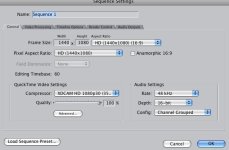
Maarek - Here are my compressor settings and my sequence settings. I also compressed it out at 59.94, 30, and 29.97 and saw stuttering in all four versions, but at different places - just in the pans. Thanks!

File Extension: mov
Estimated file size: 55.37 MB
Audio Encoder
AAC, Stereo (L R), 48.000 kHz
Video Encoder
Format: QT
Width: 1280
Height: 720
Pixel aspect ratio: Square
Crop: None
Padding: None
Frame rate: 60
Frame Controls: Automatically selected: Off
Codec Type: H.264
Multi-pass: On, frame reorder: On
Pixel depth: 24
Spatial quality: 50
Min. Spatial quality: 50
Temporal quality: 50
Min. temporal quality: 50
Average data rate: 4.096 (Mbps)
Fast Start: on
Picture 1.jpg
 
I have the 50p PAL version of the cam but shouldn't the timebase be 59,94 for the US version? Are the stutterings in the original file if you check it out on VLC or other players?

If it is, try turning of the enhanced stabilization and seeing what happens then.

1440x1080 anamorphic? Shouldn't you use a 1920x1080 screen size?
 
HX9 – Wondering if the HX9 is for you? Watch this video!

HX9 – Wondering if the HX9 is for you? Watch this video!

HX9 – Wondering if the HX9 is for you? Watch this video!
http://pocketcinematography.com/?p=82
I'm thrilled to share this video with you all! It isn't the "other worldly" looking footage that I'd LIKE to share with you all. Rather, it is what you can probably expect from the HX9. It isn't all "gravy" either. You'll see some really bad footage. (Rain and low light). There are simply some areas that this camera just doesn't shine. All of that said, it is still the king of the hill when it comes to pocketcinematography for under 500usd! But still....this is a GREAT sampling of what to expect. Enjoy!

 
Hi, was just coming to post that as I managed to upload it last night ;)

Yeah, from this footage you can pretty much see what it does well, what it does bad. Good light = awesome quality, the less light there is the more the quality goes down. And quick motion breaks the encoding up quite fast compared to my 7d. Had some nice rain last night so was a great opportunity to see how much it holds up.

But still...man. This is a GREAT pocketcam. It kinda rivals the Sony HC1 I have...even in lowlight. Which in itself is unbelievable.
 
Last edited:
HHL thanks for posting the video, thinking the same as you will be THE cam, much better then a gopro.

Also bought one, perfect for my flyduino multiwii multikopter, light, wide, 50p, great picture, great OIS, ok as my Nex5 lack of manual functions, but those automatics looking promissing, seems to be better then on my Nex5 which badly underexposed in my eyes in some situations, snow, much sky (yes ok how should she know).
Anyone compared?
But this focus tracking is awesome on HX9, and she exposes well it seems as far i saw, to ad a ND will be the least problem at least for the price, but a fixed shutter would be so nice sony, as always something in what panasonic gives more options, i wont need any AE programm, always confuses me more then to dealing with f-stop and time.
Considered a Lumix fx47 or fx100 before, but the 47 does only 25p sensor wise and the 100, no video OIS ,i dont know, its no big hype arround, so it may not the best video cam, funny, the Lumix 100 is only 20€ more expensive then the luimix 47 here,anyway the sony is even cheaper:cheesy: and i am pretty astonished from the videos i saw.
Hope the the OIS will help eleminating some vibrations, whlile hanging under a copter for AP, lots have problems with that, but this one wow, will see.
 
What impresses me so much with the HX9 is the images that CAN be achieved if you know what you are doing. If you understand what to expect from the camera and have the cinematic skill to capitalize on it's strengths. This video (for a pocket cam) is OTHER WORLDLY. For a DSLR this video isn't anything mind blowing....but again....we're talking about a fixed lens camera that fits in your pocket and costs less than 400 dollars! The look of this footy is so impressive for a pocket cam. Enjoy Peeps!

 
I hate to say I told you so....but: (No software stabilization....clearly usable footy here...even without post. With post, I think you would have "pro" aerial footy, and on a budget!)

 
Here's another community that is trying to see if the HX9 is a good fit for them. The XGamers or Action Sports people. This video isn' t a good example of quality footy....but you can see that they're trying to see if it's a good fit. You CAN see that they'll need to figure out the "shutter speed" thing because the jitter is a BIG problem in a lot of these shots. Anywho....

 
Back
Top