Need Help with Recording Setup (NOVICE!!)

fbmc

Member
Hello everyone!

Just a warning: I'm new to this forum as well as audio/video capturing, editing and distribution.

I've looked around on here and haven't really found the answer to my problems.

I'm needing some advice for the best setup for my company's request to record a monthly meeting, as well as some "TV Show" type interviews.

Here's the room types we will be recording in:
A conference room that is about 18ft by 65ft with about 100-200 people in it. There is a podium at one side of the 18ft length and the camera will be positioned on the other side of the 18ft wall. The maximum length we will look at recording is from one side of the 65ft to the other.

What we have:
Wireless lapel microphone:
VocoPro 4 wireless microphones with receiver and amplifier model UHF5805
Bogen GS 360 Amplifier with rca audio output
Computer with Firewire and RCA input


We are needing to capture:
The audio from the podium, and possibly the wireless microphones that are passed around. The amp/receiver is setup in a separate, but adjoining room, so we can't just run a direct line to the camera that would be recording it.

We'd like to setup like this, but want to know if 1) it's possible and 2) if it's the best way:
Have a camera that outputs to Firewire that would be fed into a computer that we use for live streaming. The camera would be setup to also record (in a digital format) the presentation onto an SD card, or a similar type of digital media (no CD or DVD). There would be an input on the camera that would allow an external input from a microphone. When we want to use it in the "typical" configuration, we would have a line in from the amp in the other room (jack installed for this purpose), but when we wanted to use a separate microphone, where we didn't have the input from the other room available, we could either use a separate wireless microphone (lapel Mic) OR have some kind of transmitter connected to the amplifier that would allow us to capture the signal that's going out to the speakers in the room, to act as input for the camera.

I know there's a lot of components to this whole system and it's very confusing, but imagine where I am, novice, interested in the whole thing, BUT not wanting to be stuck with it.

I look forward to hearing from you all on how best to tackle this.

Thank You in advance.

Dustin
 
WHY wouldn't you "have the input from the other room available"? It sounds rather like a makeshift kludge with artificial limitations not justified?
 
The powers at be like to change the room setup from time to time and our facilities manager prefers not to have cables running along the floor. We would rather have the capability to use the wired jack in the wall with the option of a wireless transmitter from the amp in the other room, but I need to know what transmitter and what camera would work for this setup.
 
I don't think that a wireless transmitter is a good idea, especially since that is your only means of connecting to your main audio source. Batteries die and cell phones cause interference. A cable is nearly fool-proof (unless someone unplugs it.) Get a roll of gaff tape to match your floor and tape the cable down. It's really the most reliable way.
 
Yea, we've had problems with the lapel mic and cell phone. Regardless, I will need some sort of recommendation for a camera that would accept the external source.

We are looking for something like high end consumer ($100-$400), as we aren't looking to make some really super fancy video, just get the information captured.


Also! If you all could recommend something simple to add the powerpoint slides that are usually presented during our recorded sessions, that would be excellent. I have used WireCast trial and it was awesome, but they don't want to cough up the $450 for the license. Wirecast was simple, rather fool proof, and gave great results. I've used Adobe Premier Pro before, but that almost seems like too much for what we are wanting to do. OpenSource would be great, but at the most, I think we could get something for $200 at most.
 
fbmc,

You have many needs and some weird limitations. Your powers that be are tying a hand behind your back by not wanting cable. You may not need "fancy video", but how bad is good enough?

Cams in your price range < $400 aren't going to have firewire out, or much in the way of audio capability except maybe 1/8" stereo input with little control over the input. Unless you spend significant $$, your cam won't have firewire output, so think HDMI output. Make sure it will embed the audio in the HDMI stream. You will likely need a video card to stream HDMI input to your CPU in real time. Cheap cams will not be wonderful in low light, so hopefully your podium has some light on the speaker.

If you want a cam with much audio capability, you will need to spend 2k +. If you use a cheap cam, you will need some way to control the audio reaching your cam. There are add on audio boxes for controlling audio to 1/8" inputs such as Juiced Link or Beachtek. These will offer you a minimum of control and feed your cam input, but are limited to two channels. So you could plug your VocoPro into one input and your podium mic into another.

If you have to go wireless for your speaker, the Sennheiser G3 systems are about the minimum at around $600. But realize that lighting ballasts, cell phones, and possibly the other wireless system can cause interference. Does your speaker move around, if it is a podium lecture, get away from the lav mic and go with a traditional interview mic. They can be wired or use a wireless like the G3.

G3 system = $600. XLR cable = $50 Did you say you were on the cheap and wanted to improve your sound?

This is a very simplified approach and will need refinement.

There may be other approaches such as separating the audio from the cam and go direct to your CPU via a usb interface. There could be latency issues with this, but is worth a look especially if you buy a audio limited cam.


Grant
 
We have a camera now, the Samsung SC-D363 Mini DV Camera which has a "DV" connection that we are connecting via firewire directly into the PC for capture.

The way the audio currently is setup, we have the microphone that is directly connected to the amp through a floor jack. The amp has an input for the microphone and for the vocopro receiver/amp. The amp outputs to speakers in the ceiling as well as the rca audio out (labeled "Tape"). We then have the wireless lapel mic that is sitting on the podium which we use as input into the PC using the wireless receiver for the lapel microphone into the microphone port on the PC. The PC is working well for video, but the audio is a disaster, primarily because of the lapel mic.

They keep mentioning a new camera, but I don't think we necessarily need a new camera, so much as we need to get our audio situation straightened out. It would be nice to have a camera that can accept the input from an external source, but within our price range, we might just want to spend the money on a good audio setup for input into the PC and have the PC do the work instead of the camera.

What do you all think about just going after the audio in this situation and what are some recommendations as to them wanting something that can go from the RCA output on the back of the amp to the input of the 3.5mm on the PC.
 
Amazing as it may seem, firewire was common on DV cams 5-10 years ago, but most newer non-tape cams have abandoned the feature in favor of USB and or HDMI.

Per the last line in my post.

"There may be other approaches such as separating the audio from the cam and go direct to your CPU via a usb interface. There could be latency issues with this, but is worth a look especially if you buy a audio limited cam"

You want to look at usb or firewire audio interfaces for this. There are so many, it would be hard to recommend one in particular. Edirol, FocusRite, PreSonus, Motu, Apogee, M-Audio Tascam, among the many, all have their fans at wide ranging price points and features. Better ones will give you phantom power for condensor mics, gain control, limiters, etc. You can decide how many inputs you want or need beginning with one and going up. As I mentioned, you may have some difficulty with latency which will throw your audio sycn off. Some, like the MOTU firewire models claim zero latency. Since you are direct streaming, I am not sure how you would correct this in real time, IF it occurs. For your recorded version, you could edit the synch later.

I use the MOTU Traveler Mk3 and have had pretty good luck with it, though the software has a learning curve. Your mileage may vary.

You will likely get more response to this posting in the Audio Section, though they can be a rough bunch.

Grant
 
One of the things that surely isn't going to happen is to change the amp and the vocopro receiver.

Is there some kind of adapter that we could get to go from the RCA out to the mini-jack input on the wireless transmitter that we have for the lapel mic? Then we can have the RCA jack put in to go from RCA to 3.5mm for the computer and then have tha bility to do the wireless should we need to change to a different configuration.
 
Not sure if I am confusing you or vice versa.

The amplifier for your PA is irrelevant except that you need it for your house sound and maybe you need to pass the sound through it before you get to your computer audio interface. Audio interfaces, depending on model, will have any number of different inputs, XLR, 1/4", and RCA, and others. The idea of the audio interface is to take a variety of signals and convert them to either USB or firewire. Buy one that fits your need.

If you need additional control of your audio before your house amplifier, and that is a good idea, you could use a simple music mixer like a small Mackie model with features appropriate to your distribution need. They will have duplicate output channels for your recording and house audio needs. This would allow you to feed your cam, audio interface, and house sound all at the same time, and would provide gain control on the inputs.

There are many audio facilities which have the same issues you have, and churches come to mind as a good example. If you search around, there are websites that will show you the most common ways to get this done.

Grant
 
Ok, we have the house amplifier which has an input for XLR from the microphone receiver. The house amp has some of the inputs you mentioned, and the output for "tape" which I believe is is a mono output (which is fine for what we are doing). The "Tape" connector is like that of a single red RCA jack. What I'm hearing you say is that I need an audio interface that allows me to connect to this interface in order to change the balance and gain on the final output to the camera and computer.

I'm not sure where the USB comes into play since I would be using the output from the RCA jack.

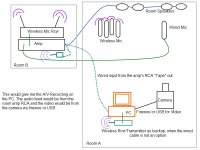
I have attached a picture of what I currently have and what I think may work, but I'm sure theres something else that I may need. Would I want to put an audio interface between the feed from the amp before it got to the PC, so that I can balance, adjust gain, etc.?

If so, what would be a good interface for this type of thing?
 

Attachments

  • audio-a-b-setup.jpg
    audio-a-b-setup.jpg
    117.6 KB · Views: 0
The dotted line from the amp to the PC is where the audio interface would be. It would allow you to adjust the levels of the audio coming into the computer. I have the Tascam US-122L, but as someone else mentioned, there are many, many others.
 
What about for the wireless transmitter in the room where the amp is? I really don't have any idea of some kind of adapter to go from the RCA to either XLR or mini XLR transmitter.

Thank you all so very much, you've all been very helpful and patient.
 
Going from the line-level RCA output of the PA amplifier to a line-level input (probably mini-phone) on the computer could be as simple as an ordinary cable with the proper connector on each end.

If you want to receive that wireless microphone, then you will need its matching wireless receiver (or another identical receiver).

No audio is shown connected to the camcorder. Do you have software that will record the video via Firewire and the audio from a separate source? Software typically assumes that the audio is embedded in the Firewire stream. Shooting videotape without recording the sound is never a good idea.
 
I have a wireless mic and receiver that I currently use. Model: Digital Reference DR-22 audio-technica The Wireless Microphone is: Model ATW-T701
We looked for an adapter to go from the RCA to the mini-XLR 4 PIN but we had trouble because the model we have is not the standard wiring, from what I understand.

I usually use Windows Media Encoder for the first recording and it usually functions well and I have yet to have out of sync audio and video.

The audio and video have been of decent quality until lately when the wireless microphone has been acting up.

Should I still look into recording the audio and video on the camera itself with an output to the computer so that we can broadcast online without needing a second camera?

If so, we will need to look at the camera options because we currently have the Samsung Mini-DV Camera that I mentioned earlier.
 
"I'm not sure where the USB comes into play since I would be using the output from the RCA jack"

USB is another way to get your audio into your computer, thus the interface. It will convert your analog signal to digital. A interface can give you more control than just taking the RCA output straight to your CPU. If you needed gain control, limiters, plug flexibility, or phantom power for a mic, a interface can do all that and more. Better ones have firewire output.

What I mentioned earlier is if you use a mixer before the amp, breaking out the podium audio and the wireless audio before the house amp, you can have two tracks of audio into your CPU; one for the handheld wireless, and one for the speaker. That gives you control over the two audio inputs and breaks your CPU and or cam feed out before the amp. It would add a layer of flexibility and improve the quality of your audio.

If you are satisfied with all your audio levels, and you don't want to edit separate tracks later, then the direct to CPU or cam is all you need, but is very limiting. This comes down to a matter of control, how much audio control do you need. At the most basic level, all you needed was to improve the output from the podium. Use a wire (best), or get a Senn G3 wireless kit which is no sure thing. If you want to improve your audio, you have some suggestions on how to garner more control and gain flexibility.

Grant
 
Is there a recommendation for a camera that would record while also outputting into a format that we can capture on the PC (the PC we have has an RCA capture card in addition to the Firewire card that I previously mentioned).

Here's what I envision based on feedback from this group:
-The Current PC will be connected to the output of an Audio Interface. That AI will then be connected to the output of the amp, which mixes both the wireless and wired microphones
-The PC will be connected to a camera that will record to a digital media (SD card, etc.) and also output to a firewire, USB or RCA connection to the PC.
The PC will record the audio from the amp and the video from the camera while the camera serves records with it's on board mic, as a backup.

What I need to know is a recommended camera for this purpose, keeping in mind my limited budget.
 
If the cam you have now has FW, it should probably do that. And you have FW input into the PC right?

If you are going to use only a audio interface, and no mixer, you might want to get one that has gain control via knobs and headphone out. This will give you some control over your mix.
You might find one that has an audio return which could be plugged into your cam so your cam would record the same mix. More expensive models will have more outputs with greater control.

Grant
 
It has FW, however it records to mini-dv which is not what we want because we have to convert it.

Any suggestions?
 
DV - tape is still an ideal media for long form events like this as long as you don't need HD. It gives you instant backup which lowers your infrastructure cost in other backup media. You will probably lose your FW port if you go with a cheap sdhc media cam, so you may need to consider HDMI for the cam out to PC link if you change. You will need a expansion card or breakout box to do so. Matrox and Black Magic make such products and start around $500.

You may find that whatever else you go with isn't going to be much easier with regard to your existing log and transfer. If you go to a AVCHD cam, I believe Edius will edit native, so look at that software. But most everything else will need conversion to an editing codec. Rendering out time can be significant.

Then you will need to decide how you intend to backup. Data files will stackup like cordwood for long form events. You could buy SDHC cards for each event, but that costs a lot more $$ than a simple DV tape. Hard drives, Blu-Ray data, and tape are the other norms, but the media and or burning devices cost. If your files are small, DVD is OK, but you may end up spanning one event across multiple discs. Look at Roxio Toast for data burning.

If you had a real budget, there are all sorts of other ways to approach your entire situation, but with limited $$ plain old DV - tape still has a place.

This thread has been a little tough, because I've been like the grim reaper, saying stuff you don't really want to hear.

Grant
 
Last edited:
Back
Top