Need help with 'Colour Temperature'

Kenneth Lau

Active member
This question came up to my mind when I was playing around with my 5D and trying to set the colour temperature.

Was wondering, are there any ways to measure the colour temperature ( beside using the AWB ) when all kinds of different lights source are mixed into the scene?

I read about how the AWB function work, is that the camera takes the average colour temperature of all the light source in the scene. But how do you do that when you don't have the AWB function?

Does anybody know the answer to this question?!?
 
This question came up to my mind when I was playing around with my 5D and trying to set the colour temperature.

Was wondering, are there any ways to measure the colour temperature ( beside using the AWB ) when all kinds of different lights source are mixed into the scene?

I read about how the AWB function work, is that the camera takes the average colour temperature of all the light source in the scene. But how do you do that when you don't have the AWB function?

Does anybody know the answer to this question?!?

Yes, there are meters that measure color temperature. The way Auto White Balance works, is that the software in the camera 'finds' areas of the image that are either very high value, or very 'nearly' equal in RGB value, or the like, then decides that's 'neutral grey', and makes adjustments accordingly. This simplistic approach can be 'way off', depending.

Manual white balance where the image has a variety of values, will have similar problems.

The usual procedure for manual white balance is to have a known neutral grey target, then fill the camera frame with that target, then hit manual white balance. This assures the software 'does the right thing'.
 
With the 5d this is what I have always done..

press info info info - this brings up the RGB histogram

Point the camera at something white/grey

Change the temp until the three colour peaks are equalised

I cant remember if displaying the RGB histo is default or if you have to change the settings to get it to show..

Best

SamMM

*additionally I use this method to select 'off' colour balances - for example I might be shooting a 'morgue' scene and dial it 3-500k cold or a 'surf dudes on the beach' scene and dial in a bit of warmth

The RGB meter will also show if lights have a major green swing
 
Last edited:
hmm...
How do you guys do it when you shoot with RED?
I was shooting with the RED scarlet last time, and couldn't find a AWB button.

I basically guessed the colour temperature and adjust it while looking at the monitor.
How do you guys do it when you shoot with RED?/
 
Nothing is going to work well if you have mixed temp in the shot, it's not magical.

Not necessarily... Mixed temp is used a lot for getting moonlight (Daylight but camera balanced for Tungsten)... But, in these cases when using mixed light it is to get a character (in this case an HMI to look cold) and are chosen for that reason.
 
take a still shot with you 5d and take the canon RAW file into photoshop

play with the color temp slider or hit photoshop's auto. It works very well
 
Well, yeah, intentional, for a reason, not
"There's daylight from that window, green spiked fluorescents in the overheads, and I'm using tungsten as my key".
 
Colour Temperature Epic Fail

Colour Temperature Epic Fail

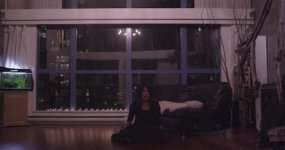
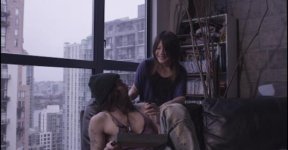
Recently I have been really struggling with this colour temperature thing. Here is some screenshot I took from the footage I shot with the SCARLET and I wanted to share with you guys, and hopefully get some professional advice.

First of all, for all the day light scene, I set the colour temperature to 5600K and for all scene I light with tungsten I set it to 3200K. However, after viewing the footage, I noticed that all the footage is a little 'pink' ( 002,003 ). Don't know if you can tell from these pictures, I think the white balance is a bit OFF. I have been reading some forums and they say that the footage from RED are raw and you can control your colour using CineX... so is that mean I can fix it or change to whatever colour I want in CineX? And, if you look at my footage, do you think the colour look off??

Also, when I was shooting, beside the RED LCD monitor, I didn't have any bigger monitor to use. I noticed tremendous amount of gain ( 001 ) after importing the footage to my computer. I couldn't really tell there was much gain on set using that RED LCD. Have anyone encounter similar problem? Should I have a bigger and a proper monitor on set next time??? or should I hire a DIT operator instead??

PLEASE help me out if you know what I am struggling with.

SOrry for being such lack of knowledge. This was my debut of shooting RED and I didn't quite know what I was up to.

..............
 

Attachments

  • 001.jpg
    001.jpg
    17.9 KB · Views: 0
  • 002.jpg
    002.jpg
    19.3 KB · Views: 0
  • 003.jpg
    003.jpg
    11.4 KB · Views: 0
The Scarlet shoots RAW - you should be able to put the temperature slider anywhere in post or just click a grey card to WB and paste that reading onto all of the clips ?
 
Bigger screen shots would be beneficial I think.

Look, just because RED shoots raw, doesn't mean you don't have to think about color balance on set. They way colors interact in the frame and most importantly on skin tones is what's going to bite you in the butt if you're not careful. Yes, you can non destructively alter the WB and tint in REDCINE-X but if you have a lot of mixed sources in your frame uncorrected in relation to each other you are going to have a lot of work with secondaries and power-masks in post to make everything look right.

Yes, you will be able to change your white balance in post and yes, I do think the colors are off here. The best thing I have found is to shoot with a grey card so you can color pick a source in post you know is going to give you neutral color and then correct from there. RED also requires a fair amount of light to expose and not get lots of noise in the image. Did you pay attention to your noise goalposts in the histogram when you were shooting? It is a pretty accurate guide to what the image is going to look like. In addition because of the nature of raw it is upon you to not only properly WB the footage but things like sharpening and denoising fall into your purview as well. The camera doesn't do anything for you - you have to work for that image.

On set it is important to have accurate WB like I said because of the interaction of light sources in your frame. On the RED you can assign the auto WB to a button on any of the modules or display devices you have connected to the camera and do a traditional WB on set (which of course can be altered in post any way you see fit).
 
Also, when I was shooting, beside the RED LCD monitor, I didn't have any bigger monitor to use. I noticed tremendous amount of gain ( 001 ) after importing the footage to my computer. I couldn't really tell there was much gain on set using that RED LCD. Have anyone encounter similar problem? Should I have a bigger and a proper monitor on set next time??? or should I hire a DIT operator instead??

PLEASE help me out if you know what I am struggling with.

SOrry for being such lack of knowledge. This was my debut of shooting RED and I didn't quite know what I was up to.

..............

Well... if you are shooting with a Red, and don't know anything about it, and have no time to find out... even I, Mr. DIY would say... 'yes, hire a DIT/Operator for the Red'... from your initial post it wasn't clear that you were shooting on a 'sophisticated' camera, rather than a prosumer or below...

I don't know anything about Red... other than better dead than... but I digress...

In any case you screen captures look 'magenta' to me on my screen... but in any case, if you do have Raw, whatever that may mean in Redland, you should be able to adjust for color balance in post. Again I don't know what tools are available for manipulating the Red Raw files and generating output for use with an NLE... so I don't know know if you can 'whack' the colors big time... or can only may subtle adjustments.

Since I shoot on a GH-1, I don't have a lot of room to 'whack' the colors...

I'd take samples of say the 'white' book case in the background on shot 002, the 'grey' side and see what it's color shift from 'grey' is... that would set the color cast for the 'fill' coming from the room lighting. Then check the daylight coming through the windows. This may be a place where you would use 'masking' in your NLE to do different color corrections on the windows, vs. the interior.

The other two shots look to be interior but 'night' window, and totally interior respectively. In those cases finding 'white' or 'neutral grey' objects in the scene, and correcting for those should get you to a 'neutral' point... then if you want to go to a specific cast, you can work from the neutralized shot.

This sort of reasoning on my part is from a number of years dealing with stills, and digital stills and correcting for ugly lighting often found at wedding venues... which could not be controlled to any great degree...
 
Bigger screen shots would be beneficial I think.

Look, just because RED shoots raw, doesn't mean you don't have to think about color balance on set. They way colors interact in the frame and most importantly on skin tones is what's going to bite you in the butt if you're not careful. Yes, you can non destructively alter the WB and tint in REDCINE-X but if you have a lot of mixed sources in your frame uncorrected in relation to each other you are going to have a lot of work with secondaries and power-masks in post to make everything look right.

Yes, you will be able to change your white balance in post and yes, I do think the colors are off here. The best thing I have found is to shoot with a grey card so you can color pick a source in post you know is going to give you neutral color and then correct from there. RED also requires a fair amount of light to expose and not get lots of noise in the image. Did you pay attention to your noise goalposts in the histogram when you were shooting? It is a pretty accurate guide to what the image is going to look like. In addition because of the nature of raw it is upon you to not only properly WB the footage but things like sharpening and denoising fall into your purview as well. The camera doesn't do anything for you - you have to work for that image.

On set it is important to have accurate WB like I said because of the interaction of light sources in your frame. On the RED you can assign the auto WB to a button on any of the modules or display devices you have connected to the camera and do a traditional WB on set (which of course can be altered in post any way you see fit).


By shooting with a grey card, do you mean to record the footage shooting an actual grey card in every scene, and then use 'Pick colour' to white balance it in CineX???
 
Look, just because RED shoots raw, doesn't mean you don't have to think about color balance on set.

Absolutely. Raw capture will not easily handle changing the comparitve colours of a mixed source scene. Its critical to consider colour temp ratios during the lighting design .. just you just dont need to obsess on what settings are used on the camera because that is just meta data that is not baked in

S
 
Back
Top