After reading many reviews and comments, I decided to buy a Totevision 703HD onboard monitor for use with the HVX and Brevis 35mm adapter. It was a long process, so I figured I’d post a review of the monitor and setup in the hopes that it helps my fellow dvxusers with their decision.
Btw, early on I discovered that I was only ten minutes away from the Totevision headquarters in Seattle, this gave me a great advantage as I was able to demo the monitor before I bought it. The people there have been tremendously helpful to me and are aware of dvxuser and our needs. It’s always nice to know you’re dealing with good people.
So without further ado, my primary requirements for a monitor were that it:
1) Allow me to accurately focus when shooting HD footage with the adapter
2) Make it easier for me to view the exposure of an image
Added desires were that it:
1) Run off Panasonic Batteries
2) Not be cumbersome to use
3) Look professional when mounted to my camera
4) Not break the bank
Here’s what I bought, the stores and prices:
- Totevision LCD-703HD Monitor Spytown $565 (free shipping)
- Panasonic Threaded Battery Adapter Vidleds $63.50
- Heavy Duty Swivel Mount (w/thread not shoe mount) Vidleds $30
- BNC Connectors (to allow for all cable combinations) TriangleCables $27.99
- Hardware for building Panasonic Battery Mount Home Depot $4.24
Total Spent was: $690.73
I had issues with Spytown where I called a week after ordering to find that they never placed the order with Totevision (it ships direct). They said they would place it immediately, but no shipping info a few days later, so I just called Totevision and drove over to pick it up.
Had a similar problem with VidLeds where they didn’t ship until I emailed them a week after placing the order (the day they said it would arrive). Fortunately it still made it for the shoot I had.
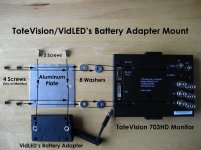
I attached the Panasonic battery adapter by taking a medium gage piece of aluminum, cutting it to size, drilling 4 holes to match the VESA holes already on the back of the monitor, then drilling two more holes that line up with the threaded holes on the adapter. I bought 2 screws with as small heads as possible to attach the adapter to the plate, then I used 2 washers for each VESA hole and the screws that come with the monitor to attach it to monitor. The pictures should help a bit.
Ok, so Nice Things about the monitor:
- The picture is great. You can easily make out any specks of dirt on the ground glass and can tell when you’re out of focus. We compared the totevision image to the final footage displayed on a calibrated monitor and they looked practically identical. Maybe a smidge off with some color, but I didn’t toy with that much.
- Viewable Angle was very good, everyone on set would sit back and watch it on the monitor. (small 4 person crew)
- The new models come with mounting holes on the top and the bottom, so you can rig it upside down easily (yay no drilling). They don’t come with extra mounting plates though (these attach to the monitor to allow the swivel mount to connect). I was able to just ask for a second one, and if you contacted them, you may be able to do the same.
- The Panasonic battery adapter on the back works great. There are less messy cables to have it on the back, and it feels very secure with the VESA plate. I obviously also like being able to use the same batteries as my camera. One dvxuser battery lasted a good part of the day, maybe 8 hours give or take?
Nitpicking the monitor:
- As stated by other users, the Component In/Out are directly connected to the circuit board. That gives the fear that if they break the monitor will be useless. I used L-Shaped BNC adapters to relieve some of the pressure.
- There is no underscan or blue gun in the HD mode. It’s also annoying how certain buttons do nothing in the HD mode, they toy with you, making you think you can have underscan… but no.
- The buttons are kinda wussy, they easily get mushed in when stored. Though none have broken so I guess that’s ok.
- They put holes all over the top & bottom of the metal case, I assume for cooling. However in Seattle that seems like an invitation for water to leak in and get on the circuit board.
- The black mounting plates I got (attach monitor to swivel) were powder coated poorly so that when trying to screw them in it was tough. My mount even got stuck. Totevision is aware of this problem though and the next batch will be fixed.
Overall I’ve got to say that I love this monitor, it makes shooting in HD so much easier and more fun when you can actually view it on the day on something besides that HVX LCD. My buddy was constantly saying how cool the shots looked and how he needs to buy an HVX/Totevision now as well. I’ve got to say going with a Panasonic battery mount was a great decision too, I’m so glad I don’t have to carry and worry about charging multiple battery types.
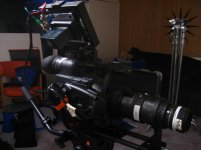
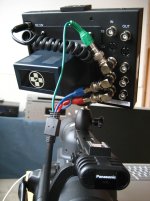
Anyway, here are some pictures. I spray painted the aluminum plate black, both to prevent any weird reflections and to look more professional.
Feel free to post questions or comments. Hope this was helpful and not just excessive spam
Btw, early on I discovered that I was only ten minutes away from the Totevision headquarters in Seattle, this gave me a great advantage as I was able to demo the monitor before I bought it. The people there have been tremendously helpful to me and are aware of dvxuser and our needs. It’s always nice to know you’re dealing with good people.
So without further ado, my primary requirements for a monitor were that it:
1) Allow me to accurately focus when shooting HD footage with the adapter
2) Make it easier for me to view the exposure of an image
Added desires were that it:
1) Run off Panasonic Batteries
2) Not be cumbersome to use
3) Look professional when mounted to my camera
4) Not break the bank
Here’s what I bought, the stores and prices:
- Totevision LCD-703HD Monitor Spytown $565 (free shipping)
- Panasonic Threaded Battery Adapter Vidleds $63.50
- Heavy Duty Swivel Mount (w/thread not shoe mount) Vidleds $30
- BNC Connectors (to allow for all cable combinations) TriangleCables $27.99
- Hardware for building Panasonic Battery Mount Home Depot $4.24
Total Spent was: $690.73
I had issues with Spytown where I called a week after ordering to find that they never placed the order with Totevision (it ships direct). They said they would place it immediately, but no shipping info a few days later, so I just called Totevision and drove over to pick it up.
Had a similar problem with VidLeds where they didn’t ship until I emailed them a week after placing the order (the day they said it would arrive). Fortunately it still made it for the shoot I had.
I attached the Panasonic battery adapter by taking a medium gage piece of aluminum, cutting it to size, drilling 4 holes to match the VESA holes already on the back of the monitor, then drilling two more holes that line up with the threaded holes on the adapter. I bought 2 screws with as small heads as possible to attach the adapter to the plate, then I used 2 washers for each VESA hole and the screws that come with the monitor to attach it to monitor. The pictures should help a bit.
Ok, so Nice Things about the monitor:
- The picture is great. You can easily make out any specks of dirt on the ground glass and can tell when you’re out of focus. We compared the totevision image to the final footage displayed on a calibrated monitor and they looked practically identical. Maybe a smidge off with some color, but I didn’t toy with that much.
- Viewable Angle was very good, everyone on set would sit back and watch it on the monitor. (small 4 person crew)
- The new models come with mounting holes on the top and the bottom, so you can rig it upside down easily (yay no drilling). They don’t come with extra mounting plates though (these attach to the monitor to allow the swivel mount to connect). I was able to just ask for a second one, and if you contacted them, you may be able to do the same.
- The Panasonic battery adapter on the back works great. There are less messy cables to have it on the back, and it feels very secure with the VESA plate. I obviously also like being able to use the same batteries as my camera. One dvxuser battery lasted a good part of the day, maybe 8 hours give or take?
Nitpicking the monitor:
- As stated by other users, the Component In/Out are directly connected to the circuit board. That gives the fear that if they break the monitor will be useless. I used L-Shaped BNC adapters to relieve some of the pressure.
- There is no underscan or blue gun in the HD mode. It’s also annoying how certain buttons do nothing in the HD mode, they toy with you, making you think you can have underscan… but no.
- The buttons are kinda wussy, they easily get mushed in when stored. Though none have broken so I guess that’s ok.
- They put holes all over the top & bottom of the metal case, I assume for cooling. However in Seattle that seems like an invitation for water to leak in and get on the circuit board.
- The black mounting plates I got (attach monitor to swivel) were powder coated poorly so that when trying to screw them in it was tough. My mount even got stuck. Totevision is aware of this problem though and the next batch will be fixed.
Overall I’ve got to say that I love this monitor, it makes shooting in HD so much easier and more fun when you can actually view it on the day on something besides that HVX LCD. My buddy was constantly saying how cool the shots looked and how he needs to buy an HVX/Totevision now as well. I’ve got to say going with a Panasonic battery mount was a great decision too, I’m so glad I don’t have to carry and worry about charging multiple battery types.
Anyway, here are some pictures. I spray painted the aluminum plate black, both to prevent any weird reflections and to look more professional.
Feel free to post questions or comments. Hope this was helpful and not just excessive spam