Music syncing problem

lalugela

Active member
Howdy,
So we shot a fun lip-syncing video on a GoPro, and I'm trying to sync it up to the actual track with no luck. What do I need to do?!

I know that the GoPro shoots 30 fps with 48 khz, and I actually recrunched it so that the sound was 44.1 to match the high quality .aif of the song.... Any idears?

Thank you mucho,
Max

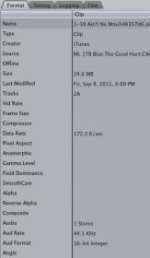
Attaching two screenshots of the Item Properties, the first for the GoPro video and the second for the .aif!
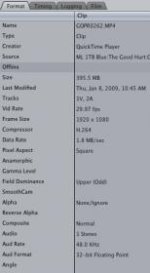
Screen shot 2011-09-26 at 2.20.42 AM.jpgScreen shot 2011-09-26 at 2.21.13 AM.jpg
 
We were using an iPod which I imagine was 44.1? The lag is immediately noticeable. I sync the beginning and it slowly drifts. By the end of the song the video lags the track by about a second I would guess. I don't think I have a different version of the song, but do you think it has something to do with it being an mp3 vs. an aiff?
 
If it was an mp3, there is your issue right there. Now, you may have an "out" here. Maybe.

Have you tried converting the original mp3 directly to a 48k wav/aiff? Then try to stretch the file (preserve tone) to fit. If with your set-up you cannot do this, find someone with ProTools/DP/Sonar. Give them the video audio, and the mp3, and tell them to convert the mp3 to 48 and match it in length to the video file while preserving tonality. On your images, I see a major drift issue. 44.1 vs. 48k

Normally, I would first match up the waveforms to get me close, then finish it by listening. You probably wont need to listen to the whole thing over and over again. Just the beginning, middle and end.

If you cannot do that, there is one other "cheat" you can do. But again it needs a DAW to do it right. Import as said before, but before converting it, cut it up into small pieces, then convert each piece to 48K. That may also help minimize your drift. You will need to to just nudge the pieces to fit/sync.

As said before, 48k is the normal sample rate for sound in video.
 
Last edited:
Back
Top