MTS file wont copy from SD card

Essami

Well-known member
Hi,

I have a strange issue with copying one particular 00012.MTS file from an SD card. I've tried both my computer (Dell laptop, Win Vista) card reader and straight from the FS700 via USB connection. Both fail with an error. It's only this one file. I have mroe then 100 MTS files on the SD card and they all copy fine to my computer with no problem.

The card is a SanDisk SDXC I 64GB card and Ive used with no problems before this a few times. But still seems like it's a card problem. The clip plays back well in the computer from the card and in the camera as well.
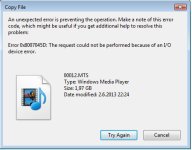
probSD.jpg

Any suggestions?
 
Last edited:
Wow! Trying to install the content browser but it's asking for a serial no? You gotta buy this so you can TRY to save your footage....??? Any free suggestions?
 
Tried Content Management Utility and that failed as well. Everything fails between 9-15% so the file must be corrupted or there's a bad sector on the SD card. Really weird... I've never lost a file before and it's frustrating as you can watch it no prob but moving it is a no go.
 
If the file is important for you and it plays well in camera ... u could output it via hmdi or sdi to an external recorder or pc/mac with video input and just capture it.
 
If the file is important for you and it plays well in camera ... u could output it via hmdi or sdi to an external recorder or pc/mac with video input and just capture it.

Yes its an interview so I will need to do that I think... I think thats what I need to do indeed. Just a bit of a hassle since I dont have that equipment at hand. But will have to do that...
 
Thanks for the tip Stuart! Lucky I saved the boxes that came with the SD cards, found a serial number there and downloaded the program! Will try it out!
 
Can't believe this... The SanDisk RescuePro Deluxe is stuck at 10%... Something really wrong with the card.
 
I just realised that the clip in question is a spanned file. Meaning it's a part of a long interview clip that's spanned into 2 files (I think). Could this have anything to do with the problem I'm having?

How do you join spanned clips?
 
I just realised that the clip in question is a spanned file. Meaning it's a part of a long interview clip that's spanned into 2 files (I think). Could this have anything to do with the problem I'm having?

How do you join spanned clips?

On a Mac I use Clipwrap, I dont know if it works on a PC but I am sure there is a PC equivalent.

Or use the Sony SW that came with the 700. You can download the latest version from Sony's support pages.

Also FCPX can import directly from the import screen, joining spanned files directly. CS6 Premiere may also do this on a PC.
 
Wow! Trying to install the content browser but it's asking for a serial no? You gotta buy this so you can TRY to save your footage....??? Any free suggestions?

Note

A serial number is required to install this application. Please use the one provided in your camcorder/deck product package. If you have a previous serial number from XDCAM Advanced Pack or NXCAM Activation Pack, that can also be used for the installation.
If you do not have a serial number (for example if you are currently using Content Browser v1.x or XDCAM Browser together with Sony equipment), we are offering one FREE serial number per customer for a limited time. Click here for more details.

It will take you here where Sony will send you a free serial number. I hope this help

https://www.sonycreativesoftware.com/campaign/contentbrowser
 
Big thanks Daomay for the link! Happy to have the content browser although it too gives an error when trying to export the clip. SanDisk prorescue finally managed to save the faulty clip! I did loose some 30 seconds of it but other then that it looks like I've got most of the clip back. Thank you very much Stuart!

Im a bit hesitant to use the SD card again. Is this type of fault covered under warranty of the card?
 
Back
Top