Running Movie Studio 12 64 bit. I uninstalled my older VMS10 and am now getting the stopped working message at the splash screen. If I wait a bit Movie Studio 12 build 896 64 bit it starts and works perfectly as long as I don't close the error message screen. Crazy !!!
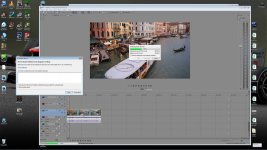
Here's the error message -
Extra Information
File: C:\Users\Carney\AppData\Local\Sony\Movie Studio Platinum\12.0\gpu_video_x64.log
File: C:\Users\Carney\AppData\Local\Sony\Movie Studio Platinum\12.0\dx_video_grovel_x64.log
File: C:\Users\Carney\AppData\Local\Sony\Movie Studio Platinum\12.0\svfx_video_grovel_x64.log
File: C:\Users\Carney\AppData\Local\Sony\Movie Studio Platinum\12.0\dx_grovel_x64.log
Problem Description
Application Name: Movie Studio Platinum
Application Version: Version 12.0 (Build 896) 64-bit
Problem: Unmanaged Exception (0xc0000005)
Fault Module: C:\Program Files\Sony\Movie Studio Platinum 12.0\x86\FileIOSurrogate.exe
Fault Address: 0x0000000054EECCE9
Fault Offset: 0x0000000054EECCE9
Fault Process Details
Process Path: C:\Program Files\Sony\Movie Studio Platinum 12.0\x86\FileIOSurrogate.exe
Process Version: Version 12.0 (Build 896)
Process Description: File I/O surrogate (not visible)
Process Image Date: 2013-03-25 (Mon Mar 25) 22:22:44
Any suggesions on how to fix this thing.
Cheers,
Pete
Here's the error message -
Extra Information
File: C:\Users\Carney\AppData\Local\Sony\Movie Studio Platinum\12.0\gpu_video_x64.log
File: C:\Users\Carney\AppData\Local\Sony\Movie Studio Platinum\12.0\dx_video_grovel_x64.log
File: C:\Users\Carney\AppData\Local\Sony\Movie Studio Platinum\12.0\svfx_video_grovel_x64.log
File: C:\Users\Carney\AppData\Local\Sony\Movie Studio Platinum\12.0\dx_grovel_x64.log
Problem Description
Application Name: Movie Studio Platinum
Application Version: Version 12.0 (Build 896) 64-bit
Problem: Unmanaged Exception (0xc0000005)
Fault Module: C:\Program Files\Sony\Movie Studio Platinum 12.0\x86\FileIOSurrogate.exe
Fault Address: 0x0000000054EECCE9
Fault Offset: 0x0000000054EECCE9
Fault Process Details
Process Path: C:\Program Files\Sony\Movie Studio Platinum 12.0\x86\FileIOSurrogate.exe
Process Version: Version 12.0 (Build 896)
Process Description: File I/O surrogate (not visible)
Process Image Date: 2013-03-25 (Mon Mar 25) 22:22:44
Any suggesions on how to fix this thing.
Cheers,
Pete