mono for dialogue... HELP

HenryDee

Active member
...So I've been following along on some topics about recording dialogue......and I was testing out some mics today and I have just a couple questions.

So I had one mic in the first XLR input of my DVX and only Input 1 was selected on channel 1. I had sound coming out the left side of my earphone and when i downloaded the audio to my comp i had it coming through my right speaker.

2. I had my mic in the 2 XLR input and both input 2's selected on channels 1and2.....and so i have full stereo on both my headphones and my computer speakers.

Should I be recording mono most definitely for dialogue and use another less sensitive mic to record background sounds on the second xlr input ?

thank you ...really appreciate any help....or if this is a question that has come up before and i haven't found it in any of my searches please link me if u have the link.

Thanks Henry.
 
Just a point of clarification: when you have the same mic signal recording to both Ch1 and Ch2, you're still recording mono. In that situation, you should lower the Ch2 level, which will give you a lower-level "safety" version of your mono dialogue in case of incidental overloads of the Ch1 audio. In post-production, you can simply take whichever channel was a cleaner recording, discard the unused channel, and pan the mono dialogue to the center.

If you recorded dialogue onto one channel only, you can still take the mono track and pan it to the center.

As for using a less sensitive mic for background sounds, its probably not a good idea. You'll have enough trouble keeping your noise floor under control with only one mic open. Instead, use that second channel for a second boom or a wireless system. Background ambient sound effects can be more easily added and manipulated in post-production, where the overall soundscape can be sculpted with additional mono, stereo and even surround tracks.
 
Henry,

I don't mean to be asking a silly question, but when you had the left/right problems when recording one track, are you sure you had your headphones on "correctly"?

Another possibility is that regardless of what track you recorded your single track on, your editing software may default to right. What are you using?

Phil
 
HenryDee;1222089... So I had one mic in the first XLR input of my DVX and only Input 1 was selected on channel 1. I had sound coming out the left side of my earphone and when i downloaded the audio to my comp i had it coming through my right speaker. ...[/quote said:
Computer speakers transposed to wrong sides of monitor
Soundcard or interface to speaker connections reversed
Mixup in connections on multichannel interface
NLE's software channel routing mixed up.
 
Hey guys thanks for all the help.....and again sorry if this has been asked many times I just thought I'd look for some help. Audio is really new to me and I'm really enjoying learning about it.

Smuir - thanks for pointing that out... so with what you said Im guessing that most films usually record dialogue in mono all the time...Il try using two booms then one pointed at my actors and one just as sensitive for recording background noise.

ptalsky- thanks for asking me if i had them on correctly cuz that happened a few times when i was recording stuff.. so i went back after reading ur post and checked . I did have my left and right sides on correctly so im not sure what im doing wrong.
and I downloaded to imovie (dontlaugh lol) I have final cut studio 2 so ill download to soundtrack and see if it changes...unless what steve said above changes that.

Steve House - thanks steve ... so that would explain why i here things through my left earphone and when i download it, I here it through my right speaker. unless im using channel 2's in which case i here stereo.

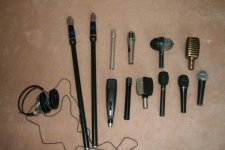
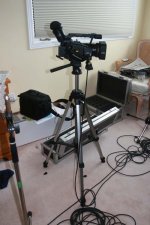
the battle goes on lol....heres some pics of the mic's im using and my dvx just for fun. thanks guys appreciate it.
 

Attachments

  • IMG_2545.JPG
    IMG_2545.JPG
    72.1 KB · Views: 0
  • IMG_2546.JPG
    IMG_2546.JPG
    85.5 KB · Views: 0
...Il try using two booms then one pointed at my actors and one just as sensitive for recording background noise.
There's usually no shortage of background noise on a production track. The typical application for a dual boom setup is to record two or more actors at once, or to allow uninterupted coverage as a steadicam follows the actor through a low doorway.

You can layer on background noise after the fact in post-production easily enough, while ADR can be a costly undertaking. For that reason dialogue is the primary concern for production sound. Production foley can also be an important consideration, and that might be what you're calling "background noise." To me, "background noise" brings to mind fridges and air conditioners that weren't unplugged, as well as passing aircraft and flatulent crew.
 
Back
Top