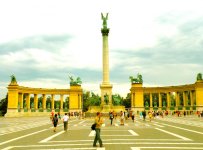
Midnight in Paris - Woody's sepia movie

robbie75vr

Active member
I love it, strong sepia and well saturated.
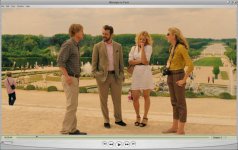
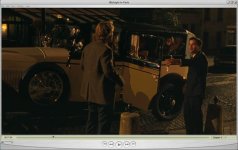
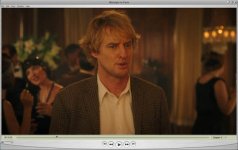
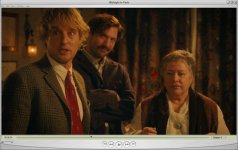
I'm trying to emulate that fantastic color style in FCPX and Premiere 5.5 with not great succes, any suggestion about how to do it ?

Thanks
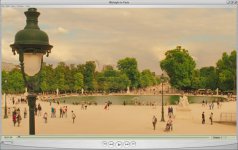
 
I love it, strong sepia and well saturated.
I'm trying to emulate that fantastic color style in FCPX and Premiere 5.5 with not great succes, any suggestion about how to do it ?

Thanks
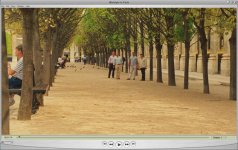
I've not seen the movie. But from the trailers. It's not sepia but warmed color. Post a frame of what you have and perhaps that will clarify what you want.
 
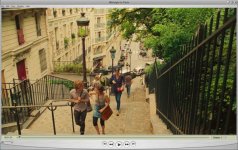
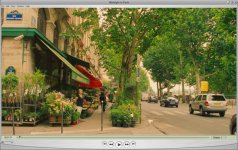
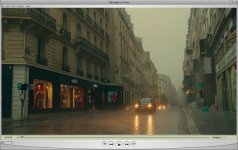
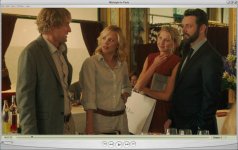
Thanks , this is it:
 

Attachments

  • 1.jpg
    1.jpg
    60.5 KB · Views: 0
  • 2.jpg
    2.jpg
    73.8 KB · Views: 0
  • 3.jpg
    3.jpg
    85.3 KB · Views: 0
  • 4.jpg
    4.jpg
    91.7 KB · Views: 0
  • 5.jpg
    5.jpg
    61.1 KB · Views: 0
  • 6.jpg
    6.jpg
    58.5 KB · Views: 0
  • 7.jpg
    7.jpg
    63.6 KB · Views: 0
  • 8.jpg
    8.jpg
    57.5 KB · Views: 0
  • 9.jpg
    9.jpg
    53.1 KB · Views: 0
  • 10.jpg
    10.jpg
    60.7 KB · Views: 0
What material was the material you use shot on?
Secondly, I highly recommend you get Magic Bullet Looks, or at least a color corrector that allows curves. A slight S-curve would greatly enhance contrast and give a more natural saturation (there's a great preset in "Looks" called "Film Curve" in the post section).
 
My material is very similar, different town, same photography style (well limited to my skills obviously not like the master Woody..)

I use magic bullet looks but I don't have the same effect, the film curve makes just the opposite, this movie is very low contrast, so far I applied a sepia tone, oversaturated a bit, excluded cyan and blu from strong sepia correction, brightened middle/dark tones and lower the highlight brightness (the opposite of film curve)..

I'm trying to do it in DaVinci Resolve but it's not convincing yet..

I read in the end rolling titles of the movie that they made chemical toning of the film.. so I think that's the main difference..
 
My material is very similar, different town, same photography style (well limited to my skills obviously not like the master Woody..)

I use magic bullet looks but I don't have the same effect, the film curve makes just the opposite, this movie is very low contrast, so far I applied a sepia tone, oversaturated a bit, excluded cyan and blu from strong sepia correction, brightened middle/dark tones and lower the highlight brightness (the opposite of film curve)..

I'm trying to do it in DaVinci Resolve but it's not convincing yet..

I read in the end rolling titles of the movie that they made chemical toning of the film.. so I think that's the main difference..

A couple of things. Woody wasn't the cinematographer on the movie... The cinematography credit is shared with Darius Khondji and Johanne Debas for the second unit. In any case, the 'warm/yellow' cast seems to be a popular attribute of Khondjis filming, which such examples as "Delicatessen"(1991) and "The City of Lost Children"(1995, shared with others).

"Delicatessen"

large_delicatessen_blu-ray_5.jpg


"The City of Lost Children"

600full-the-city-of-lost-children-screenshot.jpg


As for 'sepia'... while other may have various definitions of the actual 'color', in most cases I've only seen it referred to a monochrome color in the yellow-brown, brown, or red-brown zone.

I would not class these examples as 'sepia'.

Here's a quick example I did in Photoshop, with simple 'brown/red' layer, set to screen mode, adjusted to 65%, and then curves adjusted to give more constast.

attachment.php


Premiere Screen Shot with layer and curves adjustments.

attachment.php
 
Last edited:
I'm not a professional photographer, and my only editing tool is iPhoto. But based on what I've read about the cinematography in "Midnight" and from having viewed it three times in the last three days, here's my formula: increase brightness (or, in the case of iPhoto, exposure), decrease contrast, increase saturation, and warm the temperature. Here's the result applied to a photo I took in Budapest on a very cloudy day.
DSCN0888.jpg
 
Back
Top