Merged clips audio now out of sync. No explanation WTH? Never saw this before.

msp1518

Member
This is bonkers. So I spent two days syncing up my sound to find that it's all out of whack. I have the ProRes video (from an FS700,) with camera audio. I have the externally recorded audio, which is multiple tracks.

I place them all in the timeline, sync up the audio perfectly by hand. I verify it's perfectly synced (this isn't rocket science).

Then I MERGE CLIPS. That merged clip appears in my Project Bin. Very cool.

But... This afternoon I started going through the takes (finally) and found they are ALL out of sync. WTH!!!???

Naturally I am at a complete loss. Two ten hour days wasted. This has never happened to me before in 5+ years of editing. What gives? Any ideas?

I have Adobe CC 2015 on a PC. I used to have CS5 so this is my first project on the newer software.

Look at how off those tracks are now.
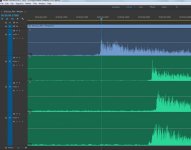
Sound_not_synced.jpg
 
That sucks. Two wasted work days is a lot... I would recommend you get Pluraleyes. I generally don't merge clips either because you may have trouble down the line sending to mix...
 
That sucks. Two wasted work days is a lot... I would recommend you get Pluraleyes. I generally don't merge clips either because you may have trouble down the line sending to mix...
I have PluralEyes. But it won't give me the audio correctly. Maybe I am doing something wrong but when I open the PE XML in Premiere all of the audio looks to have been downmixed to stereo (I googled this and found other people asking what gives).

There should be four audio tracks. But I have a simple stereo track. See all those empty tracks????????

What am I missing?

PluralEyes_StereoOnly.jpg
 
Why not use PPro's Muticam tool which has a built-in sync-by-waveform feature?

I've also heard of problems matching back if you merge clips in PPro (maybe this was fixed in CC15)?


-Andrew
 
Why not use PPro's Muticam tool which has a built-in sync-by-waveform feature?

I've also heard of problems matching back if you merge clips in PPro (maybe this was fixed in CC15)?

-Andrew
I haven't quite figured it out yet. The tutorials all deal with many cameras and one sound track. But I have ONE camera angle and audio with 3 different tracks. So I get lost trying to do the process. I cannot find one single solitary tutorial or guide that addresses my issues. They all deal with multiple camera angles and a simple single stereo or mono track.

Should someone know of a tutorial that will help me PLEASE share it.
 
I haven't quite figured it out yet. The tutorials all deal with many cameras and one sound track. But I have ONE camera angle and audio with 3 different tracks. So I get lost trying to do the process. I cannot find one single solitary tutorial or guide that addresses my issues. They all deal with multiple camera angles and a simple single stereo or mono track.

Should someone know of a tutorial that will help me PLEASE share it.


I don't know of any tutorials off hand but it basically goes like this:

1. select all the clips you need (audio and video)

2. Right click and select Create Multi-cam Source Sequence

3. select your settings (here is what I usually use)
- Sync Point: Audio
-Track channel: mixdown
-Seq preset: Pick the right frame size and frame rate
-Offset audio: 0
-Move source clips to processed Clips bin: no (though sometimes I choose 'yes' if I'm trying to find a clip that won't sync for some reason)
-Audio - Seq Settings: all cameras
-Audio - Audio channels: Mono

4. hit Okay.

5. Open the new multicam sequence (multicam in PPro is just a nested sequence), get all the audio on same tracks (if need be) and check the sync. A great thing about the multicam in PPro is since it is a nested sequence you can open it up and modify it at anytime and those changes will ripple through every edit you've already done.


-Andrew
 
I don't know of any tutorials off hand but it basically goes like this:

1. select all the clips you need (audio and video)

2. Right click and select Create Multi-cam Source Sequence

3. select your settings (here is what I usually use)
- Sync Point: Audio
-Track channel: mixdown
-Seq preset: Pick the right frame size and frame rate
-Offset audio: 0
-Move source clips to processed Clips bin: no (though sometimes I choose 'yes' if I'm trying to find a clip that won't sync for some reason)
-Audio - Seq Settings: all cameras
-Audio - Audio channels: Mono

4. hit Okay.

5. Open the new multicam sequence (multicam in PPro is just a nested sequence), get all the audio on same tracks (if need be) and check the sync. A great thing about the multicam in PPro is since it is a nested sequence you can open it up and modify it at anytime and those changes will ripple through every edit you've already done.

-Andrew

I'll give this a try as soon as I can find the time, thank you. What is the meaning of mixdown? I want to keep each and every channel as is.
 
I'll give this a try as soon as I can find the time, thank you. What is the meaning of mixdown? I want to keep each and every channel as is.


That option just tells PPro to look at all the available audio tracks when trying to sync up the footage. Further down under the "Audio" section ("seq settings" and "audio channels") is where you tell PPro how you want your audio laid out in the new multicam clip.

I will add that I'm in CC2014 so things might be a little different CC2015 (I haven't used 15 yet).

-Andrew
 
Oh boy... I just tried to do this and the Multicam stuff is grayed out. I cannot click on it. I spent a few hours trying to figure out why and am lost. I really am tearing my hair out here.
 
Back
Top