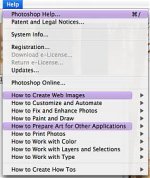
F FilmBoy77 Veteran Feb 8, 2008 #1 for whatever reason certain options in my menu options are highlighted. under every drop down there are certain options highlighted in purple. is there a way to turn this off? Attachments Picture 1.jpg 18.5 KB · Views: 0
for whatever reason certain options in my menu options are highlighted. under every drop down there are certain options highlighted in purple. is there a way to turn this off?
nordicspy New member Feb 12, 2008 #2 You are using a task-specific workspace instead of the default Photoshop setup. You can reset Photoshop to the default workspace by selecting Window>>Workspace>>Default Workspace.
You are using a task-specific workspace instead of the default Photoshop setup. You can reset Photoshop to the default workspace by selecting Window>>Workspace>>Default Workspace.