Media off line, What the....?

David G. Smith

Steak Knife Member
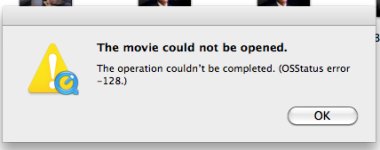
I a editing in FCP 7 and am working on a project. I saved the project and when I re-opened it a bunch of my footage has gone off line. I am getting this error message when I try to reconnect to the media:
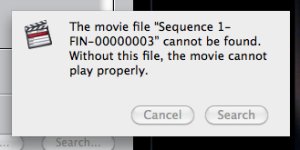
FCP 7 error message.jpg

The files are being saved to an external ESATA Drive. What is the file that the error message is referencing, and why should it not be found? Any help will be appreciated. Thanks.
 
I believe that's a render file it's referencing. Make sure you didn't delete your renders somehow, then you might consider trashing your preferences.
 
Ok. A little more info. I had some clips that had multiple layers (Titles mostly) and I put these clips into new sequences, rendered all the elements and exported the clips out as QT movies to my scratch disk. Some of these QT will not open now. I am getting this error message when I try to open them in QT7.

FCP error message 2.jpg

Anyone know what that is about?
 
As I suspected from your first post...

When you rendered out the sequences you probably did not check the "make self-contained" option. This creates a Quicktime reference movie that pulls from the original assets you dropped into the timeline. When one of those assets gets moved or gets deleted, the Quicktime reference movies no longer play. Reference movies are great for saving space, but things can get messed up pretty quick if you don't remember to not touch the original files. Reference movies also wreak havoc when used in Compressor. Pretty sure this is your issue, restore the original files and you might be able to fix the issue.
 
Alright... I think I got it... the big question is why did those files get deleted? The only thing I did was hit "Save all" and close FCP... I did not shut down any drives or any other programs. Hmmmm.

I am now having a very baffling problem. Ok, so I put scrolling title elements in a separate sequence, rendered them, then exported as QT to the scratch disk using the "Use current settings" option.

Now, i went back into the scrolling title sequence copied one of the tracks (Just a pic element) paste inserted it into the main cutting sequence... and the %$&%ing titles appear over the element when I play the main sequence back! They don't appear when I play the copied element in the canvas.... Ahhhhh, this is driving me crazy! And to beat it all, this is on a EXPLETIVE DELETED Spec piece! Ahhhhh!
 
Back
Top