Measuring GAIN vs ISO and Dynamic Range - XF100

drapeama

Well-known member
I've just started using a Light Meter, so I'm deep in the learning process. I'm getting comfortable at getting a good exposure based on the reading, for photography so far. I have a Sekonic L-508 that I bought used. Got it tested and it's accurate. I also have a set of White/Grey/Black cards as well as a Passeport ColorChecker.
I'm playing around whit these with my Canon T2i and my XF100.
I've checked this video from this guy, which helped me quite a lot (at 7m33s):


I'm a little lost in all this new world. What I would like to do, would be to measure the dynamic range of my cameras, to know how much stops I have available when shooting video, then do the math from there to save the highlights and light the shadows to the desired exposure from the readings.
That and as my XF100 is based in GAIN (dB) and not ISO, I'd like to measure what dB values equals in ISO values, to make things easier as well.

I know I'm starting pretty much from scratch, but I'd like to learn where to start, what to do and how to do it because so far I don't think I'm doing all right! If there's anyone here willing to help, that would be great!
 
Last edited:
Without a proper dynamic range chart and a waveform monitor, the task is going to be infinitely more difficult than it could be. But as a learning exercise that might be fine.

The relationship between ISO and GAIN in regards to exposure is simple: 6dB of gain = 1 stop of exposure. If your camera is natively 500 ISO, and you set the camera to 6dB of gain, that's changing its sensitivity to 1000 ISO. When you double (or halve) ISO, you are changing the sensitivity by one stop of exposure. When you add or subtract 6dB of gain, you're changing exposure by one stop. 3dB = 1/2 stop of exposure change, 1dB = 1/6 stop of exposure change.

Calculating the dynamic range of the camera is easiest done by googling "what's the dynamic range of an XF100" and seeing if anyone credible has done a test. If they haven't, then you need a grayscale chart that you can extend the range of. I use DSC charts and I have the XYLA 18-stop backlit chart, it's ideal for the purpose, but also highly expensive. You can sort of get the job done by using a typical gray bars chart and a lightmeter and a hard light with barn doors; light the chart so that the top half of the bars are fully lit, and the barn doors cut the light from reaching the bottom half; that will give you a much wider dynamic range than a plainly-lit simple reflective chart would show. Then use the 508's spotmeter to determine exposure values for each half-bar. Expose the image so that the whitest bars blur together and the darkest bars blur together, then figure out which bars the camera was able to accurately expose and which ones were all black or all white and therefore outside the camera's dynamic range resolving capability. Then figure out using the spotmeter what the exposure difference is between the brightest-resolved bar and the darkest-resolved bar.
 
Without a proper dynamic range chart and a waveform monitor, the task is going to be infinitely more difficult than it could be. But as a learning exercise that might be fine.
I'll have to get one of these exposure chart then. I thought it could be possible using the Passeport ColorChecker, as there's 6 different cases, from white to black.
As for the WaveForm monitor, there's one built-in the XF100 and I find it very useful to use. I don't know if it can be as good as a proper WaveForm monitor?

The relationship between ISO and GAIN in regards to exposure is simple: 6dB of gain = 1 stop of exposure. If your camera is natively 500 ISO, and you set the camera to 6dB of gain...
Thanks! That's pretty much what I had from the reading off the grey card:
-6dB = ISO100
0dB = ISO200
6dB = ISO400
12dB = ISO800
18dB = ISO1600
24dB = ISO3200
Over 12dB it was pretty much unusable, but from a 1/3" sensor I can understand.

Then, how can one determine the "native" ISO of a camera? Is it determined by the manufacturer or can be calculated?


You can sort of get the job done by using a typical gray bars chart and a lightmeter and a hard light with barn doors; light the chart so that the top half of the bars are fully lit, and the barn doors cut the light from reaching the bottom half; that will give you a much wider dynamic range than a plainly-lit simple reflective chart would show. Then use the 508's spotmeter to determine exposure values for each half-bar. Expose the image so that the whitest bars blur together and the darkest bars blur together, then figure out which bars the camera was able to accurately expose and which ones were all black or all white and therefore outside the camera's dynamic range resolving capability. Then figure out using the spotmeter what the exposure difference is between the brightest-resolved bar and the darkest-resolved bar.

If I understand it right, let's say using the three color cards (black, grey and white), I could do something similar, and use the spotmeter to read the EV difference between the three?
Changing the settings in the camera by 1stops and reading off the WaveForm monitor, I could get an idea what the camera is able to see? From there, I should be able to calculate the range, if I understand it right?
 
I don't know if it can be as good as a proper WaveForm monitor?
I would be surprised if it wasn't useful; I'm sure the implementation is fine. That's what I'd use, as it's very simple to see when a chip is overexposed and clipping, or when it's crushed to black and indistinguishable from the noise. A lot easier task if you have a waveform, so I'm sure the in-camera one would be fine for the purpose.


Then, how can one determine the "native" ISO of a camera? Is it determined by the manufacturer or can be calculated?
If you have an 18% gray card, just light it and expose it at the camera's auto-exposure setting. See what f-stop it determines is proper. Then take a reading off the card using your spotmeter, and adjust the ISO until you get the same f-stop.

Cameras frequently have imprecise or steppy irises; sometimes the camera will only report full stop or half-stop exposure values, so it can help to vary the light just a little until you see the iris readout on your camera change. If it says f/5.6, and you increase and increase the light ever so slightly, at some point that 5.6 will change -- maybe it'll say f/4, or maybe it'll say f/4.8, or maybe it'll say f/5.3, I don't know the XF100, but it doesn't really matter; what you want to do is get a "true" exposure of f/5.6, so once it changes the display to say that it's more open than f/5.6, then start darkening the light down little by little until the iris display changes to f/5.6. At that point, you probably have a true & proper exposure at f/5.6, and can then read it off with your lightmeter to see what ISO it reports.

If I understand it right, let's say using the three color cards (black, grey and white), I could do something similar, and use the spotmeter to read the EV difference between the three?
Changing the settings in the camera by 1stops and reading off the WaveForm monitor, I could get an idea what the camera is able to see? From there, I should be able to calculate the range, if I understand it right?

Maybe, although it would be much harder. The ideal chart would have a one-stop difference between each gray bar, with 10 or 12 bars on the chart (or 18, as in the case of the Xyla). Trying to do it with three would be vastly more difficult. But, if you're dedicated, technically you could do it with just one (an 18% gray card). Get in a pitch-black room, and point the camera at the gray card on a pure black background (black velvet would be best as it's non-reflective), and set the iris on, say, f/16. Then turn on the waveform, and use a light on a dimmer, and start adding just enough light so you can barely see it register on the waveform. The waveform should look like a flat line at the bottom, but as you increase the light incrementally, eventually you should see a line start to emerge from the noise floor and register on the waveform. When you see that happen, that's pretty much your bottom end of exposure. Take a reading on the card with f/16 using the meter, to determine the actual exposure value at that light level. Then pop the iris all the way open, and you should be able to get to f/2 or f/1.4 or whatever the XF100 opens up to, and the waveform should still be registering that line; every f/stop you open the iris, the line will move higher and higher. You're looking for the point where it no longer goes any higher -- when it "clips" off the top. If you get the iris all the way open and it's still not clipping, that's when you start bringing the light level up. When you hit a light level and iris combo at which point the waveform simply will not register any higher, where it's clipping off the top, that's when you know to stop. Bring the light back down until the line on the WFM just starts to move down, and then reverse to where you get it to the absolute maximum exposure. Then take a lightmeter reading at the camera's current f-stop and the light level, and figure out what the exposure value is.

At that point, you'll have an indication of absolute darkest and also absolute lightest exposure, so you should be able to calculate how many stops of total dynamic range the sensor is capturing.

To further complicate matters, though, this will give you a dynamic range capability only for that particular gamma curve, at that particular ISO. The higher you set the gain, the more likely it is that your total dynamic range will be less; cranking up the gain can frequently reduce dynamic range. Or, changing the gamma curve can significantly alter the amount of dynamic range that can be captured; on a DVX200 in "standard" gamma it delivers 10 stops, but in VLOG-L it delivers a full 12 stops. So, when you're determining the dynamic range, you're only really determining the dynamic range of that particular ISO/gain setting in that particular gamma curve. Change either, and you'll perhaps discover more or less dynamic range in each particular settings combination.
 
I would be surprised if it wasn't useful [..] so I'm sure the in-camera one would be fine for the purpose.
All right, I will put it to use. I was using it to avoid clipping on my recent shooting. Even if it seem underexposed, the codec is fine enough to be adjusted in post without introducing too much noise. I'd like to test how much "stops" underexposed can be adjusted as well.

If you have an 18% gray card, just light it and expose it at the camera's auto-exposure setting. See what f-stop it determines is proper. Then take a reading off the card using your spotmeter, and adjust the ISO until you get the same f-stop.
Excellent, I will try this. I suspect 0dB to be the base, which would translate into roughly ISO200. I'll double check that using your method.

But, if you're dedicated, technically you could do it with just one (an 18% gray card). Get in a pitch-black room, and point the camera at the gray card on a pure black background [..] When you hit a light level and iris combo at which point the waveform simply will not register any higher, where it's clipping off the top, that's when you know to stop. Bring the light back down until the line on the WFM just starts to move down, and then reverse to where you get it to the absolute maximum exposure. Then take a lightmeter reading at the camera's current f-stop and the light level, and figure out what the exposure value is.
I will try this. Any recommendation on the light power/watts to use, or it simply doesn't matter for consistency? Also, any "proper" way to light the card (at angle or pointing directly onto) if it affects it in any way?

At that point, you'll have an indication of absolute darkest and also absolute lightest exposure, so you should be able to calculate how many stops of total dynamic range the sensor is capturing.
Excellent, this really helps just from reading it! I'm sure I'll be able to test what I need from there.

So, when you're determining the dynamic range, you're only really determining the dynamic range of that particular ISO/gain setting in that particular gamma curve.
I will probably test my own CP profile, with another one and with no profiles applied, just to compare.
If I remember correctly, I read somewhere that the XFxx have a usable dynamic range of about 7EV. Not much, but maybe I'll see if my CP profile really helps in low-light, of just if it look like to.

Thanks again for all the information, that was perfect!
 
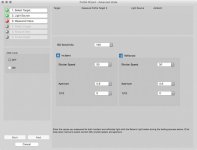
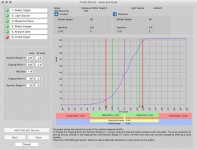
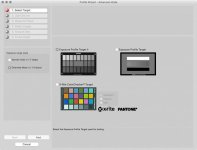
And also, I was wondering: in the video (for photo camera) he takes 3 pictures (-3stops/0stops/+3stops) and he loads them into the Sekonic DTS tool. From there, he is able to get a DR using the Passeport Checker.
If I record in video the same steps, and export a Jpeg/PNG photo for each exposition, and do the same process with the Sekonic DTS tool, I should get to the same result in a way?
MBP_Sekonic_DTS_Select_Meter_Screen.jpgMBP_Sekonic_DTS_Enter_Exposure_Settings.jpgMBP_Sekonic_DTS_Initial_Profile_Graph.jpg
I won't be able to put the data in the meter, but I'll know how much stops over and under I can go with the camera, at a certain ISO and with a certain Gamma curve.
Just wondering.
 
If you have an 18% gray card, just light it and expose it at the camera's auto-exposure setting. See what f-stop it determines is proper. Then take a reading off the card using your spotmeter, and adjust the ISO until you get the same f-stop.
So I tested it yesterday, and so far, the 0dB seems to be the "native" ISO as it's the one that sets automatically, and the aperture adjust in consequence.
From the reading, the 0dB translate into ISO200.

At that point, you'll have an indication of absolute darkest and also absolute lightest exposure, so you should be able to calculate how many stops of total dynamic range the sensor is capturing.
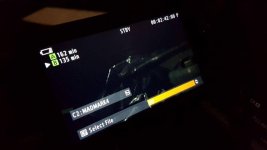
From what you wrote, I tested both the minimum and maximum lighting accordingly:

No CP Profile:
Minimum: F/16, 0dB, 1/60 and got 6.0EV
Maximum: F/1.8, 0dB, 1/60 and got 10.4EV
Dynamic range of 4.4?
14423883_10154628080467526_753024087_o.jpg

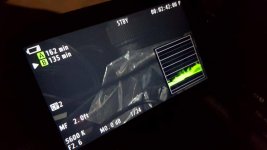
My CP Profile:
Minimum: F/16, 0dB, 1/60 and got 7.0EV
Maximum: F/1.8, 0dB, 1/60 and got 9.7EV
Dynamic range of 2.7?
14329139_10154628080532526_1537467099_o.jpg

So I feel like I'm not doing something right in the process, because my profile don't have deep blacks and shows more shadow details. There's like 1.7EV difference between both profiles.
Unless it's very limited in Dynamic Range?
 
There is a difference between exposure latitude, the usable +/-EV range for exposure shifts at a given ISO/gain setting, and dynamic range of the resulting image, which is how much usable value range exists in the image between white clip and noise floor or black clip. Usable DR is more a personal judgement based on how you process the image in post and how much noise you find acceptable. More detail in the shadows indicates more dynamic range in the captured video. But you will need to adjust contrast and black level in post to restore deep blacks to what you want to see. How much detail and noise you keep in the graded image is up to you.
 
Back
Top