Mask question

TR16MM

Active member
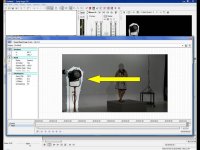
Does anyone know how to remove an object in a frame? Does Sony Vegas Pro have the same cut and paste ability like Photoshop? Please see my attached photo?

Sorry, but I meant this for Sony Vegas NOT AE. Can an ADMIN update this in Vegas for me?
 

Attachments
  • MASK QUESTION.jpg
    MASK QUESTION.jpg
    89.4 KB · Views: 0
Last edited:
Hi,

Yes and it depends.

If you were using a tripod and the lighting was even it is likely that can sample the the vertical pixles on the edge of the right side of the light and use Photoshop to make a layer to cover the light on a layer in Vegas.
sample1.jpg


The copy (Control C) then paste, (Control V) and use the transform tool to extend the image over the range of the offensive part of the video. It will be in a new layer (Layer 1).

Import only that layer as an Alpha channel in Vegas.

sample2.jpg


If you were not on a tripod, you would have to use key frames and it would be a bit more difficult.

Good luck.

Mike
 
I like to export a single frame and use Photoshop's clone and healing brush to rebuild that section. Then save as a .psd with a transparant background, import, make sure Vegas is interpreting the pixel aspect ratio properly, and go.

The only problem is there is no moving noise. So, match noise is usually needed.
 
Back
Top