MAGIX Vegas Pro 15 Released Today!

TheDingo

Veteran
MAGIX released Vegas Pro 15 today: MAGIX Vegas Pro 15

I downloaded the 30-day trial version to see what's changed, and here are the main things for me...

- Much faster playback of 4K content in the timeline
- Native support for LUTs ( you can also adjust the mix between the source image and the LUT transformed image )
- Native support for GH5 10-bit Files ( I've been waiting for this since March )
- The Picture-in-Picture FX control is very easy to use ( you can also visually drag to adjust it's location, size, etc... )
- The Crop FX control is also very easy to use

In the Suite version of Vegas they have added the Boris FX Sapphire Render Unit which normally costs $295 all by itself.
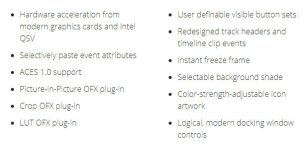
MVP15NewFeatures.jpg
 
Have to second the faster play back. UHD (Gx8/Gx85) now plays very smoothly on the timeline and renders 1 to 1.6 times length (depending on how many FX's you done) when rendering to a AVC internet friendly 1080P from 4k. This was on a I7700/4200, Rx480 8 gig, 32 gig ram, and to a 512 SSD (pretty stand home video setup I think).
 
Playback is considerably faster in general. If you lay on a load of FX, you won't see nearly as much of the commensurate lag as you used to.
 
One other thing worth checking out is the new MAGIX AVC/AAC MP4 CODEC, with some people reporting render times THREE times faster than the Sony CODEC.
 
Thanks for posting this info. I like the direction they're going with this software. Anybody have an opinion on how Vegas compares to Premier Pro when it comes to green screen work? My impresion is that Premier has the egde. Once I finish my current projects, I will likely upgrade from Vegas 13 to 15.
 
Vegas has a very good keyer, and it's better than Premiere's legacy keyer, but it's not as good Premiere with Keylight.
 
Just edited my first video on VP15, and so far I'm very impressed. I was using VP13 previously on my mid-spec PC (i5 6400, 24GB RAM, GTX970) and found it almost impossible to edit 4k from my Panasonic HC X1. Now, with VP15, it automatically builds proxies and makes editing a pleasurable experience. And rendering times seemed to have improved significantly. I rendered the 4k project to 1080 25fps, and with colour corrections and zoom/pans it took around 3 mins to render a 1 minute edit using the Magix AVC compression.
 
I've had the exact opposite experience as most of you. Those that have been around here a while will recall that I was a HUGE Vegas fanboy back in the day. I used Vegas from Version 4 through 9, then stopped upgrading, but kept using it for a few years. I cut three features, all in one timeline and 40 shorts in Vegas. All together, 9 years with Vegas before I switched to Premiere in 2012 with CS6. I used that for a while then switched to Avid for narrative work where I've been the past two or three years (I also use Resolve for quick YouTube videos and such). I was ecstatic when I heard version 15 was coming. I was excited for the new UI as well as the other feature and performance improvements. When the big day finally came and Vegas 15 dropped, I downloaded the trial as soon as I could. And that is where my excitement ended.

Full disclosure, yes, I have a lower end i7 laptop with only 8 gigs of RAM and and 840M GPU. BUT- Avid, Resolve and Vegas 13 (the last version I had installed for odd projects), they all run great. They start quick, there's no lag when I slap that spacebar, they just work. Starting Vegas 15, I could see this wouldn't be the case. I waited well over a minute for the software to load. When it finally opened, yes, I was instantly in love with the new UI. I quickly loaded some test clips from my T2i and Ursa Mini (all at just 1080) and started trying to edit them. Overall, I found the performance quite sluggish and was really disappointed to be honest.

Vegas used to be known for running well on lower end hardware, but I guess those days are gone. It's really sad to me when Resolve 14 (which is still in beta as I write this) out performs Vegas on my laptop when just a year ago it was the other way around.

I'm not saying the software is terrible, but definitely try before you buy. I'll be sticking with Avid and Resolve.
 
Last edited:
Back
Top