Looking for opinions

David Evans

Well-known member
Hi,

I'm rushing to finish my short to enter a national film festival and the deadline is next Sunday. I'm on the process of doing the last Color Correction tweaks and I was looking for different eyes to give me outside opinions as I'm probably starting to get a bit biased (too many hours doing this in the last days)...

I've posted a quick export with no sound. I'm looking for a cool look, with good skin tones separation and good balance.

https://vimeo.com/97677037


Thanks!
 
Anyone got the chance to watch it? I really wanted some feedback. Let me know if I posted this in the wrong section.

Cheers
 
I'm a total novice, so take this with a grain of salt. The skin looks a tad too orange to me. But it does stand out against the green-tinted background.
 
Yeah, I'm just an avid amateur, but I think it looks pretty realistic overall for the terrible overhead lighting in an office environment. I too find the skin tone a bit orange, but only on the guy with the vest. It looks like there is a tungsten light source behind him, but none of that seems to be reaching the other guy (who looks more pink). I think either skin tone would work, but I'm slightly distracted by so much difference between the two.
 
Thank you for your thoughts. Definitely agree with everything you said. The thing that was driving me crazy was the pinkish look on the actor to the right. The actor on the left was so easy to color correct, but I do agree I juiced the saturation too much. The actor on the right is proving to be a lot harder to CC and get it to the same skin tone as the other one. And yeah, overhead lighting is a pain in the neck...
 
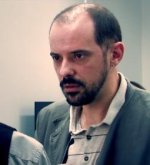
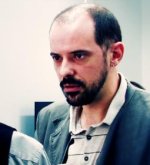
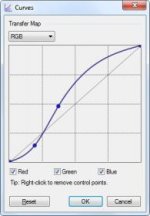
It's not bad. If it were me, the main thing I want to fix is the highlight roll-off. It's too sharp. The hot spot on the bald guy's head, for example, looks video-ish. I guess I would apply a more severe S-curve. The contrast in the mid tones, like the faces, is good though. You don't want to raise the contrast anymore of the mids when and if you fiddle with the highlights.

As for the color itself, I think you've gone a bit too much blue in the shadows. I like making the shadows cooler than the other parts, but not quite that much. Not bad.
 
good stuff Combatentropy! Thanks. The hotspot is something I want to get rid of. I'm not controlling contrast on a s-curve effect, I'm doing it on Colorista with the 3-wheel method. So I'll probably lower the wheel on the highlights and see what it gets me, right?
 
Sorry, I don't know Colorista. Here's how you do it in photo-editing programs and some video-editing ones.

orig.jpgcurved.jpgcurves.jpg

Of course it's too bright, because I worked from a screenshot of your already-graded video. With the original you can somehow raise the brightness of the areas surrounding the hot spot while better controlling the brightness of everything else. That top curve in the S-curve is what brings up the brightness of more areas, making the transition more gradual. You probably can't bring the brightness down, unless you shot raw or log, but then I really can't tell you how to do it.
 
Back
Top