
Hey everyone,
Ran across some trouble. Here's the situation:
Shot a short on super-16. Did telecine at Fotokem, where they delivered back on HDCAM and DVCAM (which I'm using for the edit).
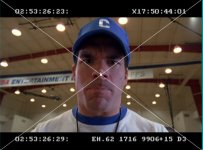
DVCAM timecode in UPPER left runs at 24fps.
DVCAM timecode in LOWER left runs at 30fps (or 29.97).
(See attached JPG for example.)
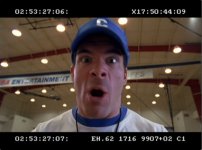
It looks fine in FCP in a 29.97 timeline as shown in attached JPG (though when my editor originally put it into a 24fps timeline, it had this same line-blurring interlace-like problem).
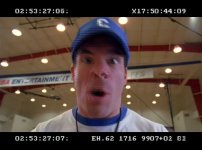
When exported as a QT movie (to get feedback from a colleague), movie now has this line-blurring issue usually when there's any kind of movement as shown in attached JPG. Settings for Compressor were h.264 LAN (bit rate dropped down to 1000), with framerate at 29.97 and keyframes every 15 frames (upped from every 150). Frame re-ordering is checked.
Subsequent export tests also left same problem. Trying switching lower/upper fields. Also tried exporting at 24fps in Compressor. Also tried placing it back in a 24fps timeline (which showed even in FCP series jagged horizontal lines) and then exporting via Compressor.
Would like to know what I'm doing wrong with export settings.
Thanks fellas,
Joshua
Ran across some trouble. Here's the situation:
Shot a short on super-16. Did telecine at Fotokem, where they delivered back on HDCAM and DVCAM (which I'm using for the edit).
DVCAM timecode in UPPER left runs at 24fps.
DVCAM timecode in LOWER left runs at 30fps (or 29.97).
(See attached JPG for example.)
It looks fine in FCP in a 29.97 timeline as shown in attached JPG (though when my editor originally put it into a 24fps timeline, it had this same line-blurring interlace-like problem).
When exported as a QT movie (to get feedback from a colleague), movie now has this line-blurring issue usually when there's any kind of movement as shown in attached JPG. Settings for Compressor were h.264 LAN (bit rate dropped down to 1000), with framerate at 29.97 and keyframes every 15 frames (upped from every 150). Frame re-ordering is checked.
Subsequent export tests also left same problem. Trying switching lower/upper fields. Also tried exporting at 24fps in Compressor. Also tried placing it back in a 24fps timeline (which showed even in FCP series jagged horizontal lines) and then exporting via Compressor.
Would like to know what I'm doing wrong with export settings.
Thanks fellas,
Joshua
Attachments
Last edited: