Lighting Blog - breakdown

cousinavi7

Well-known member
Hey guys,

I posted this on Cinema5D, but am hoping to get feedback from dvxuser as well. Apologies if you read it twice. :smile:


I've started a Lighting blog on this subject. Basically I'd like to break down shots to popular films and try and achieve the same setup. I'd love to get your feedback! Not sure that I'm nailing the lighting setups just yet, but its great fun and very educational! I'd love some feedback on what you guys think of the blog. Informative? helpful? educational?

Thanks for taking a look

http://www.thetwopointeight.tumblr.com

setup-munich46-2.png
 
I have seen it already in fact!

The only thing I would say is that it is focused on close up on faces (which I find is the easiest lighting to achieve). My recommendation: it would be well cool to do some breakdowns on larger scenes, which I find to be more difficult.


Either way, nice work for sure, and well done!
 
I couldn't agree more Simon. At the moment I'm limited to the availability of lights. As my kit grows I'd love to expand scenes to wider/complex shots. I'd also like to add movement to the camera work and post clips rather than frame grabs, but alas, more gear down the road!

I would agree that the CU seems the easiest as well. However, when viewing a lot of work, it seems the DP can blow the closeup easily. It seems like its very easy to get a "soap opera, sitcom" effect. Don't get me wrong, the sitcom is valuable in context, but what I struggle with and want to get better at is not making my short films/cinema come across with a sitcom effect. The challenge is to make a scene look motivated but visually interesting, without coming across that they are on a soundstage with all kinds of crazy lighting rigged above them! I definitely error on the side of too much light.

these exercises are definitely helping try to be more minimal with light but also effective.

Great feedback!
 
Interesting stuff. it's interesting seeing how your results match the originals and how you've gone about it. Looking forward to seeing some more.
 
Hey Cousinavi7, Great blog. I'm just getting into learning Lighting. Never realised how detailed it was, your blog really helps.

I'm confused at how you set your camera exposure, do you set bang in the middle between the highest fstop and the lowest. Thinking about it, would you set your lights up and then vector cope so that highlighs don't clip beyond 100 and shadows below 0?
 
Good question bubblegummonster. As far as setting my camera for exposure here's my process. I'm not married to this and am open to better ways to nail exposure, but with my knowledge, this is what I know. I pick an ISO like 160, or 320, or higher if needed. We lock that it, then depending on what depth of field I want I usually want to land around f/4. So we light to that accordingly.

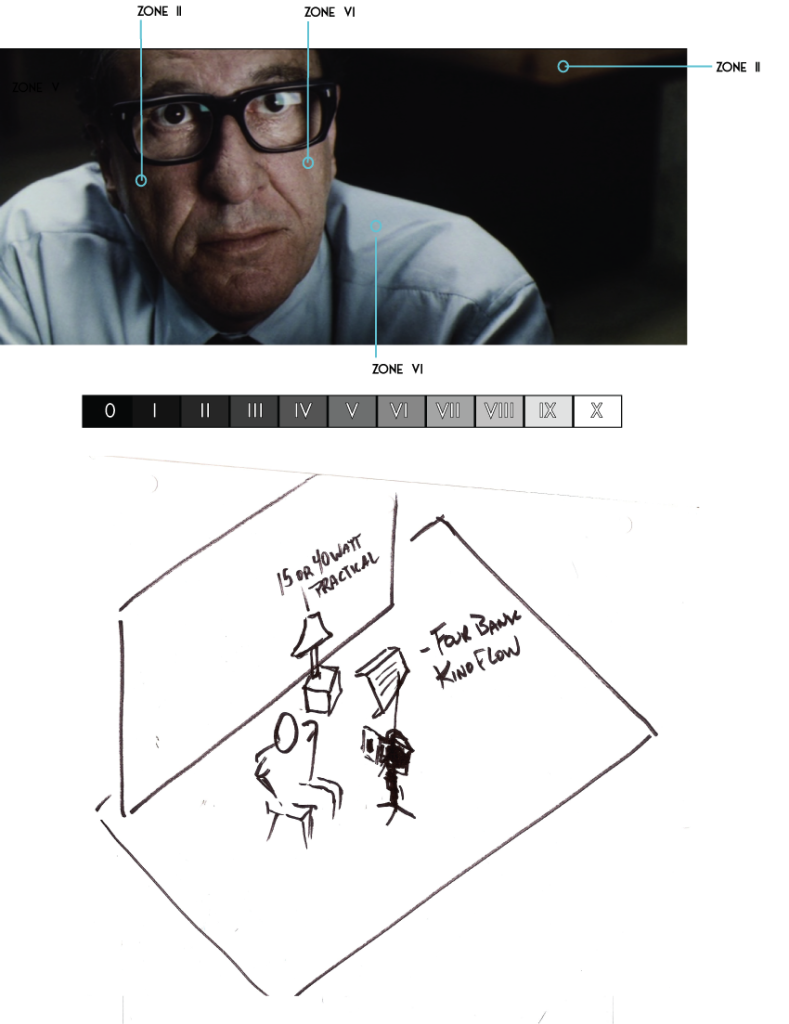
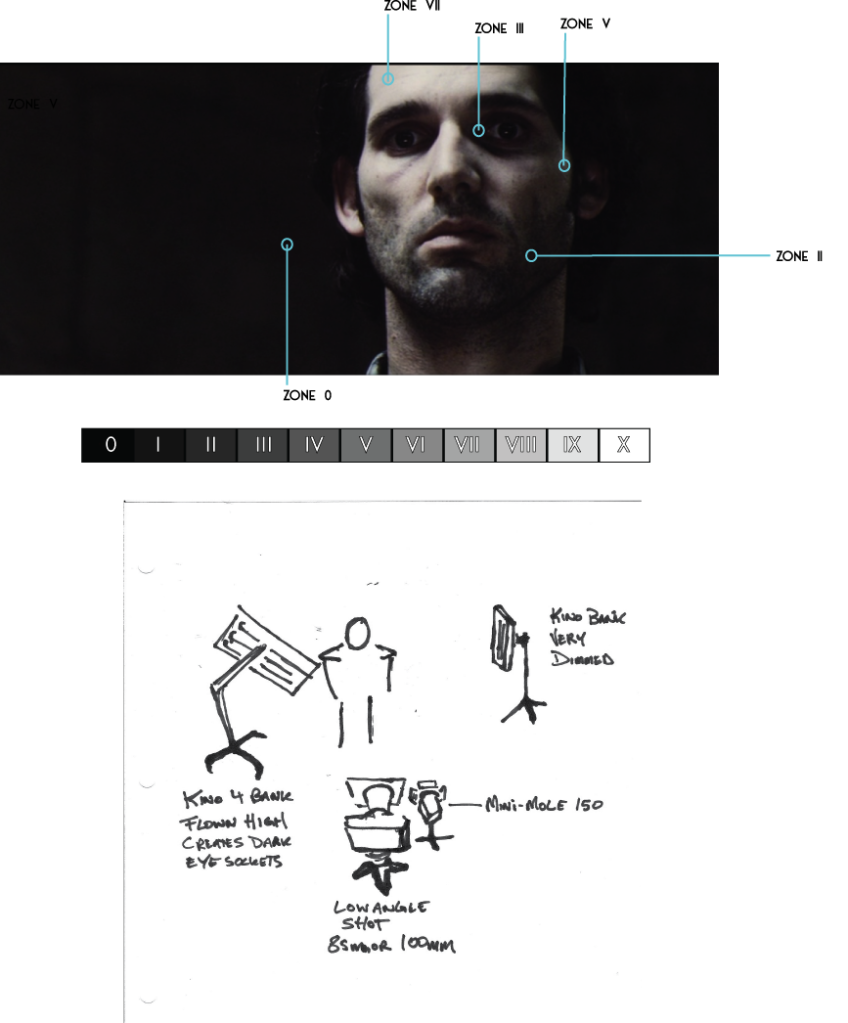
An incident meter reading in front of the talents face, gives me middle grey. This is "Zone V". As a rule of thumb, I should be able to spot meter from the camera view to the highlight of the caucasian skin. This should read one stop above (Zone VI). In theory, this should be correct exposure, however you can see on my blog, it didn't give me the results I wanted. On Munich 59 I exposed Emily with her skin reading zone VI. this was too bright and made her feel like she was under a light, rather than coming from an open window (also has to do with hard light over soft). On Munich 46 I wanted to see what would happen if we exposed the skin for zone V, knowing I would blow it out later to achieve the bleach-bypassed washed out look. This infact was probably the wrong choice. By the time I blew everything out, my eye sockets went too dark.

As far as vector scopes thats beyond me. I've played with them a little but not enough to know. I'd love someone to chime in about vector scopes while setting exposure.... Thoughts??? :)
 
Good question bubblegummonster. As far as setting my camera for exposure here's my process. I'm not married to this and am open to better ways to nail exposure, but with my knowledge, this is what I know. I pick an ISO like 160, or 320, or higher if needed. We lock that it, then depending on what depth of field I want I usually want to land around f/4. So we light to that accordingly.

An incident meter reading in front of the talents face, gives me middle grey. This is "Zone V". As a rule of thumb, I should be able to spot meter from the camera view to the highlight of the caucasian skin. This should read one stop above (Zone VI). In theory, this should be correct exposure, however you can see on my blog, it didn't give me the results I wanted. On Munich 59 I exposed Emily with her skin reading zone VI. this was too bright and made her feel like she was under a light, rather than coming from an open window (also has to do with hard light over soft). On Munich 46 I wanted to see what would happen if we exposed the skin for zone V, knowing I would blow it out later to achieve the bleach-bypassed washed out look. This infact was probably the wrong choice. By the time I blew everything out, my eye sockets went too dark.

As far as vector scopes thats beyond me. I've played with them a little but not enough to know. I'd love someone to chime in about vector scopes while setting exposure.... Thoughts??? :)

When someone talks about 'scopes' I tend to think they are from the 'video world', when someone speaks 'ISO' I tend to think they are from the film world...

But the The Zone System is about setting the exposure for the desired result. It may be true that caucasian skin is typically Zone VI... but for a low light scene... it needs to be something less... hence the need to know what will result by giving less light and place the skin tone where it is desired... and what affect that may have on other elements of the image, background goes pitch black... darker complexioned actors go black... and so one would need to control the light carefully to have such a shot where both the light and dark complexion 'work'...

On the 'dark eyes'... a small kicker or catch light in the eyes would have helped, and allowed for the deep dark sockets to not look like just skull pits...

On IRE, I think the placement of caucasian skin is at about 70-75 IRE, and 18% grey card should be about 50 IRE, but like you I've not used that system much, now that I'm using a DSLR for shooting digital film... I had a real problem trying to understand how to properly light with my DVX100 because it was a 'video' oriented camera, but I had no method to get any 'scopes', as I didn't have Adobe On Location, or Final Cut Pro scopes... and the open source widgetry just didn't seem to work for me...
 
Last edited:
As far as vector scopes thats beyond me. I've played with them a little but not enough to know. I'd love someone to chime in about vector scopes while setting exposure.... Thoughts??? :)

The vector scope is not the tool you're really looking for....instead you want the waveform monitor. Really I would strongly suggest using that over any light meter. Different processes require different tools, and for the digital capture, a light meter is one tool you don't really need. It can be helpful at times, but when you want to get critical exposure, or really look at your image, it's time to look at your scopes.

I was trying to find a good article about how to read a waveform monitor, but it's slim pickins. Here's one though.

http://www.recipe4dvd.com/club/DVDCOL/Techniques/TReadAWaveformMonitor.htm

Basically, your light meter won't tell you if you're clipping or not. 3 stops over 3 stops under is not true for every camera. If you use the waveform monitor instead, along with a spot meter function in your camera, you can get perfect exposures every time. Best of all, you can know for a fact where your skin tones lay, if anything is below or at 0 IRE and the same for 100 IRE...no matter what settings you use or what camera you use.
 
The vector scope is not the tool you're really looking for....instead you want the waveform monitor. Really I would strongly suggest using that over any light meter. Different processes require different tools, and for the digital capture, a light meter is one tool you don't really need. It can be helpful at times, but when you want to get critical exposure, or really look at your image, it's time to look at your scopes.

I was trying to find a good article about how to read a waveform monitor, but it's slim pickins. Here's one though.

http://www.recipe4dvd.com/club/DVDCOL/Techniques/TReadAWaveformMonitor.htm

Basically, your light meter won't tell you if you're clipping or not. 3 stops over 3 stops under is not true for every camera. If you use the waveform monitor instead, along with a spot meter function in your camera, you can get perfect exposures every time. Best of all, you can know for a fact where your skin tones lay, if anything is below or at 0 IRE and the same for 100 IRE...no matter what settings you use or what camera you use.

I'm not familiar with what Canon has, but for the GH-1/2 there are no 'scopes'. Furthermore, since the disappearence of Firewire connectivity, such tools as On Location, are somewhat tedious to use, as it requires
that one transfer the media to the computer with On Location. Further, furthermore, in the case of the GH-1 there is no live HDMI output, and I don't know what the relationship between HDMI output on the GH-2 vs.
what the camera is capturing. Don't know how that goes for Canon.

The only 'cheap' scopes are usually found available on the camera itself, such as the Panasonic AF-100, and other more 'video' camera solutions.

The net result is, one does have to calibrate one's light meter to the DSLR, to determine when it is going to saturate... but guess what... one had to do that with film film anyway... (or at least should have done it...)...

And further further more, using scopes does not tell you how much light to rent when you are standing at the rental house counter... a meter can at least tell you what the ambient light of a location is, then you can figure in what you need for lights...
 
and for the digital capture, a light meter is one tool you don't really need.

I'll disagree with this. I've found that different cameras tell me different things about exposure and each tells me something different in different situations too. My light meter always tells me the same thing so any camera I use, I compare the two and based my judgement on that. But I always compare.
 
And further further more, using scopes does not tell you how much light to rent when you are standing at the rental house counter... a meter can at least tell you what the ambient light of a location is, then you can figure in what you need for lights...

Of course it doesnt, but that's why I said it doesn't work for critical exposure. If you want to rough things in with your meter, they're great. Figuring out what lights you need is more of a numbers game and looking at the different photometrics of different lights. Even with film you can do that without a light meter.

I'll disagree with this. I've found that different cameras tell me different things about exposure and each tells me something different in different situations too. My light meter always tells me the same thing so any camera I use, I compare the two and based my judgement on that. But I always compare.

Since all cameras tell you something different, shouldn't you look at something that is basing it's output directly from the camera?

These DSLR's make it a bit harder to do that, but the histogram always helps quite a bit.
 
Yeah the histogram and highlight/zebras are great but I also need to check the in-camera meter as well. I've found that the cameras all show something different while metering and even when using the different metering modes. Moving the camera even just a tiny amount can affect the reported number greatly. While I think in-camera metering is vastly better than it used to be, there is still too much inconsistency for me to completely trust it.
 
it looks like he's got some soft light from the front and some from directly above. I would say that it's a much smaller source than a 4 light flo, maybe a 2'x2' 2 light flo with heavy diffusion and barndoors(the light falls off too quickly below his face to be an open light). It looks like the same color and type of light from above and slightly behind the talent as the light on the shoulders(and top rim of the right side of his glasses) is much too bright to be from the same source.
 
it looks like he's got some soft light from the front and some from directly above. I would say that it's a much smaller source than a 4 light flo, maybe a 2'x2' 2 light flo with heavy diffusion and barndoors(the light falls off too quickly below his face to be an open light). It looks like the same color and type of light from above and slightly behind the talent as the light on the shoulders(and top rim of the right side of his glasses) is much too bright to be from the same source.

I agree there's a top light that seems to be perhaps a littel back and to the frame left of Rush. What also occurred to me is that the 'catch' light of the fluorescent panel is not really the actual light that is lighting the face. The shadow from the glasses on Rush's face seems harder than a 'wide fluorescent'... almost like a shaped light and the fluorescent is there just to match the master shot, where one sees the 'practicals' in the shot.
 
Yeah the top light was interesting hitting Rush's shoulders. In our setup we blasted him from the front and it overpowered the toplight :) Live and learn for next time. Interesting thought that the front is a 2x2 Kino with heavy diffusion, then he is lit with another light? Would the gaff/dp really go to that trouble? Also wouldn't you see the "real" light source reflected in his eyes? I only see the kino bank reflection? Interesting thought, I've never heard of using an entire kino as an eyelight solely and then lighting them from another source? Heard of it with tiny obie lights....
 
Yeah the top light was interesting hitting Rush's shoulders. In our setup we blasted him from the front and it overpowered the toplight :) Live and learn for next time. Interesting thought that the front is a 2x2 Kino with heavy diffusion, then he is lit with another light? Would the gaff/dp really go to that trouble? Also wouldn't you see the "real" light source reflected in his eyes? I only see the kino bank reflection? Interesting thought, I've never heard of using an entire kino as an eyelight solely and then lighting them from another source? Heard of it with tiny obie lights....

Well, for me the sharpness of the shadow caused me to thing that there was something else there.. In addition, if the shadow was from the fluorescent, I'd expect a little shadow under the glasses on Rush's cheek... I'm of course conjecturing, but the light could be coming from almost the same plane as the camera lens, perhaps slightly above, and from the same direction as the visible light.

On the otherhand, could have boosted the contrast on the shot perhaps, but then I would have expected more blow out on the lens reflection, well... perhaps not with 'power window' selection of effects... But if you notice in your setup, there is no shadow from your talent's glasses... Sort of the thing one would expect from a 'wide' defuse light... On the other hand the edges of the glasses shadow are 'softer' than a really hard focused light coming from 'near by'...

Since I don't have any lights to play with... I can't really set something up to test my thought on this...

The other thought that just occurred to me... the fluorescent is totally made up... dropped in during post...
 
Last edited:
Yeah the top light was interesting hitting Rush's shoulders. In our setup we blasted him from the front and it overpowered the toplight :) Live and learn for next time. Interesting thought that the front is a 2x2 Kino with heavy diffusion, then he is lit with another light? Would the gaff/dp really go to that trouble? Also wouldn't you see the "real" light source reflected in his eyes? I only see the kino bank reflection? Interesting thought, I've never heard of using an entire kino as an eyelight solely and then lighting them from another source? Heard of it with tiny obie lights....

I'd say it was just the flo in front and the one overhead. Upon thinking of it, they might have just used some frost on the fill from the front, that would soften the light but still keep the beam of the light somewhat intact leaving you with the soft-ish rectangle reflection in his glasses.

It also looks like the flo is pretty far back too, maybe 12-15ft? Flo light falls off pretty quickly so moving it just a couple feet can change your exposure a lot.

It's funny thinking about how we are thinking about this really hard and analyzing it like we are and someone on set probably just set up the light, threw some frost over it, set up the overhead light, metered the lights and adjusted to get exposure without even really giving it a lot of consideration!

"how bout now?"

"nah move it back another foot"

"here?"

"yeah that looks good, lets roll"
 
Last edited:
Great points you guys! Svart I tend to agree with you. Its interesting to think that we are trying terribly hard to mimic and find the exact placement they found. But we have to keep in mind that they were not mimicing and trying to re-create anything. They were just adjusting to get a feel they liked (bearing in mind that they couldn't spend 4 hours setting up a CU shot. They probably had the 10-15 mins that most DPs have and they went' with it. Also thats years of practice making them very efficient at what they do.
 
Yup, the knio flo played as the front key and eye light. Egg crate out and plus diffusion, should be 216 to match the softness of fluorescent at the wide shot.
The overhead fluorescent plays as the back light on the shoulder.

Hard glasses shadow it is because it is placed close to the face.
The overhead are longer than 4 feet so it seems like they use real T12 fluorescent. To match that, they also change knio flo bulb to T12.
And I bet they use tungsten film stock for the scene and mess with the color at post.

One thing I don't understand on your lighting diagram. Why there is a 15/40 watt practical?? I don't see it in the wide shot tho, is it block by the actor??

Pretty good exercise, my college professor would actually asked us to pick a scene from a movie and re-create the lighting too. It trains you to learn how to light and frame at the beginning. Your close up is a good idea, watch out for the ambience lights (fill). And your key is not strong enough to create contrast and softness some time, SCHINDLER’S LIST 1 (need more contrast, can add negative fill), MUNICH 59 (need more softness).
Since you are shooting digital, latitude is difference than film. OG frame Zone ratio can be a reference but can't be guide.
I am just kind of pickle.LOL.
so another note... why in the world would you shoot at F4/ F5.6 most of the time.... since you have control of your lighting set up, go F2.8. If you have that much light to spare, I will put some diffusion.
Learn how to play with DOF so you can match OG frame better.

Anyway, I can go on and on... However, over all, great job tho, you got the lighting positions right. I believe you will learn much more down the road.
 
Back
Top