Light meter - recommendations?

Charles' split-screen shot comparison method sounds pretty smart. I'm not sure I'm equipped to do that at present though perhaps I could work it out. It's not an instantaneous solution, though. For a simple 2-4 light set-up, metering your units may not set you back much time.

I have it built into a flight case that generally lives on the cart below, although at times I have pulled out the case and used it standalone because of limited space like on a follow van or in a pre-built monitoring setup.

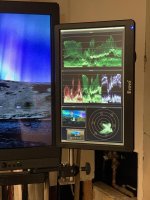
The primary component is a Blackmagic ATEM Constellation HD switcher, controlled via laptop running the ATEM software. For scopes I use Scopebox, a full customizable standalone app. It's configured to display waveform, RGB parade and vectorscope. I run an outboard portrait-mode computer monitor to display the scopes. I have an OWC hub inside the case to interface the computer via Thunderbolt 3 to the switcher and various USB components. The flight case has a custom patchpanel for connecting sources and monitors.

I have a programmed X-Keys keypad next to the laptop that selects the appropriate camera source (A, B, C or Multiview via a Decimator DMON Quad). Also on this keypad is a button that will take a frame grab, via Scopebox. These grabs show up in a folder within the ATEM software so I just drag them into the framestore from there. At this point I can now call them up as a source via the switcher and can A-B between live image and the grab, do a wipe in any direction, half-dissolve for lining up a matching shot (aka onionskin) or whatever else tickles my fancy.

One could theoretically build out a micro version of this with an ATEM Mini Pro or SDI and an iPad Pro (not sure about how to get the video into the iPad for scopes, haven't tried that one yet). Probably better in that scenario to use a trusty monitor of choice with the built-in scopes, perhaps. I just learned about a pretty cool iOS app called MixEffect that replicates the remote panel control for the switcher with some improvements over the Blackmagic software.

This is a pretty elderly clip running through the capabilities of the system on my big cart, which I only take out on longterm jobs or ones without DIT.
https://vimeo.com/papert/cart?share=copy

The smaller cart that I built a few years later.
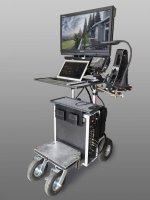
newcart Large.jpeg

the scopes monitor I added after that pic was taken:

IMG_0294 Large.jpeg
 
I often use Adam Wilt's Cine Meter II app. $25 for iPhone and iPad.

Really useful, works with a Luxi diffuser if you want incident metering (and if you can find a Luxi; as Imam says, they're apparently not made any more). For me, a really valuable feature is its reporting color temperature in Kelvin.... I end up in a lot of places with a mix of various lighting conditions. Lab equipment, work lights, overhead lights, maybe a window...maybe tinted windows. Cine Meter lets me know what's going on so I can compensate or choose my hero color temp. You know, I'd like a dedicated photo/cine meter that measures temperature, but I'm not up for paying $1500US for a Scenic C-800-U or something (I'll follow this thread to see if others suggest something to check out.

I'm using Cine Meter II with a Luxi as well. It has been such a cost effective and easy solution to measuring color temps. It's a great way to get continued value from my retired iPhone XR along with other production apps. It's surprising to hear the Luxis are no longer in production, I'll baby mine like a newborn.
 
I have it built into a flight case that generally lives on the cart below, although at times I have pulled out the case and used it standalone because of limited space like on a follow van or in a pre-built monitoring setup.

The primary component is a Blackmagic ATEM Constellation HD switcher, controlled via laptop running the ATEM software. For scopes I use Scopebox, a full customizable standalone app. It's configured to display waveform, RGB parade and vectorscope. I run an outboard portrait-mode computer monitor to display the scopes. I have an OWC hub inside the case to interface the computer via Thunderbolt 3 to the switcher and various USB components. The flight case has a custom patchpanel for connecting sources and monitors.

I have a programmed X-Keys keypad next to the laptop that selects the appropriate camera source (A, B, C or Multiview via a Decimator DMON Quad). Also on this keypad is a button that will take a frame grab, via Scopebox. These grabs show up in a folder within the ATEM software so I just drag them into the framestore from there. At this point I can now call them up as a source via the switcher and can A-B between live image and the grab, do a wipe in any direction, half-dissolve for lining up a matching shot (aka onionskin) or whatever else tickles my fancy.

One could theoretically build out a micro version of this with an ATEM Mini Pro or SDI and an iPad Pro (not sure about how to get the video into the iPad for scopes, haven't tried that one yet). Probably better in that scenario to use a trusty monitor of choice with the built-in scopes, perhaps. I just learned about a pretty cool iOS app called MixEffect that replicates the remote panel control for the switcher with some improvements over the Blackmagic software.

This is a pretty elderly clip running through the capabilities of the system on my big cart, which I only take out on longterm jobs or ones without DIT.
https://vimeo.com/papert/cart?share=copy

The smaller cart that I built a few years later.


the scopes monitor I added after that pic was taken:

Wild.

Realistically, I'm not going to increase the complexity of my shooting situation to anything like this.

But...trying to think of doing it with a lighter lift... I have the Accsoon Cineview Nano usually running from A cam to a Galaxy tablet I bring to give the producer. And that can get me false color and scopes. I could screenshot the image or the false color readout on the tablet. And then it's simply a matter of how to do an A/B with the screenshot and the liveview... I wonder if there's capability for that in the Accsoon See app... I could also run the feed to a second device. (The Nano can feed up to 5 devices.) I could take screenshots on that and then hold that device next to the liveview on the tablet. At that point, you're losing the ability to compare the final image on the same monitor. But at least I could compare false color readouts without worrying about monitor differences muddying the water... Food for thought...

Of course my setup is like a battleship (plus a somewhat smaller frigate) and not everyone needs all that it does nor can deal with the size and bulk. I made the small cart so that I can break it down quickly and load by myself into an SUV, but it's still a bit of a thing. But it also functions as my home away from home, replete with footrest, phone chargers and cupholders, all things I have appreciated after many long days on set!

This conversation has got me thinking about the smallest/lightest version of this, and wondering if it is worth trying to package it for other DP's. I haven't been keeping up with current generations of things, I'm not sure I knew that Blackmagic had a $345 micro switcher with SDI (only $50 more than the HDMI version), and that MixEffect app looks quite robust.

As you realized, the "killer app" is being able to compare still images with the live image, and for me at least, look at the scopes at the same time. It's almost confoundingly simple to be able to match setups this way, vs notes with meter readings, or playback on a different device (that may have a different grade or LUT etc). I can look at a wall in the background and run the vertical wipe across it and see on the waveform or false color exactly how the levels compare and then adjust accordingly. I've shot from mid-day to tragic hour keeping the look consistent with this method--adjust camera exposure to match the background ambience, then bring down the light sources for the foreground.
 
In case you need one in a pinch, you could use an app on your phone. I think your camera may have a built in light meter too.
 
Back
Top