Letus or No Letus for Green Screen Shoot?

Go team! lol.
Douglas is there a lot of movement in your stuff or is it interviews or head shots?
You use a letus right?
Cheers
 
Last edited:
Thanks a lot for the advice here, it's really interesting to read the various opinions and sides to the coin.

It seems to me that, in general, it's possible to get a good key both with and without the adapter, but that it's more difficult to achieve this well with the adapter.

For me, I'm conflicted as I love my Letus like everyone else b/c I like the organic look and filmic appearance. But at the same time, what point is a film look if you don't have a good enough key in the first place!

This suggests that, for me, whilst I do love my Letus, it would be wisest to shoot with the 'naked' EX1 on this occasion because I am not experienced with GScreen shoots and my responsibility should be to get a good key first and foremost.

Would you agree?
 
Douglas the key looks good,

Andrew, A bad key is a bad key, it looks hokey so yeah, focus on the key first then the texture. I personally think Green Screen is a pain, but there are many VFX shots that it is essential for. We are used to shooting 360 sets and mostly with film or Red One, When we shot with EX SERIES or HDV cameras, we felt we could could make it surreal enough with source motivated key lighting along as it was true 24p. We didn't want to fuss around with adapter and focus marks especially on a small budget and crew. In the end it looks great and you can see the results on Children of the Grave, July 1st SCI-FI Channel . We took plates of an abandoned asylum and key then added the erie children in front. But if you choose to use an adapter, great! All i'm saying is, we don't bother , the ease without one out weighs the complications with one and we are referring to something with movement of course. Bottom line in the end it still looks like film to the viewer.
Cheers, Philip
 
Last edited:
Right, I suppose a lot of it will also depend on how I work the key. Like one of the hall marks of the adapter is they roll off the focus, which helps the organic look. If I do a key and just do a first pass by knocking out the greens then it will prob still look pretty crisp. However if you go back into it and maybe do a light wrap or blur the edges just the right amount etc then the edges of your subjects will have this softness to them?
 
Oh and I just thought, as a supplementary question - for C/U's is it better to Zoom or Move the camera?

I.E. Say I'm framing an actors head, should I zoom into the framing and shoot from there, which will naturally produce shallower DOF or should I move the camera closer to make sure I keep a wide dof and so a crisp background?

I'm also assuming obv the camera should stay away from the line of the lights.
 
Of course Douglas's key looks good with the Letus. If all you are doing is shooting a medium shot of a person with no foreground or background elements, then it doesn't matter as much if you use an adapter. Everything is in focus, therefore the edges of his body are defined and survive the key.

But if you have REAL props on the stage in the foreground/background, or other actors or whatever, your key is going to be horrible. You will not be able to keep everything in focus at f/4, and everything that is in soft focus will bleed into the green background. When you key this scene, you will lose part of these foreground/background objects and be stuck with harsh cut-out edges. To make these look less harsh, you'll have to sacrifice EVEN MORE of the original objects by contracting the matte and feathering the edges.

Yes, shooting with a bare camera will make a sharper image, but it's easy to soften that either in camera or in post. I have shot a lot of green screen and it is a process where you should have the cleanest, flattest, sharpest image up front.

Deep focus is essential to good green screen work. If you can afford to lose that much light with your adapter, go for it. Otherwise a bare camera is much easier.


Marco
 
Last edited:
Does that also mean that one should keep the camera at it's sharpest, which for the EX1 I think is about 5.6-8?

And I suppose that also affects my 2nd message about zooming/moving the camera.
 
Of course Douglas's key looks good with the Letus. If all you are doing is shooting a medium shot of a person with no foreground or background elements, then it doesn't matter as much if you use an adapter. Everything is in focus, therefore the edges of his body are defined and survive the key.

But if you have REAL props on the stage in the foreground/background, or other actors or whatever, your key is going to be horrible. You will not be able to keep everything in focus at f/4, and everything that is in soft focus will bleed into the green background. When you key this scene, you will lose part of these foreground/background objects and be stuck with harsh cut-out edges. To make these look less harsh, you'll have to sacrifice EVEN MORE of the original objects by contracting the matte and feathering the edges.

Yes, shooting with a bare camera will make a sharper image, but it's easy to soften that either in camera or in post. I have shot a lot of green screen and it is a process where you should have the cleanest, flattest, sharpest image up front.

Deep focus is essential to good green screen work. If you can afford to lose that much light with your adapter, go for it. Otherwise a bare camera is much easier.


Marco

How about something like this http://exposureroom.com/members/DouglasVillaba.aspx/assets/abf10273d7b74bf88fb77b3a65bf40b0/
 
Oh and I just thought, as a supplementary question - for C/U's is it better to Zoom or Move the camera?

I.E. Say I'm framing an actors head, should I zoom into the framing and shoot from there, which will naturally produce shallower DOF or should I move the camera closer to make sure I keep a wide dof and so a crisp background?

I'm also assuming obv the camera should stay away from the line of the lights.

Andrew, Is this with or without adapter, you can zoom 10-20% most times with an adapter

I'm assuming you asking about without an adapter, you can zoom in no problem, i got great keys zoomed in. *A Trick if you stay widish or medium, then u can zoom in in post after you key the background. Then you will have a push in and pan on the whole composited shot. Especially if you end up mastering to SD and the you can zoom and pan 50% more.
Cheers
 
Last edited:
Does that also mean that one should keep the camera at it's sharpest, which for the EX1 I think is about 5.6-8?

And I suppose that also affects my 2nd message about zooming/moving the camera.

Marcos right on the money, especially with complex keys.
Andrew, Turn the detail off on the EX1 though, it morays and sizzles horribly.
You can zoom in, the EX stays pretty consistent all the way through the lense, just make sure you have a good external monitor and crisp focus on the edges, use peaking function to help. 5.6 is a sweet spot, but a naked ex, will handle it.
Cheers
 
Last edited:
We got into that question for a serie's pilot where the main actor is in front of the camera and the background changes at each joke (he visits appartments). Backgrounds are photo-realistics 3D plates, so the goal is to make the green screen integration the most realistic as possible.

We made some tests with and without mini35 (Sony EX3 bare vs Sony EX3 + SG Blade (RR2) + Nikon 24mm).

We definitely used the adapter solution for many reasons :
- With a few meters between the actor and the greenscreen, the slight defocus from the mini35 helps the key, especially with Sony EX series.
- When the actor uses his hands in front of the camera, you can actually feel the DOP, which helps the realistic effect with the defocused 3D background.
- The tests with bare lense made the actor way too sharp and in-focus while the background wasn't. Integration wasn't nice.

Here is a small test we made with a simple background. You can actually see the vfx breakdown after the scene. And also, it is in french : http://player.noside.fr/appart1

Screenshot :


We used -3db gain and sharpening off (around -20) on EX3. We also got small chromatic aberation because of the SG Blade, which we removed in post. The new optics should solve that.

I think it depends on what you're going to shoot, but for our project, the SG Blade helped a lot !

the link is not working?
 
Horror film green screens picts

Horror film green screens picts

Nomalz, very cool, the sweat is a nice touch indeed as well. This has been a fun thread, thank you Andrew for starting it and everybody for contributing.

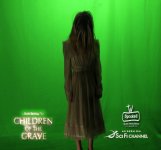
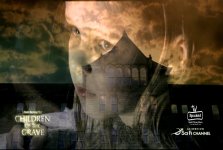
After all the cool posts, i thought it might be cool to post some green screen picts on more complex keys, with things like fabric, stringy hair, and VFX overlays , You know the "RING" girl. lol We usually multi composite the shots, so we were very happy the key held up.

The footage is featured in Children of the Grave and will air July 1st Sci- Fi Channel 8PM/5PM C

Cheers
 

Attachments

  • green1.jpg
    green1.jpg
    133.3 KB · Views: 0
  • green2.jpg
    green2.jpg
    220.5 KB · Views: 0
  • briroomfire2.jpg
    briroomfire2.jpg
    291.7 KB · Views: 0
  • briophnge.jpg
    briophnge.jpg
    291.8 KB · Views: 0
  • cotg1.jpg
    cotg1.jpg
    272.1 KB · Views: 0
Last edited:
Thanks a lot for the advice here, it's really interesting to read the various opinions and sides to the coin.

It seems to me that, in general, it's possible to get a good key both with and without the adapter, but that it's more difficult to achieve this well with the adapter.

For me, I'm conflicted as I love my Letus like everyone else b/c I like the organic look and filmic appearance. But at the same time, what point is a film look if you don't have a good enough key in the first place!

This suggests that, for me, whilst I do love my Letus, it would be wisest to shoot with the 'naked' EX1 on this occasion because I am not experienced with GScreen shoots and my responsibility should be to get a good key first and foremost.

Would you agree?

Absolutely agree Andrew.

If you're not that confident in pulling a key then avoid shallow depth of field, movement, hair, transparency etc... But removing all of those elements will result in a less filmic looking composite.

Now here's a thought, do you have to do it green screen? How about rear projection with a digital projector? The BG is going to be soft anyway since you're using an adapter?

Cheers

Dean
 
Great thoughts Dean,
we just finished a shoot with rear projection, duh, why didn't i think of that?
Guess that's why they pay u the big bucks, lol
Cheers
 
Nomalz, very cool, the sweat is a nice touch indeed as well. This has been a fun thread, thank you Andrew for starting it and everybody for contributing.

After all the cool posts, i thought it might be cool to post some green screen picts on more complex keys, with things like fabric, stringy hair, and VFX overlays , You know the "RING" girl. lol We usually multi composite the shots, so we were very happy the key held up.

The footage is featured in Children of the Grave and will air July 1st Sci- Fi Channel 8PM/5PM C

Cheers


Very cool keys, Phil.

Question though, is that "ring girl" key a final key? Reason I ask is that the light is coming from the wrong direction on the girl compared to the background ( trees show direction). Kind of makes it look like a key because the lighting doesn't match. I'm gussing that this was just a test key?

And this is probably a good point for anyone who wants to make realistic keys, it's important to make the foreground lighting match the lighting of what will eventually be the background. You can probably fix the light color in post without too much difficulty - There are plugins for AE that will do that for you as well (at least color wise). However, if you light direction is wrong, that's harder if not impossible to fix in post.

Same goes for CGI. Mismatched lighting is a dead give away.

-M
 
Good eye mate, yeah, the top one is a test composite, just to show first pass keying example.

I would either flip the background and grade for color matching, but usually this would be one of multiple comp layers to come.
Cheers
 
Back
Top