Learning how to edit: Basics vs. Professionally

Learning how to edit: Basics vs. Professionally

  • Final Cut Pro X

    Votes: 6 19.4%
  • Adobe Premiere

    Votes: 6 19.4%
  • Avid Media Composer

    Votes: 3 9.7%
  • Sony Vegas

    Votes: 2 6.5%
  • Lightworks

    Votes: 0 0.0%
  • It doesn't matter

    Votes: 14 45.2%

  • Total voters
    31

Jimmy Pierce

Well-known member
I know this is a question that everybody asks, but thought I'd take a specific angle to it.

I've been teaching editing for about 9 years. I started with Sony Vegas (it was Sonic Foundry at the time) then started teaching Final Cut Pro 5 for a few years and slowly made my way to Final Cut Pro X. I've also learned Premiere, and I can navigate most of it, but have not used it consistently enough. Think back to when you first learned how to edit and with what, and each transition you made. One very important statement I make to my students is that it does not matter WHAT you use to edit but learn HOW to edit, and to grasp the concepts of post production.

I have a student recently who reads a lot online and is convinced that Adobe Premiere is the best thing since sliced bread, everybody uses it, it's the industry standard, Final Cut Pro X is a bad taste in his mouth. He's learned how to use it for a few months now, but as a professional, I would not say he can sit down and edit fluently at this point and Adobe Premiere would simply be confusing and he's be taking a step backwards. Regardless of the interface, the concepts of editing have not changed. Things like continuity, placing b-roll above clips, adjusting sound levels, adding transition and color correction are all features that both Premiere and Final Cut Pro offer. So one cannot claim one to be better than the other. It's a matter of personal preference. That's my belief.

Mac vs PC and budget aside, my questions are, if you're a beginner and learning how to edit, do you think it matters?

Can you eventually switch from one to the other without much effort? If you didn't know how to edit, what would you go to first and do you think you would learn quickly or struggle?
 
I learned to edit in Premiere 6 and 6.5 when I was in high school. They probably should of taught us Movie Maker or iMove as far as learning the basics of editing, but I learned on the pro stuff. When I graduated, I switched to Sonic Foundry Vegas 4.0 and stayed with Vegas through Vegas 9. By then, my work was becoming more VFX heavy and I was learning After Effects so I switched to Premiere CS6. I stayed with Adobe for a few years now but about a year ago got fed up with how buggy the software had become and turned my back on them for Avid Media Composer and Nuke.

For someone starting out, I would say, start with whatever you can get your hands on. Just learn how to manipulate the story through images. Pacing, using different shots, that's what editing is. The software is just the means you go about it. While initially moving from Premiere to Vegas was technically difficult, the basic art form was the same and I just had to learn how to do certain things the Vegas way. Same for moving back to Premiere after nine years, and then Avid after another two. They all do the same thing, it's about what works best for you. In my case, I make narrative films, and I wanted to leave AE for node based compositing. I knew Hollywood had established workflows for just such a case, so Avid and Nuke were the logical choice.

To answer the question, If I was just starting out if I wanted to be a filmmaker, but was stuck cutting my own films, I'd probably choose Premiere today. If I wanted to edit Hollywood films, I'd jump in with Avid from the start.
That said, I am a filmmaker who cuts his own stuff, and now I use Avid. It wasn't difficult to switch at all.
 
Last edited:
Younger folks now have a VASTLY better underlying sense of how software interfaces work.

Final Cut and Premiere are SO similar it's almost as if they were designed by some of the same people. (They were.)

Nowadays Video NLEs and Audio DAWs are all about 95% similar to each other.

And yes. Almost all of the same functions and quality are generated by each of them.
 
Not going pro and not intending to go pro, just to edit a documentary I shot, I’m trying the freeware DaVinci Resolve 12. It looks like it may answer my present needs.
 
Younger folks now have a VASTLY better underlying sense of how software interfaces work.

Surprisingly, this is wrong, they are clueless in using computers. We have such a hard time getting them to put files where they should go and not just dropping everything on the desktop. They generally have no idea how to find an application if there isn't a shortcut on the desktop to launch it. For a generation that has never known time without computers or smart phones, their technical savvy is really poor.

We always get at least one student who is strongly opinionated about whatever editor they dabbled with in highschool, they are uniformally wrong! They hate Mediacomposer so much that they never open their minds to learn to use it, not much you can do. As far as industry standard, Media Composer is it, it is the standard by which all others are compared. Except in Russian language countries, they don't have a language pack so most people there use something else.

All that said, Lightworks is easier for me to grasp.
 
Surprisingly, this is wrong, they are clueless in using computers. We have such a hard time getting them to put files where they should go and not just dropping everything on the desktop. They generally have no idea how to find an application if there isn't a shortcut on the desktop to launch it. For a generation that has never known time without computers or smart phones, their technical savvy is really poor.

We always get at least one student who is strongly opinionated about whatever editor they dabbled with in highschool, they are uniformally wrong! They hate Mediacomposer so much that they never open their minds to learn to use it, not much you can do. As far as industry standard, Media Composer is it, it is the standard by which all others are compared. Except in Russian language countries, they don't have a language pack so most people there use something else.

All that said, Lightworks is easier for me to grasp.


Avid, but i agree with the above, i love lightworks personaly, Pp and FCX are great tools in the right hands, but for stright forward editing and managment of the process, Avid has it sorted.. that and about 90% of the films i grade are edited in Avid, where 90% of the short form and commericals are edited in Pp and FCP7.. so what's the end game for the students? short form, music video's and corprate? or feature films?

PS, i normaly edit on either Flame, Avid|DS or Avid MC, i don't cut much and when i do - it's only commericls these days, most of my working time is gradeing and finishing now
 
if you're a beginner and learning how to edit, do you think it matters?

The basics of editing are the same no matter what you use.

But as for which to use, and which a student will take to better -- that depends on the student. There's no one answer. Everyone's brains are wired differently.

Vegas always worked for me because it's designed in a way which innately makes sense to me. Other software is not. But others say the same about other software, and I don't have any reason to think it's not true for them.

But the main thing is to concentrate on teaching/learning EDITING, and not the SOFTWARE. Unfortunately, I've seen far too many "editing" courses which are actually tutorials on the specific NLE rather than on editing itself.
 
The "mother duck" syndrome - whereby the first moving thing a duckling sees when it comes out of the egg becomes it's mother and it follows it everywhere - is perfectly represented in the many NLE users who believe that their NLE is the thing they must follow. I've found the best example is Casablanca users, who stick to a system more expensive and complicated than any of the others but with fewer features than WMM or iMovie - and yet make a living out of using it. Or that part of industry which sticks to AMC despite editors having to use around twice the keystokes of other systems, something of which Avid must be aware but isn't going to dare change. I think at some stage I've used them all, they all have their quirks, I'd prefer Edius if they could fix the interface, Avid if they could fix the modes, PP if they could fix the transitions, FCPX if it could run on Windows, Vegas if they could make it stable, Magix VP if they added some pro features, and so on.
 
There are still DS machines running? Someone I went to high school with made a good business out of running DS, but then they kind of stopped supporting it so he went off to Flame too. He's down in the DC area.
 
I think at some stage I've used them all, they all have their quirks, I'd prefer Edius if they could fix the interface, Avid if they could fix the modes, PP if they could fix the transitions, FCPX if it could run on Windows, Vegas if they could make it stable, Magix VP if they added some pro features, and so on.

Pretty good summary, they all have good things and not so fun things about them. We use Media Composer at work, I can get by on it. I discovered Lightworks when they started the public beta of it's rebirth and really like it. We also have Premiere though the pricing makes it very hard to continue for us. I've played with Vegas many years ago and should probably look at it again. We used to have FCP at work, not going to comment. I used Edius before Grassvalley bought it, it was OK but many years ago. Tried Pinnacle's whatever, couldn't believe when Avid bought them and sold it as a pro product (our PBS station bought this and swore at it every single day until they went to Mac and Premiere).

These days I need to build a new computer and get working with Resolve for editing and all the other features they are building into it, and I think I need to run this on Linux for a complete change.
 
There are still DS machines running? Someone I went to high school with made a good business out of running DS, but then they kind of stopped supporting it so he went off to Flame too. He's down in the DC area.

got two of them running, just shipped a pile of national commericals from one of them, the other one is a support machine for Resolve

but Flame has a future, DS not... still the best paint & GFX system, and audio editing to a sample make it my top pick for commericals
 
For a new student, I think it is best to learn on the system that is currently the most popular, which I believe is Premiere. Theory being, while you are learning and have many questions, it will be easier to find the answer because of the larger number of users sharing info on the internet.

I started with Premiere, went to Vegas because it was easier and more reliable, then back to Premiere because of the much larger online assistance. Plus, if you wanted formal training either online, classroom, workshop, it will be more likely to be the SW with the largest number of users.

If someone takes it further to the pro, semi-pro or advanced stages, they can then change. But they will have cut their teeth on the platform that was most widely used.
 
Pretty good summary, they all have good things and not so fun things about them. We use Media Composer at work, I can get by on it. I discovered Lightworks when they started the public beta of it's rebirth and really like it. We also have Premiere though the pricing makes it very hard to continue for us. I've played with Vegas many years ago and should probably look at it again. We used to have FCP at work, not going to comment. I used Edius before Grassvalley bought it, it was OK but many years ago. Tried Pinnacle's whatever, couldn't believe when Avid bought them and sold it as a pro product (our PBS station bought this and swore at it every single day until they went to Mac and Premiere).

These days I need to build a new computer and get working with Resolve for editing and all the other features they are building into it, and I think I need to run this on Linux for a complete change.

+1 for Lightworks. Tried the first Beta release and it just clicked for me. Stayed with it since. Though the tools are the same, it has a distinctive workflow that does have a learning curve. I moved from Premiere in early pro releases plus various releases of Premiere elements. Never liked the interface. Had a little experience with Avid in rental suites back when, liked it OK. But I learned to edit cutting film on Moviolas and Steenbecks.
Conceptually Lightworks follows a film media management and editing paradigm. The workflow was designed by and for film editors. I don't think there is a more efficient platform for organizing and cutting long form narrative or documentary works. It is picky about the quality of material you feed it. DI grade editing codecs like Prores, DNXHD and Cineform with proper timecode run like butter. Highly compressed AVC/H.264 causes problems, not something unique to Lightworks. Though it still takes a reasonably powerful computer with dedicated media drives, it will run well on much more modest hardware than Resolve requires.
 
Last edited:
Why does one guy pick up a chain saw and creates noise and sawdust and another guy using the same chainsaw creates a work of art????

It doesn't matter which brand of chainsaw either person uses, the results are the same.

Al
 
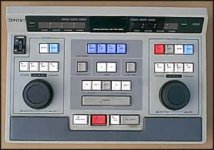
sony01.jpg
Anyone remember these? The old Sony three point edit controllers? aaaah, preroll....

Any of the modern NLEs are going to give you similar options, so it just becomes a question of interface preference. If you really want to learn how to edit, set up one of these relics and give your students a tape with a typical ENG cameraman's shots from the night. Then tell your students they have 15 minutes to put together their news piece.
 
Yes, I still have a couple of them. You know what, they still work for controlling things like our Avid Airspeed. The 440's all went in the trash.
 
I started using Ulead Video Studio (back in the early 2000s). Moved to Sony Vegas Pro 8.0. Then tried Premier Pro CS3, moved back to Sony Vegas Pro 8.0.
Sony was intuitive, but wasn't stable enough to me. Last two project I've been unable to render the timeline out, without issues (black screen, unfinished render...).
Since then, I moved to AVID Media Composer 7 and I'm very happy with the move. Wouldn't go back. Quite easy learning curve as well, with the Kevin P. Mcauliffe tutorials!
 
Back
Top