Keying Advice Needed!

tavoyfilms

New member
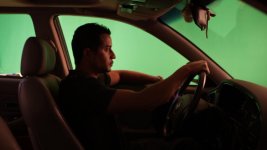
Greetings all! So this is my first experiment creating a composite shot with keying. Here is a screenshot of my test footage, which I believe to be a properly lit green screen and subject (driving during the evening on a well-lit city street). Before I attempt to start keying this shot, I can already see my biggest headache is going to be the amount of green screen reflection inside the car, particularly on the headrest, dashboard, and visor.
http://bayimg.com/oAkBfAADC
I've thought of a million different ways I might tackle this shot, but before I start banging my head against the wall tweaking and rendering useless footage, I was wondering if there are any keying "wizards" out there who might be kind enough to offer some advice. I'm using AE5 (so Keylight 1.2), and I also have Colorista II at my disposal.
 

Attachments

  • Driving Pre-Key_01176.jpg
    Driving Pre-Key_01176.jpg
    33.9 KB · Views: 0
I think the main problem is that you apparently want a relatively underlit car interior, meaning that your well-lit greenscreen background will unavoidably spill into the car to some extent.

Although scottmd80's suggestion will help, I think the best solution will be to apply more light to the car interior, thus overpowering the green spill - if necessary you can still darken the interior down again in post.
 
Thanks for the advice! I'm also noticing that there is no interior illumination from the dashboard displays. I'm thinking a soft light with a blue gel placed inside the car shining towards the subject's face might help the shot out as a whole?
 
To be honest, this green screen looks pretty good. I learned long ago that there is no such thing as a perfect greenscreen. Having it as you do now may actually make it easier as you have good lumakeying opportunities too.

Basically, you will just need to make sure that you correctly despill the dashboard and other areas that are getting green spill. Bear in mind for future shoots that having the greenscreen further away from you talent is a good thing as you will get less green spill and any imperfections in the greenscreen will be softened out due to the softer focus. Of course, logistically it isnt always possible to move further back.

Try photographing a similar car setup for real, and use the stills to inform the colour and lighting and exposure etc that you will want in your composite. Dont be tempted to give a larger dynamic range that is natural, its a dead giveaway. Watch your edges too, you will want some bleed between foreground and background like you get in real life.

Post tests if you can an I'll try to offer advice as you go. I've done limited keying, but had a few tough ones on deathly hallows, so may be able to advise. You will inevitably need to do some roto, even if its just for color correction, so be prepared for that too...

Hope it helps...
 
I would suggest, if the camera is locked off, to simply key out the driver window where his head create motion in the frame and for everything else just rotoscope and create a mask, that way the only area you need to worry about keying is around his head.
 
Back
Top