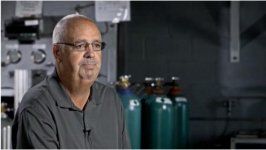
Just did a video of a missionary from our church... advice?

jrm27

Active member
Hi all,

I've been doing some video here and there for my church as an addition to my normal design job there. A little while ago a missionary that we support came into town. I was asked to sit down and interview him and reacquaint him with some folks in our church through a video to be shared on Sunday morning. I've done a few of these with different situations, but this is the first that I've been able to post. I was asked to make the video about 5 minutes and to include lots of info about what he does, what his relationship with our church is, his family, his hopes for the future of his ministry, etc... He brought along a few pictures that I was asked to include.

I was on a very truncated time schedule for someone with my lack of experience. I had about two days to shoot, edit, and deliver. I was abel to spend a couple hours with our missionary and ask questions... it was a lengthy process as English is not his first language. I used two cameras. Both canon T2i running magic lantern. One camera had a 24-70 2.8 lens and the other a 50mm 1.8. Sound was done with a cheap radioshack lav into a zoom h1 and synced up with plural eyes.

Watching it there is plenty that I would change. I feel like I have some weird framing going on, some harsh lighting (little cheap home depot clamp lights), and some sound issues. However, I'd love some feedback from the community as well. I know I'll be doing many more of these and would like to get better. I know some may object to the religious content, but I am hoping that I can receive some helpful feedback. I'm somewhat new to this site, and am not familiar with the rules on postings of this nature. If there are issues with me posting this content, I apologize and will move/take down/remove the thread if needed.

Thanks in advance for any insight!

-jon
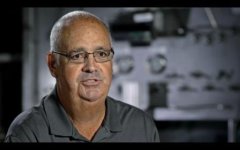
 
I think you did a great job, all things considered. The thirds rule is great to follow for framing. What I would do in the future, with two cameras, is to have them both fairly close together with a common perspective and common framing. i'd have one mid/wide and one up close.

I have done two variations in the last few weeks. One was to have the main camera in a typical 10 degree or so off setup and the second on a slider, another 10 degrees or so off center. Here are the two shots:

Main Camera (GH2)
Screen Shot 2012-10-06 at 12.04.19 PM.jpg

2nd Camera on Slider (AF100)
Screen Shot 2012-10-12 at 10.34.50 PM.jpg


I just shot on Wednesday again but with a different crew. In this case, we had a main camera with mid shot (typical), 2nd camera a little further off with a close up and then a third on a slider with a mid shot. I don't have the footage of that shoot yet.

The point being that in all of these, we keep the same perspective, with the subject on the same side with common framing elements. In the above pics, you always see the control panel.


Lastly, good job on the b-roll and the slider footage.
 
When I look at these things, I always start with my ex-college lecturer head on, and kind of expect lots of problems - especially as you (like students) always tell you about bad things before you see them. I found very little to complain. I found the sound fine - clean and sounding natural. The music sources blended well. Technically, the one thing I really didn't like - although this could just be me hating the 'new' techniques often seen on TV now, was the framing where the subject was frame right, looking right. For me - this wrangled a bit. I know that the old notion of looking room is a bit old hat now, I'm still a firm believer that it makes viewing easier, seeing where the subject is looking. The lav mic worked well - so why didn't you hide the cable? Up inside the subjects top it's invisible.

I'm not sure if the colour balance was a bit orange intentionally, or by accident - but it actually worked I thought. The graphics windows with stills and other clips in them worked nicely. I'm not quite sure if fading out while he was talking looked ok? I think it felt to me a bit like a mistake?

You seem to have created a style that works, so my own thoughts are simply to change the second position framing a bit to make people like me a little more comfortable, hide the cable and that's about it. These comments are pretty minor really so you've obviously got the eye for it. Normally people using the cheap work lights suffer from really hard lighting, with strange shadows, but however you did it, it works.

A good sign of a good video when you review these things is that instead of looking for issues, you start to listen to the story - and I found myself doing this, having to rewind a bit to look again.

Nice work!
 
Thanks for the input fellas. I really appreciate it.

Thanks for helping m with some of the basics of framing. I can see how working on a similar axis with similar framing elements would be a good idea. I'll work on that in my next one and create the different looks with different distances, mid/close, etc... Thank you. And yes, cramming the subject all the way to the right and then having him look outside the frame is a little uncomfortable for me too now that I'm separated enough from the project to look at it as a whole and not just a bunch of clips. I think the framing tips will help me a lot. Thank you!

Yes, the white balance does have a bit of an orange-ish tint. That's an area I need to work in. I worked the WB in post, but I think I need to to a better job at the source. I definitely should have hidden the lav better. Actually, while I was in Africa last month I did a similar audio setup with some interviews and worked on hiding the lav better.

Thanks for the compliment on the lighting. I think it' about 4 of those cans... on straight on from the back, one reflecting off a piece of white posterboard, one on the floor behind the subject, and one to his far left ... just trying to cancel out some of the weird shadows. The only place I really don't like the lighting is in those shots where the subject is on the far right. I think that gets a little harsh. But, there's always next time.

Thanks all! Please keep the help coming, I've got a long way to go!
 
I agree with the others, both the positives and areas for improvement. Nice job!

You might want to adjust your lighting position a tad. When he moves around (e.g. 1:20 - 1:24), the shadow on the right side of his face (screen-left) does this funny sort of dance. Looks like his right shoulder and arm are casting a little bit of a shadow, which means your screen-left light (or bounce card) is setup too low. By raising the light up and moving it clockwise around him toward the back, you would eliminate those shadows and also create a little bit more separation from the background by forming a rim around his right shoulder. It might increase the shadows on his face a little but I think it would be more consistent and add more depth to your shot. You can see this in Heartfelt's screen grabs.
 
Dave,

Thanks for the comments, I really appreciate the kind words and the direction. I didn't even notice that strangeness of the shadow. Thanks for pointing it out to me! Yes, that light/bounce was set up pretty low. I'll try bringing that higher next time. Thank you!

-jon
 
Back
Top