jerky rendered output

when i watch my rendered output there are multiple incidences of jerky video flickers, anybody have any ideas what i might be doing wrong, how to fix this? A five minute short film (my first) that i split up of course into a dozen clips/scenes, cross fades. 29.9fps native 1920x1080 original footage, rendered to 1280x720 same fps, uncompressed, the pulled into DVD Architect and made into mpeg2 DVD.
 
I've found that "jerky" and "flicker" tend to mean different things to different people -- any way you can post an example of the problem?
 
Okay here is the clip about a 7MB quicktime .mov
http://borealpictures.com/preview/jerky.mov
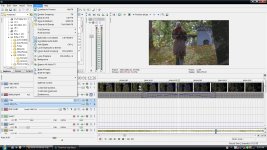
The video jerky movement (one of several in my entire 5 minute film) happens just after the woman picks up a flower bunch and starts walking up the slope, and just before the transition to the crow in the tree. Thus the jerkiness in the video happens during the crossover clip/scene transition, also seen on the attached screenshot of the film in Vegas Pro editor, where it happens at 1:12 on the timeline where you can see the crossover fade, right smack in the middle of that is where the jerky movement happens.
 

Attachments

  • scrnshot-vegas-jerkyclip.jpg
    scrnshot-vegas-jerkyclip.jpg
    358.5 KB · Views: 0
Try rendering as DVD Architect format from Vegas. (Under MPEG-2.) HOWEVER, change the rendering quality setting to Best, because you are rescaling the image.
 
No change, still the jerky frames at spots. I think it must have something to do with the fade/crossover since that is where this always seems to occur.
I think there is no easy way to fix this, I am just going to have do the grunt work and go into my NLE and look at frame by frame in the vicinity of the trouble spots, figure out what is going on, fix it.
 
Last edited:
Back
Top