Jagged Edges

Mr.Durden

Member
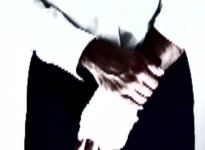
I have an issue with jagged edges that appear on diagonal lines in my footage. The Posted images are taken strate from Uncompressed self contaned FCP movies. The footage was shot 24pA with a DVX100a, imported with pulldown and edited on a 23.98 timeline. These jags arent interlacing, they seem like horizontal or vertical stepping. They appear frequently and are quite noticeable.
When i watch the footage on an interlaced TV it seems fine, but on my 20" inch Imac Monitor it looks quite bad.
I can notice this on video footage or DVDs i didnt shoot aswell (less pronounced though), so could it just be because im watching the footage on a Hi-Res Screen?
Is this normal? why does it happen? is there a filter i can apply to avoid this?
Thanx
 

Attachments

  • jag.jpg
    jag.jpg
    35.5 KB · Views: 0
  • jag2.jpg
    jag2.jpg
    26.9 KB · Views: 0
Are these only small parts fof larger images?

The resolution in SD itself is limited to... SD.

Could you post a whole frame?

Gunleik
 
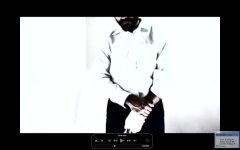
Heres the hole shot, its still very noticeable. The Image has a contrast filter and a tint filter by the way. You can especially notice the jaggys on the white sleeve with the black pants as background.
Thanks for the help
 

Attachments

  • jags.jpg
    jags.jpg
    41.5 KB · Views: 0
This is really not more informative....

Open the file in quicktime (I know it's going to be squeezed), find the frame, hit "copy" and paste that into a photoshop file of the standard size. Save as .jpg

Or export single frame as TIFF (from FCP) and convert that to .jpg.


If you're monitoring on a computer screen, the NLE can do all sorts of tricks to accellerate the preview (which is all a computer screen image will be ever, btw...)

Have you checked it on a proper monitor or played it out to a TV?

The image looks like a proxy image with evry second line only showing, blown up to the double on a computer screen. (which I BTW suspect it is).

Remember to set the qt file to show full rez, btw before you copy the image...

My guess is that you're fine... (Check on TV first)

Gunleik
 
Doesn't QT have a low-quality/draft mode, and you have to manually set it to high-quality playback? Could be what's happening here; he says it's not in the footage on the TV, just in the QT playback.
 
Yep.

What I'm suggesting. FCP also downrez for monitoring (AFAIK).

Trust prod monitor or TV. Not computer screen.
 
Back
Top