Is ProRes RAW just compressed RAW in a ProRes wrapper?

DPStewart

Veteran
Hey folks,

I am trying to get a clear understanding about just what ProRes RAW actually is, and all I'm finding is a lot of "laypersons" explanations of "how great it is, and easy to work with" which doesn't really tell us what's under the hood.

Seeing as how there are already at least half a dozen different Compressed RAW formats out there already I guessed that it's just a form of Compressed RAW put into a ProRes wrapper in some way.

Is this accurate? Or can someone else give us a clearer more accurate explanation?

Thanks superheroes!
 
Is ProRes RAW just compressed RAW in a ProRes wrapper?

There is a dearth of technical detail, but the more I think about it, the more I wonder, what else could it be?

ProRes's principle of compression is something called the Discrete Cosine Transform. You don't need to understand what it means right now. It's just the way that ProRes finds ways to express the same image in fewer words.

That method is also used by the JPEG file format. In fact it is used by almost every video codec: DV, MPEG, etc. The only other compression technique I have heard of is wavelets, which is used by JPEG2000, REDCODE, and Cineform. Anyway, the recent lossy RAW codecs all use JPEG. So CinemaDNG has a lossy compression option now, and it's based on JPEG. Blackmagic shortly after started including lossy RAW in its cameras, and I have heard it is essentially lossy CinemaDNG (though I don't know if Blackmagic follows the spec in every single way). You've also heard about slimRAW? Same deal.

So we have already proven methods of compressing RAW, based on JPEG. ProRes is like JPEG, so likewise it should be straightforward now to apply ProRes's formula to RAW files.

In case the question (by you or anyone else) is, is a new kind of compression used: I think no, for three reasons: (1) the public-relations announcements say "same technology," which is vague but, (2) coming up with a new formula is a lot of work, and (3) if they had come up with a new formula, they would be shouting it from the rooftops.

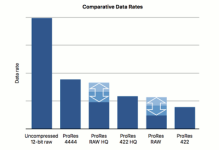
In case the question is, is ProRes RAW compressed at all, then I think Apple's white paper says that it is.

prores_raw_ratios.png

--- https://images.apple.com/final-cut-pro/docs/Apple_ProRes_RAW_White_Paper.pdf

I had a nebulous understanding of the Discrete Cosine Transform. I had even read a book about it. But it wasn't until I found and watched this set of videos that it finally got clear: http://www.dvxuser.com/V6/showthread.php?360018-How-Image-Compression-Really-Works&p=1986750493 . You can thank yourself for prompting me to break down and finally look for a good video or two.
 
Last edited:
There is a dearth of technical detail
I can't find anything about white balance. If its raw then its the image off the sensor before its been debayered. Can someone explain why there is no whitebalance adjustment. (Yes I know you can still grade the image.)
 
I can't find anything about white balance. If its raw then its the image off the sensor before its been debayered. Can someone explain why there is no whitebalance adjustment. (Yes I know you can still grade the image.)
There’s white balance controls in FCPX... my understanding is that you use the normal controls in the software... there’s no special “raw” controls...

Also all cameras shoot raw differently... for example the raw of the FS5/7/700 have white balance baked in their raw...
 
Why does this whole idea give me the feeling of smoke and mirrors?

Because there are already an armful of compressed RAW formats, and because like combatentropy stated above, if they had come up with a NEW encoding method they would be shouting it from the rooftops.
 
There is a dearth of technical detail, but the more I think about it, the more I wonder, what else could it be?

ProRes's principle of compression is something called the Discrete Cosine Transform. You don't need to understand what it means right now. It's just the way that ProRes finds ways to express the same image in fewer words.

That method is also used by the JPEG file format. In fact it is used by almost every video codec: DV, MPEG, etc. The only other compression technique I have heard of is wavelets, which is used by JPEG2000, REDCODE, and Cineform. Anyway, the recent lossy RAW codecs all use JPEG. So CinemaDNG has a lossy compression option now, and it's based on JPEG. Blackmagic shortly after started including lossy RAW in its cameras, and I have heard it is essentially lossy CinemaDNG (though I don't know if Blackmagic follows the spec in every single way). You've also heard about slimRAW? Same deal.

So we have already proven methods of compressing RAW, based on JPEG. ProRes is like JPEG, so likewise it should be straightforward now to apply ProRes's formula to RAW files.

In case the question (by you or anyone else) is, is a new kind of compression used: I think no, for three reasons: (1) the public-relations announcements say "same technology," which is vague but, (2) coming up with a new formula is a lot of work, and (3) if they had come up with a new formula, they would be shouting it from the rooftops.

In case the question is, is ProRes RAW compressed at all, then I think Apple's white paper says that it is.

View attachment 130368

--- https://images.apple.com/final-cut-pro/docs/Apple_ProRes_RAW_White_Paper.pdf

I had a nebulous understanding of the Discrete Cosine Transform. I had even read a book about it. But it wasn't until I found and watched this set of videos that it finally got clear: http://www.dvxuser.com/V6/showthread.php?360018-How-Image-Compression-Really-Works&p=1986750493 . You can thank yourself for prompting me to break down and finally look for a good video or two.

Thanks man, that was super helpful.
 
To say it’s “just” compressed RAW in a ProRes wrapper is to say getting a man on the moon is “just” sitting him on top of a big rocket. Yes the mathematical concept of ProRes video and ProRes RAW codecs are similar, but there is a LOT that needs to be accounted for otherwise the results would be useless. There’s a lot of math in there that Apple won’t be sharing anytime soon unless you’re a developer. Note that the new codecs are only 1/3 or 1/4 compressed which is a consideration that had to be made for the RAW data.

The big deal here is that you are working natively in RAW while in FCPX. All of the color correction and any fx are applied to the raw data, which is only rendered out at the very end for your deliverable. That’s huge.
 
To say it’s “just” compressed RAW in a ProRes wrapper is to say getting a man on the moon is “just” sitting him on top of a big rocket. Yes the mathematical concept of ProRes video and ProRes RAW codecs are similar, but there is a LOT that needs to be accounted for otherwise the results would be useless. There’s a lot of math in there that Apple won’t be sharing anytime soon unless you’re a developer. Note that the new codecs are only 1/3 or 1/4 compressed which is a consideration that had to be made for the RAW data.

The big deal here is that you are working natively in RAW while in FCPX. All of the color correction and any fx are applied to the raw data, which is only rendered out at the very end for your deliverable. That’s huge.

Not sure why you were down voted with this one Mitch - as I feel it's a huge deal as well - and quite looking forward to trying it out.
 
New !! Improved Formula, now double action with enzymes.

It is RAW 2.0 better, cleaner, faster. And connected to the Apple Brand so it must be good. Anyone who calls this Just Another Codec or JAC is wrong.

There is RAW and there is marketing RAW, obvious the last one is better.
 
New !! Improved Formula, now double action with enzymes.

It is RAW 2.0 better, cleaner, faster. And connected to the Apple Brand so it must be good. Anyone who calls this Just Another Codec or JAC is wrong.

There is RAW and there is marketing RAW, obvious the last one is better.
Hype is hype, perhaps this would sell by the dozens:

proresfiber1.jpg
 
Okay - so it seems that ProRes RAW is really a format primarily intended for Final Cut users, of which I am not one.

I only really shoot Blackmagic and RED either in uncompressed or compressed Cinema DNG or RED Code, and with Resolve 15 being what it is will likely only finish there for forseeable future. Resolve handles those RAW formats with ease, so I guess ProRes RAW is a particular market-segmant option that is of no real use to me.
Okay...just wanted to know what it was.
Thanks folks.
 
I have been doing some testing of ProRes RAW in FCPX. It behaves just like regular ProRes including playback and color correction, but with an extra option clip information for what Log encoding to use for debayering. FCPX automatically applies both the log encoding and a LUT when importing. From a workflow perspective, this suddenly makes working with RAW footage much more tempting and an option for quite a few more projects than I would normally consider. In retrospect, it seems weird that ProRes RAW wasn't created awhile ago when CMOS sensors and RAW video feeds became more common. It makes a heck of a lot more sense to record ProRes RAW than it does ProRes HQ straight from a camera.

I have a Canon C300 II and I think it is a pretty great option for recording and editing the RAW output from the camera. I think it would be even more useful for a camera like the EVA1. If you don't have a camera that outputs RAW, ProRes RAW doesn't mean anything. You also have to be a FCPX user and an Atomos owner. I am sure that will change soon.

The RAW output from the C300 II didn't seem very useful until now. Working with Cinema DNG was a chore, especially with FCPX, and recording ProRes HQ seemed pointless since it was a less efficient codec than the internal codec. Give me a small little ProRes RAW recorder and I might just keep it strapped to my camera fulltime in case a client thinks they might want to do some serious color grading.
 
I have been doing some testing of ProRes RAW in FCPX. It behaves just like regular ProRes including playback and color correction, but with an extra option clip information for what Log encoding to use for debayering. FCPX automatically applies both the log encoding and a LUT when importing.

Thanks for sharing this info. I'm looking forward to updating my FCPX & hope to try this out soon enough. Just to be sure I understand - you could always select or deselect the log / LUT option after importing log footage (from Canon, Sony, etc). With Raw, I assume this option is still the same? And curious if you use or have tried any 3rd party CC app like Color Finale, etc with the raw codec yet...
 
I haven't tried any third party apps.

You can deselect both the RAW to Log conversion and the LUT conversion. I tend to use the new LUT utility rather than the clip LUT choice, but they are both an option. I don't like to add the LUT direction to the clip because it will do a hard clip at 0 and 100 IRE before you can do any color correction to retain highlights if need be. If you don't select a RAW to Log conversion, it seems to process the footage as a best guess at Rec709 with no knee. Or something. Very high contrast and saturation with the C300 II RAW footage, but it is still gradeable.

Also, the internal RAW to C-LOG 2 conversion for FCPX directly matches the internal C-LOG 2 footage on the C300 II. The frame is shifted for some reason, but the colors and exposure are the same. There is quite a bit more color information in the RAW footage than in the internal codec and the footage holds up to heavy grades or keying better.
 
Okay - so it seems that ProRes RAW is really a format primarily intended for Final Cut users, of which I am not one.

I only really shoot Blackmagic and RED either in uncompressed or compressed Cinema DNG or RED Code, and with Resolve 15 being what it is will likely only finish there for forseeable future. Resolve handles those RAW formats with ease, so I guess ProRes RAW is a particular market-segmant option that is of no real use to me.
Okay...just wanted to know what it was.
Thanks folks.

Nope. It was simply implemented on FCPX first. In time it will propogate to other platforms.
 
Back
Top