
Nicholas Natteau
Veteran
is it possible to animate an Illustrator signature in AE with "trim paths"???
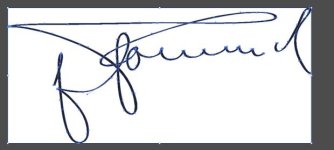
For a WWII documentary, I downloaded Rommel's signature from wikipedia in SVG format and converted to AI Illustrator format. I'd like to animate the signature in After Effects. I know how to do this two ways: with the "Stroke" and with the "Write-on" effect.
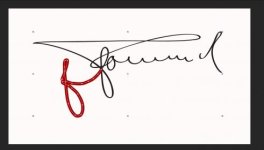
But this signature is somewhat complex to animate. As the stroke effect gets to the "R" in Rommel's signature, it inevitably reveals later bits of the "R".
Now with a shape layer, animating any line (no matter how complex) is effortless. You just add "trim paths" and set "end" to 0% at the start and "end" to 100% at the end. Is there a way to convert a vector image signature in AE to a shape layer that would allow me to add a trim path?
Thank you in advance for any feedback.
For a WWII documentary, I downloaded Rommel's signature from wikipedia in SVG format and converted to AI Illustrator format. I'd like to animate the signature in After Effects. I know how to do this two ways: with the "Stroke" and with the "Write-on" effect.
But this signature is somewhat complex to animate. As the stroke effect gets to the "R" in Rommel's signature, it inevitably reveals later bits of the "R".
Now with a shape layer, animating any line (no matter how complex) is effortless. You just add "trim paths" and set "end" to 0% at the start and "end" to 100% at the end. Is there a way to convert a vector image signature in AE to a shape layer that would allow me to add a trim path?
Thank you in advance for any feedback.
Last edited:
