Is it my HD speed (7200rpm) causing this stuttering in 1080p AE animation render?

Hi guys,
I'm pretty certain it is but wanted to check with you if it could be anything else.

I have an AE animation which is a logo sting of 10 seconds.

If I render it out to a 720 .mov it plays back smooth and fine on my Mac pro in Quicktime and any other player.

If I render it in 1080p .mov then it plays back very stuttery in all player (tried VLC, iTunes, QT etc.)

I believe it's the hard drive that just can't deliver the bit rate properly on my 7200rpm Caviar Blacks.

If I put the file on my boot drive which is an SSD it plays fine.

Could it be anything else?

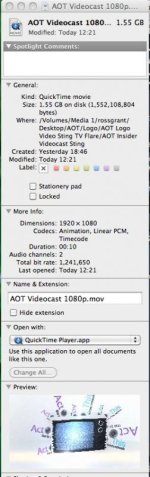
When I 'Get Info' on the file it says the total bit rate is 1,231,821

It's a 10 second file coming in at just over 1.5GB.

Thanks :)
 
It's your drive, but there's nothing wrong with your drive.

Your math is messed up, since a 10 second file that weighs in at 1.5GB = 150MB/sec bit rate. This is astronomical and is equivalent to around 1250mbit/s.

I don't know of any codec that goes this high (RED RAW is 336 mbit/s I believe). There is something seriously wrong with your export. With those settings, you'd theoretically fill a DVD in 30 seconds.

It's unrealistic and there is no single mechanical SATA drive on the market that can handle a constant 150MB/sec throughput.
 
It's your drive, but there's nothing wrong with your drive.

Your math is messed up, since a 10 second file that weighs in at 1.5GB = 150MB/sec bit rate. This is astronomical and is equivalent to around 1250mbit/s.

I don't know of any codec that goes this high (RED RAW is 336 mbit/s I believe). There is something seriously wrong with your export. With those settings, you'd theoretically fill a DVD in 30 seconds.

It's unrealistic and there is no single mechanical SATA drive on the market that can handle a constant 150MB/sec throughput.

Hi Phi,

Thanks so much for the reply. I guessed it was the HD.

It's actually an AE template from Videohive so all I'm doing is dropping in my logo and then rendering it out in 1080p at the best settings.

I'm very new to AE so don't know much about the best formats to render in to make sure all of my stuff plays nicely in Premiere alongside 11080p footage from a Canon 600D so that's why I rendered it at 1080p.

I've attached a screen of the file info.

1.5 GB for a 10 second file seems absolutely insane, even though it's an animation with a lot of layers to it.

What do you think I'm doing wrong?

1080p Sting.jpg
 
I'm not a Mac guy so I don't know what options you have, but the problem appears to be that you're exporting to Quicktime Animation Codec, which has massive file sizes.

Try exporting to H.264 or Prores 422/LT instead.

Prores 422 is what they use to make movies so.......if it's good enough for Hollywood then you should be fine.

The file should be around 150mb.
 
rossagrant,

You can also do a test render in the PhotoJPEG codec at 75% .... that should get your file size much lower than your animation codec render. There are other variables that affect playback such as what sector of your disc the file is playing from.... depending on how full it is.

hope that give you an alternative for your previews....
 
Last edited:
What do you think I'm doing wrong?
Nothing. You created a high quality master file of the animation.

How will this logo be used ?

If it's intended to be used as an element in other videos it can be easily imported into any NLE (ProRes, DNxHD, etc.).
If it's intended to be a standalone movie that will be uploaded to the web use this master file as the source and pass it through a compression program (Compressor, Sorenson Squeeze, Episode, etc.) to prepare it for the web.

When creating master animation elements you should use a high quality cross platform codec such as QT animation. This allows for the most flexibility.

Regarding the stuttering, as others have suggested you should compress the master file to h.264 to allow for smoother playback. If the movie is simply for others to review you should also consider reducing the frame size to 640 x 360.
 
Last edited:
Back
Top