Intro'd for NAB: The MixPre-3 and MixPre-6

Oh dear, quoting myself: just to say, for those wondering about shipping of the Mixpre-3/6, Pinknoise (UK) has sent my unit out for delivery today, arriving tomorrow.

Cheers,

Roland

I got my notice as well. After searching and calling 4 different dealers I found one at full compass. Shipped yesterday. Looking at a friday delivery.
 
Just rolled home to find a Mixpre-3 waiting (thanks to the great people at Pinknoise). Not much time to play with/test it now, but have booted up etc. and have plugged in my lowest self-noise mic (a Rode NT1 - the new version), which, as expected, produces no hiss with the gain cranked up fairly high. Obviously far short of a serious test of the preamps, but a very reassuring start. Anyway, doubtless nothing to add to the various on-line videos and the manual, but, despite these, it is (pleasantly) surprising just how small the unit is. Touch screen is extremely easy to use and menus, as anticipated, are straightforward. Again, as anticipated, the headphone amp is excellent. The supplied double USB A to USB C cable is very (oddly?) chunky (each cable about 5mm diameter), but that's no big deal! Anyway, the sun is shining this evening and the pub is open...

Cheers,

Roland
 
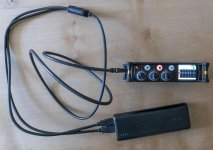
_2690040.jpg

Although chunky and stiff, the dual USB A to single USB C cable is useful for using USB A power supplies, such as a PC or the Anker Powercore 20100 in the photo, where two USB A connections are required to deliver enough power.

Cheers,

Roland
 
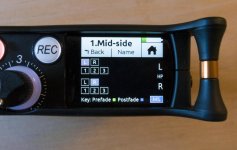
The manuals are a bit lacking in some regards, especially with mid-side recording. As the odd reference from SD on the odd forum has suggested, not only can you matrix MS recordings but you can - as with the previous and more expensive/professional SD recorders - record the original M and S signals while decoding for the headphone monitoring only. This is done, rather unsurprisingly, via use of the headphone presets. here's a shot of the settings for a headphone preset I have named 'mid-side', which shows the 'MS' box in the bottom right checked: obviously different channel set ups can be used.

Cheers,

Roland
_2690095.jpg
 
I've been working a video series about the new MixPres, and I'm working on one right now about power solutions. I found out from Sound Devices that the new MixPres require 7.5 watts at 1.5 amps. Just keep this in mind when looking at external power solutions.
 
New Software update avaiable, now you can use any size sd card.

and I also found a bug. when in custom mode all your iso tracks will not be recorded at the proper gain levels. They're working on it, should have another release in the next two weeks. Work around is to record to either the Mix L or R. so if you want to have the knobs on the recorder be gain knobs and not faders and are using custom mode beware your tracks won't come out as they should. Good news is the tracks are such high quality you can nomalize them without loss of the files.
 
I also found a bug. when in custom mode all your iso tracks will not be recorded at the proper gain levels. They're working on it, should have another release in the next two weeks. Work around is to record to either the Mix L or R. so if you want to have the knobs on the recorder be gain knobs and not faders and are using custom mode beware your tracks won't come out as they should.

Any chance of expanding on this, as I can't replicate the problem on a Mixpre-3? Are you using a Mixpre-3 or Mixpre-6? The levels of my ISOs in custom mode exactly match those of the LR mix, both in terms of metering and the recorded end product.

Cheers,

Roland
 
I have the mixpre6. if you're in custom mode the stereo mix outputs fine but if you turn off tracks L and R and just arm the iso tracks 1-6 the gain you set will not be recorded. It's as if you set your gain to 0 or something. Does that make sense? I would love to know if it's on the mix3 as well.
 
I have the mixpre6. if you're in custom mode the stereo mix outputs fine but if you turn off tracks L and R and just arm the iso tracks 1-6 the gain you set will not be recorded. It's as if you set your gain to 0 or something. Does that make sense? I would love to know if it's on the mix3 as well.

OK, have just tested and it is the same in the Mixpre-3: i.e. if recording as you describe - in custom mode with L&R mix tracks turned off and the three ISOs armed - then the metering works fine but the recorded ISO tracks have no signal. As you say, a bug that needs fixing, though one that concerns me much less than the MS (and stereo) linking bug since recording with L&R mix tracks turned on is an easy workaround (hardly a workaround as the only time I have turned them off was for this test).

Cheers,

Roland
 
what is the MS linking bug?

Well no need for you to worry as this bug applies to the Mixpre-3 only. In short, the pan controls for both channels 1 and 2 remain active (and not greyed out) in MS-linked and, indeed, stereo-linked modes. SD have confirmed that this is a bug (and that it doesn't apply to the Mixpre-6) and suggest that, while a fix is awaited, make certain to set the pan controls to centre: I've tested this workaround but it doesn't seem to work properly at all (especially when the channel 2 knob is rotated to increase width), so am awaiting the fix.

Cheers,

Roland
 
OK, have just tested and it is the same in the Mixpre-3: i.e. if recording as you describe - in custom mode with L&R mix tracks turned off and the three ISOs armed - then the metering works fine but the recorded ISO tracks have no signal. As you say, a bug that needs fixing, though one that concerns me much less than the MS (and stereo) linking bug since recording with L&R mix tracks turned on is an easy workaround (hardly a workaround as the only time I have turned them off was for this test).

Both these bugs (and others) are reported as fixed in SD's new firmware release of today, which is good news.

Cheers,

Roland
 
Damn, taken by surprise that Sound Devices would release something for this end of the market with so much on offer!

Any buyer in the roughly US$1K and under budget range now has a tough *tough* choice between: Zoom F4 / F8 / Sound Devices MixPre 3 / 6 / Tascam DR70D (plus whatever new products Tascam might bring out.... as many of theirs are long due for an update, or what brand new players might arrive and release something.... Aputure? Saramonic?).

Personally I find the MixPre 6 to be very *very* tempting! But I won't buy it (or at least, I'll *try* to **not** buy it! ha), instead sticking with my Zoom F4. As to get the MixPre 6 wouldn't be a clean cut overall big step forward over my Zoom F4 (in fact it would even be in some areas a step back), thus it is best I stay focused on the savings goal of a Sound Devices 633 which *would* represent a significant and worthwhile improvement over the Zoom F4.
Exactly, the only reason i'd move from Zoom F4 is if i'm upgrading to the real Sound Devices, 552 upwards.
 
Exactly, the only reason i'd move from Zoom F4 is if i'm upgrading to the real Sound Devices, 552 upwards.

This is what I've been recommending to current Zoom F4/F8 owners that want to upgrade. I really like the new MixPres, but I wouldn't necessarily call them an big upgrade from the Zoom recorders. Yes, the headphone amp is better and the USB functionality is stellar and the mic pres are great, but if you are really looking to upgrade, something like a 633 is the way to go.
 
Back
Top