insert and overwrite edit keyboard shortcuts not working in cs6

Not sure what I could be doing wrong but after placing my in and out points, I can't use the F9 or F10 keyboard shortcut to do a simple insert or over write edit. Coming from an FCP7 background, I chose "FCP7" for my keyboard shortcuts. But they’re both greyed out in the sequence menu. Even if I revert to the CS6 keyboard shortcuts, the "," is also greyed out.

After setting my in and out points, I have to physically drag my clips onto the timeline. This can’t be right.

Can anyone tell me what I might be doing wrong? Thanks very much in advance.
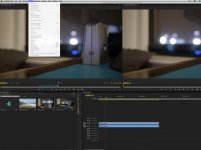
Screen Shot 2012-05-27 at 10.57.35 PM.jpg
 
You have to make sure that you have either an audio or video track highlighted. This is one of the many issues Premiere has had for years and has yet to change. Enable one of your video tracks and you'll get the ability to overwrite or insert again. Hope that helps
 
Anytime. Been using Premiere for 3 years now but didn't become a power user til 8 months ago. My friend, Andrew Devis created a series of basic tutorials for Premiere Pro CS6 you may find useful: http://library.creativecow.net/articles/devis_andrew/ You can check him out and also watch Robbie Carman's series of FCP to Premiere Pro training on lynda.com as well. I and multiple editors have featured requested the track patching issue to be resolved and hopefully they take care of it in CS6.5. Take care
 
Thanks very much mmka. Just another quick question: When you play back your sequence, any way to get Premier not to go beyond the last frame to black? In FCP, when the playhead has reached the end of your sequence, is stops on the last frame. But Premier always goes one frame beyond that to settle on black. Just hoping there's a setting somewhere to tell Premier's playhead to stop on the last frame of any sequence. Thanks very much again.
 
Anything I can do to help, I'll try my best. I know this problem all too well. If you set an out point 1 frame before your sequence goes black and play from in to out point, that should help. It may not be the best solution but I've run into that situation all the time. Try it out and let me know how that works for you.
 
I meant that the track patching system could use work in the grand scheme. A lot editors migrating from FCP 7 may wonder why I need a track highlighted to have something inserted or overwritten. I was just trying to ease the OP into how Premiere operates differently than FCP 7.
 
A lot editors migrating from FCP 7 may wonder why I need a track highlighted to have something inserted or overwritten.

The question stands. How would any NLE know which tracks you wanted to add the clips to if those tracks aren't selected in some fashion?
 
Back
Top